Hello community,

here is the log from the commit of package s-tui for openSUSE:Factory checked
in at 2020-07-17 20:51:52
++++++++++++++++++++++++++++++++++++++++++++++++++++++++++++++++++++++++
Comparing /work/SRC/openSUSE:Factory/s-tui (Old)
 and      /work/SRC/openSUSE:Factory/.s-tui.new.3592 (New)
++++++++++++++++++++++++++++++++++++++++++++++++++++++++++++++++++++++++
Package is "s-tui" Fri Jul 17 20:51:52 2020 rev:5 rq:821424 version:1.0.2 Changes: -------- --- /work/SRC/openSUSE:Factory/s-tui/s-tui.changes 2020-06-17 14:54:47.537896404 +0200 +++ /work/SRC/openSUSE:Factory/.s-tui.new.3592/s-tui.changes 2020-07-17 20:52:44.637038820 +0200 @@ -1,0 +2,10 @@ +Sat Jul 11 17:16:36 UTC 2020 - Martin Hauke <[email protected]> + +- Update to version 1.0.2 + Bug fixes and stability realease. + * Crash on save settings with no .config dir for user. + * Fix for not saving summaries independently of graphs. + * Do not display stress counter when no stress too is installed. + * Fix call for temperature hooks not called. + +------------------------------------------------------------------- Old: ---- s-tui-1.0.1.tar.gz New: ---- s-tui-1.0.2.tar.gz ++++++++++++++++++++++++++++++++++++++++++++++++++++++++++++++++++++++++ Other differences: ------------------ ++++++ s-tui.spec ++++++ --- /var/tmp/diff_new_pack.yLq7aW/_old 2020-07-17 20:52:45.681039909 +0200 +++ /var/tmp/diff_new_pack.yLq7aW/_new 2020-07-17 20:52:45.685039913 +0200 @@ -18,7 +18,7 @@ Name: s-tui -Version: 1.0.1 +Version: 1.0.2 Release: 0 Summary: Terminal based CPU stress and monitoring utility License: GPL-2.0-or-later ++++++ s-tui-1.0.1.tar.gz -> s-tui-1.0.2.tar.gz ++++++ diff -urN '--exclude=CVS' '--exclude=.cvsignore' '--exclude=.svn' '--exclude=.svnignore' old/s-tui-1.0.1/README.md new/s-tui-1.0.2/README.md --- old/s-tui-1.0.1/README.md 2020-06-13 17:21:37.000000000 +0200 +++ new/s-tui-1.0.2/README.md 2020-07-11 15:57:58.000000000 +0200 @@ -6,62 +6,66 @@  -Stress-Terminal UI, s-tui, monitors CPU temperature, frequency, power and utilization in a graphical way from the terminal. +Stress-Terminal UI, s-tui, monitors CPU temperature, frequency, power and utilization in a graphical way from the terminal. ## Screenshot -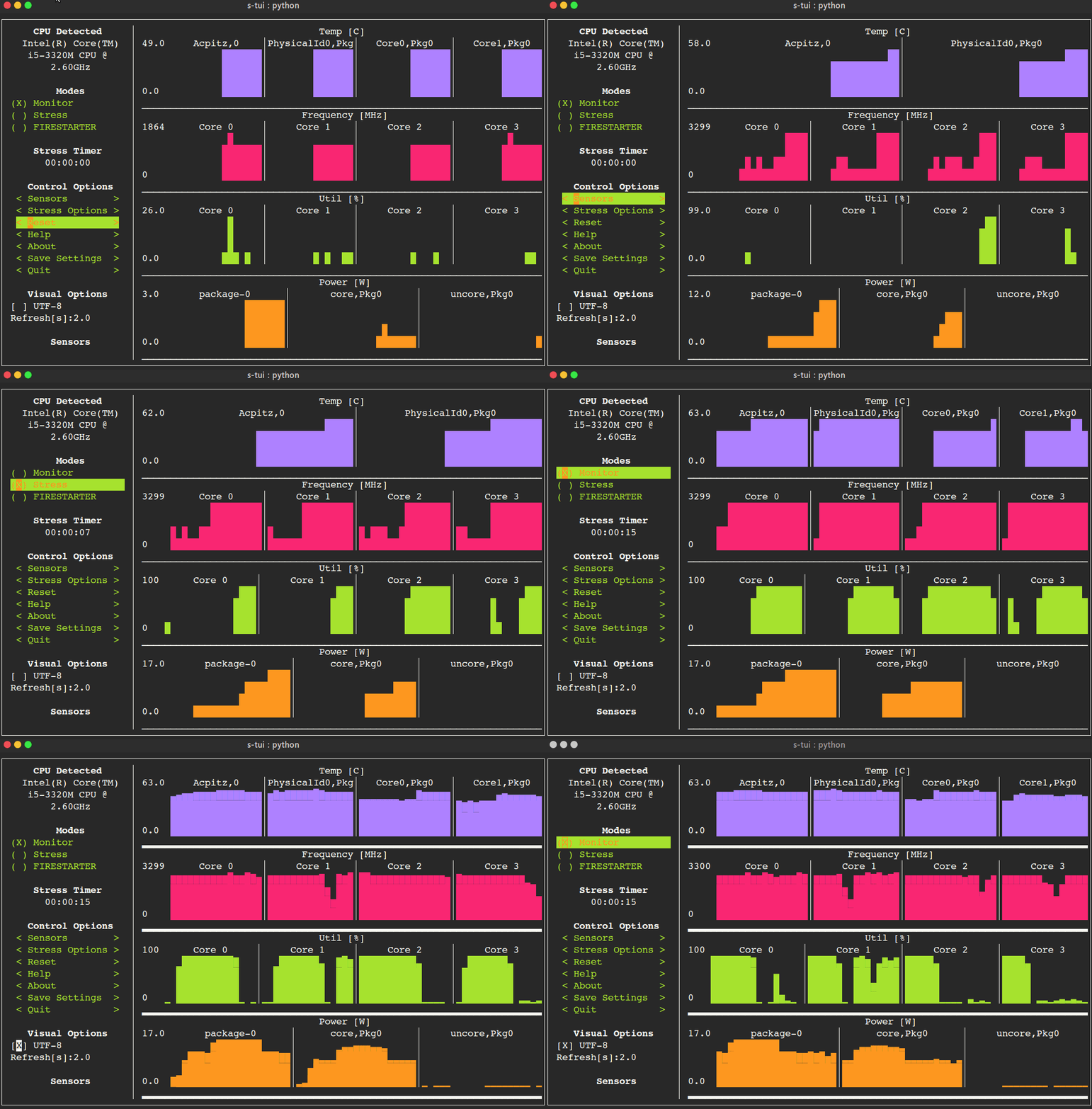 + -Table of Contents -================= +# Table of Contents - * [The Stress Terminal UI: s-tui](#the-stress-terminal-ui-s-tui) - * [Screenshot](#screenshot) - * [What it does](#what-it-does) - * [Usage](#usage) - * [Simple installation](#simple-installation) - * [pip (x86 ARM)](#pip-x86--arm) - * [More installation methods](#more-installation-methods) - * [Ubuntu (18.10 and newer)](#ubuntu-1810-and-newer) - * [Ubuntu (18.04, 16.04)](#ubuntu-1804-1604) - * [Arch Linux, Manjaro](#arch-linux-manjaro) - * [OpenSUSE](#opensuse) - * [Options](#options) - * [Dependencies](#dependencies) - * [Configuration](#configuration) - * [Saving a configuration](#saving-a-configuration) - * [Adding threshold scripts](#adding-threshold-scripts) - * [Run from source code](#run-from-source-code) - * [OPTIONAL integration of FIRESTARTER (via submodule, does not work on all systems)](#optional-integration-of-firestarter-via-submodule-does-not-work-on-all-systems) - * [Compatibility](#compatibility) - * [FAQ](#faq) - * [Contributing](#contributing) - * [Tip](#tip) +- [The Stress Terminal UI: s-tui](#the-stress-terminal-ui-s-tui) + - [Screenshot](#screenshot) + - [What it does](#what-it-does) + - [Usage](#usage) + - [Simple installation](#simple-installation) + - [pip (x86 ARM)](#pip-x86--arm) + - [More installation methods](#more-installation-methods) + - [Ubuntu (18.10 and newer)](#ubuntu-1810-and-newer) + - [Ubuntu (18.04, 16.04)](#ubuntu-1804-1604) + - [Arch Linux, Manjaro](#arch-linux-manjaro) + - [OpenSUSE](#opensuse) + - [Options](#options) + - [Dependencies](#dependencies) + - [Configuration](#configuration) + - [Saving a configuration](#saving-a-configuration) + - [Adding threshold scripts](#adding-threshold-scripts) + - [Run from source code](#run-from-source-code) + - [OPTIONAL integration of FIRESTARTER (via submodule, does not work on all systems)](#optional-integration-of-firestarter-via-submodule-does-not-work-on-all-systems) + - [Compatibility](#compatibility) + - [FAQ](#faq) + - [Contributing](#contributing) + - [Tip](#tip) ## What it does -* Monitoring your CPU temperature/utilization/frequency/power -* Shows performance dips caused by thermal throttling -* Requires no X-server -* Built in options for stressing the CPU (stress/stress-ng/FIRESTARTER) +- Monitoring your CPU temperature/utilization/frequency/power +- Shows performance dips caused by thermal throttling +- Requires no X-server +- Built in options for stressing the CPU (stress/stress-ng/FIRESTARTER) ## Usage + ``` s-tui ``` ## Simple installation + ### pip (x86 + ARM) + The most up to date version of s-tui is available with pip. Install with: + ``` pip install s-tui --user ``` -(This usuall creates an executable in ~/.local/bin/ dir. Make sure it is in your PATH) +(This usuall creates an executable in ~/.local/bin/ dir. Make sure it is in your PATH) To install as root + ``` sudo pip install s-tui ``` @@ -69,18 +73,23 @@ You might need to install `python-dev` first Installation in virtualenv with [pipsi](https://github.com/mitsuhiko/pipsi): + ``` pipsi install s-tui ``` ## More installation methods + ### Ubuntu (18.10 and newer) + ``` sudo apt install s-tui ``` ### Ubuntu (18.04, 16.04) + A PPA is available but is not up to date + ``` sudo add-apt-repository ppa:amanusk/python-s-tui sudo apt-get update @@ -88,7 +97,9 @@ ``` ### Arch Linux, Manjaro + `s-tui` is in the Arch repository: + ``` sudo pacman -S s-tui ``` @@ -99,11 +110,13 @@ `yay -S s-tui-git` ### OpenSUSE + ``` sudo zypper install s-tui ``` ## Options + ``` TUI interface: @@ -140,7 +153,9 @@ ``` ## Dependencies + s-tui is a great for monitoring. If you would like to stress your system, install stress. Stress options will then show up in s-tui (optional) + ``` sudo apt-get install stress ``` @@ -149,46 +164,55 @@ s-tui is a self-contained application which can run out-of-the-box and doesn't need config files to drive its core features. However, additional features like running scripts when a certain threshold has been exceeded (e.g. CPU temperature) does necessitate creating a config directory. This directory will be made in `~/.config/s-tui` by default. - ### Saving a configuration + Selecting \<Save Settings\> will save the current configuration to `~/.config/s-tui/s-tui.conf`. If you would like to restore defaults, simply remove the file. ### Adding threshold scripts s-tui gives you the ability to run arbitrary shell scripts when a certain threshold is surpassed, like your CPU temperature. You can define this custom behaviour by adding a shell file to the directory `~/.config/s-tui/hooks.d` with one of the following names, depending on what threshold you're interesting in reacting to: -* `temperaturesource.sh`: triggered when the CPU temperature threshold is exceeded +- `tempsource.sh`: triggered when the CPU temperature threshold is exceeded If s-tui finds a script in the hooks directory with the name of a source it supports, it will run that script every 30 seconds as long as the current value of the source remains above the threshold. Note that at the moment only CPU temperature threshold hooks are supported. - ## Run from source code + Start by cloning the repository + ``` git clone https://github.com/amanusk/s-tui.git cd s-tui ``` + Install required dependencies as \[root\] or as (local user) + ``` [sudo] pip install urwid (--user) [sudo] pip install psutil (--user) ``` + Install stress (optional) + ``` sudo apt-get install stress ``` Run the .py file + ``` python -m s_tui.s_tui ``` + ### OPTIONAL integration of FIRESTARTER (via submodule, does not work on all systems) + [FIRESTARTER](https://github.com/tud-zih-energy/FIRESTARTER) is a great tool to stress your system to the extreme. If you would like, you can integrate FIRESTARTER submodule into s-tui. To build FIRESTARTER: + ``` git submodule init git submodule update @@ -196,29 +220,32 @@ ./code-generator.py make ``` + Once you have completed these steps, you can either: -* Install FIRESTARTER to make it accessible to s-tui, e.g make a soft-link to FIRESTARTER in /usr/local/bin. -* Run s-tui from the main project directory with `python -m s_tui.s_tui` -An option to run FIRESTARTER will then be available in s-tui + +- Install FIRESTARTER to make it accessible to s-tui, e.g make a soft-link to FIRESTARTER in /usr/local/bin. +- Run s-tui from the main project directory with `python -m s_tui.s_tui` + An option to run FIRESTARTER will then be available in s-tui ## Compatibility + s-tui uses [psutil](https://github.com/giampaolo/psutil) to probe hardware information. If your hardware is not supported, you might not see all the information. s-tui uses [urwid](https://github.com/urwid/urwid) as a graphical engine. urwid only works with UNIX-like systems -* Power read is supported on Intel Core CPUs of the second generation and newer (Sandy Bridge) -* s-tui tested to run on Raspberry-Pi 4,3,2,1 +- Power read is supported on Intel Core CPUs of the second generation and newer (Sandy Bridge) +- s-tui tested to run on Raspberry-Pi 4,3,2,1 ## FAQ -__Q__: How is this different from htop? -__A__: s-tui is not a processes monitor like htop. The purpose is to monitor your CPU statistics and have an option to test the system under heavy load. (Think AIDA64 stress test, not task manager). -__Q__: I am using the TTY with no X server and s-tui crashes on start -__A__: By default, s-tui is handles mouse inputs. This causes some systems to crash. Try running `s-tui --no-mouse` +**Q**: How is this different from htop? +**A**: s-tui is not a processes monitor like htop. The purpose is to monitor your CPU statistics and have an option to test the system under heavy load. (Think AIDA64 stress test, not task manager). -__Q__: I am not seeing all the stats in the sidebar. -__A__: The sidebar is scrollable, you can scroll down with `DOWN` or `j` or scroll to the bottom with `PG-DN` or `G`. You might consider also decreasing the size of the font that you use in your terminal.:) +**Q**: I am using the TTY with no X server and s-tui crashes on start +**A**: By default, s-tui is handles mouse inputs. This causes some systems to crash. Try running `s-tui --no-mouse` +**Q**: I am not seeing all the stats in the sidebar. +**A**: The sidebar is scrollable, you can scroll down with `DOWN` or `j` or scroll to the bottom with `PG-DN` or `G`. You might consider also decreasing the size of the font that you use in your terminal.:) ## Contributing @@ -229,7 +256,8 @@ To open a Pull Request, please see [CONTRIBUTING](https://github.com/amanusk/s-tui/blob/master/CONTRIBUTING.md) for more information. ## Tip -If you like this work, please star in on GitHub. + +If you like this work, please star in on GitHub. BTC: `1PPhYgecwvAN7utN2EotgTfy2mmLqzF8m3` ETH: `0xc169699A825066f2F07E0b29C4082094b32A3F3e` diff -urN '--exclude=CVS' '--exclude=.cvsignore' '--exclude=.svn' '--exclude=.svnignore' old/s-tui-1.0.1/s_tui/helper_functions.py new/s-tui-1.0.2/s_tui/helper_functions.py --- old/s-tui-1.0.1/s_tui/helper_functions.py 2020-06-13 17:21:37.000000000 +0200 +++ new/s-tui-1.0.2/s_tui/helper_functions.py 2020-07-11 15:57:58.000000000 +0200 @@ -30,7 +30,7 @@ from collections import OrderedDict -__version__ = "1.0.0-beta3" +__version__ = "1.0.2" _DEFAULT = object() PY3 = sys.version_info[0] == 3 @@ -144,6 +144,19 @@ return config_path +def get_config_dir(): + """ + Return the path to the user home config directory + """ + user_home = os.getenv('XDG_CONFIG_HOME') + if user_home is None or not user_home: + config_path = os.path.expanduser(os.path.join('~', '.config')) + else: + config_path = user_home + + return config_path + + def get_user_config_file(): """ Return the path to the user s-tui config directory @@ -165,6 +178,13 @@ return os.path.isdir(get_user_config_dir()) +def config_dir_exists(): + """ + Check whether the home config dir exists or not + """ + return os.path.isdir(get_config_dir()) + + def user_config_file_exists(): """ Check whether the user s-tui config file exists or not @@ -176,8 +196,15 @@ """ Create the user s-tui config directory if it doesn't exist """ + config_dir = get_config_dir() config_path = get_user_config_dir() + if not config_dir_exists(): + try: + os.mkdir(config_dir) + except OSError: + return None + if not user_config_dir_exists(): try: os.mkdir(config_path) diff -urN '--exclude=CVS' '--exclude=.cvsignore' '--exclude=.svn' '--exclude=.svnignore' old/s-tui-1.0.1/s_tui/s_tui.py new/s-tui-1.0.2/s_tui/s_tui.py --- old/s-tui-1.0.1/s_tui/s_tui.py 2020-06-13 17:21:37.000000000 +0200 +++ new/s-tui-1.0.2/s_tui/s_tui.py 2020-07-11 15:57:58.000000000 +0200 @@ -443,16 +443,23 @@ "[N/A] UTF-8") install_stress_message = urwid.Text("") - if not self.controller.stress_exe: + if not self.controller.firestarter and not self.controller.stress_exe: install_stress_message = urwid.Text( ('button normal', u"(N/A) install stress")) + clock_widget = [] + # if self.controller.stress_exe or self.controller.firestarter: + if self.controller.stress_exe or self.controller.firestarter: + clock_widget = [ + urwid.Text(('bold text', u"Stress Timer"), align="center"), + self.clock_view + ] + controls = [urwid.Text(('bold text', u"Modes"), align="center")] controls += self.mode_buttons + controls += [install_stress_message] + controls += clock_widget controls += [ - install_stress_message, - urwid.Text(('bold text', u"Stress Timer"), align="center"), - self.clock_view, urwid.Divider(), urwid.Text(('bold text', u"Control Options"), align="center"), animate_controls, @@ -633,6 +640,8 @@ except (AttributeError, ValueError, configparser.NoOptionError, configparser.NoSectionError): logging.debug("No user config for temp threshold") + else: + self.temp_thresh = t_thresh # This should be the only place where sources are configured possible_sources = [TempSource(self.temp_thresh), @@ -783,8 +792,13 @@ def save_settings(self): """ Save the current configuration to a user config file """ def _save_displayed_setting(conf, submenu): - for source, visible_sensors in \ - self.view.graphs_menu.active_sensors.items(): + items = [] + if (submenu == "Graphs"): + items = self.view.graphs_menu.active_sensors.items() + elif (submenu == "Summaries"): + items = self.view.summary_menu.active_sensors.items() + + for source, visible_sensors in items: section = source + "," + submenu conf.add_section(section) diff -urN '--exclude=CVS' '--exclude=.cvsignore' '--exclude=.svn' '--exclude=.svnignore' old/s-tui-1.0.1/s_tui/sources/fan_source.py new/s-tui-1.0.2/s_tui/sources/fan_source.py --- old/s-tui-1.0.1/s_tui/sources/fan_source.py 2020-06-13 17:21:37.000000000 +0200 +++ new/s-tui-1.0.2/s_tui/sources/fan_source.py 2020-07-11 15:57:58.000000000 +0200 @@ -28,7 +28,7 @@ class FanSource(Source): """ Source for fan information """ def __init__(self): - if not hasattr(psutil, "sensors_fans"): + if (not hasattr(psutil, "sensors_fans") and psutil.sensors_fans()): self.is_available = False logging.debug("Fans sensors is not available from psutil") return @@ -73,6 +73,9 @@ self.last_measurement = [] for sensor in sample.values(): for minor_sensor in sensor: + # Ignore unreasonalbe fan speeds + if (minor_sensor.current > 10000): + continue self.last_measurement.append(int(minor_sensor.current)) def get_edge_triggered(self): diff -urN '--exclude=CVS' '--exclude=.cvsignore' '--exclude=.svn' '--exclude=.svnignore' old/s-tui-1.0.1/s_tui/sources/freq_source.py new/s-tui-1.0.2/s_tui/sources/freq_source.py --- old/s-tui-1.0.1/s_tui/sources/freq_source.py 2020-06-13 17:21:37.000000000 +0200 +++ new/s-tui-1.0.2/s_tui/sources/freq_source.py 2020-07-11 15:57:58.000000000 +0200 @@ -28,7 +28,8 @@ """ Source class implementing CPU frequency information polling """ def __init__(self): self.is_available = True - if not hasattr(psutil, "cpu_freq"): + if (not hasattr(psutil, "cpu_freq") and + psutil.cpu_freq()): self.is_available = False logging.debug("cpu_freq is not available from psutil") return diff -urN '--exclude=CVS' '--exclude=.cvsignore' '--exclude=.svn' '--exclude=.svnignore' old/s-tui-1.0.1/s_tui/sources/rapl_power_source.py new/s-tui-1.0.2/s_tui/sources/rapl_power_source.py --- old/s-tui-1.0.1/s_tui/sources/rapl_power_source.py 2020-06-13 17:21:37.000000000 +0200 +++ new/s-tui-1.0.2/s_tui/sources/rapl_power_source.py 2020-07-11 15:57:58.000000000 +0200 @@ -56,8 +56,7 @@ name = item.label sensor_count = multi_sensors.count(name) multi_sensors.append(name) - if 'package' not in name: - name += ",Pkg" + str(sensor_count) + name += "," + str(sensor_count) self.available_sensors.append(name) def update(self): diff -urN '--exclude=CVS' '--exclude=.cvsignore' '--exclude=.svn' '--exclude=.svnignore' old/s-tui-1.0.1/s_tui/sources/temp_source.py new/s-tui-1.0.2/s_tui/sources/temp_source.py --- old/s-tui-1.0.1/s_tui/sources/temp_source.py 2020-06-13 17:21:37.000000000 +0200 +++ new/s-tui-1.0.2/s_tui/sources/temp_source.py 2020-07-11 15:57:58.000000000 +0200 @@ -33,7 +33,8 @@ def __init__(self, temp_thresh=None): warnings.filterwarnings('ignore', '.*FileNotFound.*',) - if not hasattr(psutil, "sensors_temperatures"): + if (not hasattr(psutil, "sensors_temperatures") and + psutil.sensors_temperatures()): self.is_available = False logging.debug("cpu temperature is not available from psutil") return @@ -62,6 +63,8 @@ sensor_name = "".join(key.title().split(" ")) for sensor_idx, sensor in enumerate(value): sensor_label = sensor.label + if (sensor.current <= 1.0 or sensor.current >= 127.0): + continue full_name = "" if not sensor_label: @@ -70,9 +73,7 @@ full_name = ("".join(sensor_label.title().split(" "))) sensor_count = multi_sensors.count(full_name) multi_sensors.append(full_name) - if ('package' not in full_name.lower() and - 'physical' not in full_name.lower()): - full_name += ",Pkg" + str(sensor_count) + full_name += "," + str(sensor_count) logging.debug("Temp sensor name %s", full_name) self.available_sensors.append(full_name) @@ -92,6 +93,9 @@ self.last_measurement = [] for sensor in sample: for minor_sensor in sample[sensor]: + if (minor_sensor.current <= 1.0 or + minor_sensor.current >= 127.0): + continue self.last_measurement.append(minor_sensor.current) if self.last_measurement: diff -urN '--exclude=CVS' '--exclude=.cvsignore' '--exclude=.svn' '--exclude=.svnignore' old/s-tui-1.0.1/s_tui/sources/util_source.py new/s-tui-1.0.2/s_tui/sources/util_source.py --- old/s-tui-1.0.1/s_tui/sources/util_source.py 2020-06-13 17:21:37.000000000 +0200 +++ new/s-tui-1.0.2/s_tui/sources/util_source.py 2020-07-11 15:57:58.000000000 +0200 @@ -27,7 +27,7 @@ class UtilSource(Source): def __init__(self): - if not hasattr(psutil, "cpu_percent"): + if (not hasattr(psutil, "cpu_percent") and psutil.cpu_percent()): self.is_available = False logging.debug("cpu utilization is not available from psutil") return


