Hello community,

here is the log from the commit of package retroarch-joypad-autoconfig for
openSUSE:Factory checked in at 2020-08-17 12:01:46
++++++++++++++++++++++++++++++++++++++++++++++++++++++++++++++++++++++++
Comparing /work/SRC/openSUSE:Factory/retroarch-joypad-autoconfig (Old)
 and      /work/SRC/openSUSE:Factory/.retroarch-joypad-autoconfig.new.3399 (New)
++++++++++++++++++++++++++++++++++++++++++++++++++++++++++++++++++++++++
Package is "retroarch-joypad-autoconfig"
Mon Aug 17 12:01:46 2020 rev:6 rq:826807 version:0~git20200730
Changes:
--------
---
/work/SRC/openSUSE:Factory/retroarch-joypad-autoconfig/retroarch-joypad-autoconfig.changes
2020-06-24 15:48:58.276426405 +0200
+++
/work/SRC/openSUSE:Factory/.retroarch-joypad-autoconfig.new.3399/retroarch-joypad-autoconfig.changes
2020-08-17 12:02:37.482602122 +0200
@@ -1,0 +2,23 @@
+Sat Aug 08 09:10:45 UTC 2020 - [email protected]
+
+- Update to version 0~git20200730:
+ * Fix Right Analog for xinput profile for Stadia Controller
+ * Add hid profile Stadia Controller
+ * Add xinput profile for Stadia Controller
+ * Add dinput profiles for 8Bitdo N30 Pro USB/BT.
+ * sdl2 profile for Stadia Controller
+ * Create Logitech_Gamepad_F310.cfg
+ * add generic 360 and Steam link profiles
+ * Fixed 8BitDo M30 udev mappings for firmware 1.14
+ * Update Razer Kishi.cfg
+ * Create Razer Kishi.cfg
+ * Added Quasicon 2P default
+ * Added NVIDIA SHIELD 2019 Remote
+ * Improve README file
+ * Create PCEngine PAD.cfg
+ * Port MAGIC-NS.cfg in udev to dinput/xinput
+ * Update Makefile
+ * Add GameCube Controller support for sdl2
+ * Add HORIPAD S to android, dinput, hid, sdl2, udev, xinput
+
+-------------------------------------------------------------------
Old:
----
retroarch-joypad-autoconfig-0~git20200622.tar.xz
New:
----
retroarch-joypad-autoconfig-0~git20200730.tar.xz
++++++++++++++++++++++++++++++++++++++++++++++++++++++++++++++++++++++++
Other differences:
------------------
++++++ retroarch-joypad-autoconfig.spec ++++++
--- /var/tmp/diff_new_pack.bIXqj2/_old 2020-08-17 12:02:38.262602557 +0200
+++ /var/tmp/diff_new_pack.bIXqj2/_new 2020-08-17 12:02:38.262602557 +0200
@@ -17,7 +17,7 @@
Name: retroarch-joypad-autoconfig
-Version: 0~git20200622
+Version: 0~git20200730
Release: 0
Summary: RetroArch Joypad Autoconfig Files
License: MIT
++++++ _servicedata ++++++
--- /var/tmp/diff_new_pack.bIXqj2/_old 2020-08-17 12:02:38.322602590 +0200
+++ /var/tmp/diff_new_pack.bIXqj2/_new 2020-08-17 12:02:38.322602590 +0200
@@ -1,4 +1,4 @@
<servicedata>
<service name="tar_scm">
<param
name="url">https://github.com/libretro/retroarch-joypad-autoconfig.git</param>
- <param
name="changesrevision">9c80559538eecb219d65ad87bf4a6c92b0269fc6</param></service></servicedata>
\ No newline at end of file
+ <param
name="changesrevision">da9592b0262ef088f7d1a818476a978385372bd3</param></service></servicedata>
\ No newline at end of file
++++++ retroarch-joypad-autoconfig-0~git20200622.tar.xz ->
retroarch-joypad-autoconfig-0~git20200730.tar.xz ++++++
diff -urN '--exclude=CVS' '--exclude=.cvsignore' '--exclude=.svn'
'--exclude=.svnignore' old/retroarch-joypad-autoconfig-0~git20200622/README.md
new/retroarch-joypad-autoconfig-0~git20200730/README.md
--- old/retroarch-joypad-autoconfig-0~git20200622/README.md 2020-06-22
17:17:56.000000000 +0200
+++ new/retroarch-joypad-autoconfig-0~git20200730/README.md 2020-07-30
14:47:39.000000000 +0200
@@ -1,145 +1,170 @@
# Joypad Autoconfig Files
-This repository stores joypad autoconfig files for Retroarch. RetroArch is the
reference frontend for the libretro API.
+This repository stores joypad autoconfig files for
[RetroArch](https://www.retroarch.com), the reference frontend for the libretro
API.
-Autoconfig files included in this repository are used to recognize input
devices and automatically setup default mappings between the physical device
and Retropad virtual controller.
+The autoconfig files included in this repository are used to recognize input
devices and automatically setup default mappings between the physical device
and the [RetroPad virtual
controller](https://docs.libretro.com/development/input-api/#retropad).
## How to create an autoconfig file
-If your input device is not recognized by RetroArch even after updating the
profiles, you can generate a profile from the menu.
+If your input device is not recognized by RetroArch even after updating the
controller profiles, then you can generate a new profile for it from RetroArch
itself.
-You can find detailed instructions
[here](https://www.retroarch.com/index.php?page=joypad-autoconfig)
+You can find detailed instructions to do this in the [official
website](https://www.retroarch.com/index.php?page=joypad-autoconfig).
## Uploading your own autoconfig file
-If you want to share an autoconfig file that is missing in Retroarch you can
upload it to this repository.
-Please remember that the goal of sharing your autoconfig file is to create a
bigger database of default controller mappings that can be used by other
people.
-If your mapping is custom-made for your own needs, it won't be really useful
for others. It's better if you share more generic and reusable mappings that
can act as a "default"
+If you want to share an autoconfig file that is missing in RetroArch, then you
can upload it to this repository.
+
+Please remember that the goal of sharing your autoconfig file is to create a
bigger database of default input device mappings that can be used by other
people.
+
+If your mapping is custom-made for your own needs, then it will not be really
useful for others.
+It is better if you share more generic and reusable mappings that can act as a
"default".
### To upload your autoconfig file follow these steps
#### 1. Checking for duplicates
-Retroarch uses three attributes of the controller to identify which autoconfig
file to use: vendor ID, product ID and device name.
-Before uploading your file, please verify that there isn't another autoconfig
file matching those three attributes.
+RetroArch uses three attributes of the input device to identify which
autoconfig file to use: **Vendor ID**, **Product ID** and **Device Name**.
+Before uploading your file, please verify that there is no other autoconfig
file matching those same three attributes already.
-You can verify this by comparing the values for `input_vendor_id`,
`input_product_id` and `input_device` attributes.
-If another autoconfig file exists including the same vendor ID, product ID and
input device name your autoconfig file will cause conflicts.
+To verify, compare the values for `input_vendor_id`, `input_product_id` and
`input_device` attributes respectively.
-#### 2. Adding input descriptors
+:warning: **Warning:** If another autoconfig file exists including the same
Vendor ID, Product ID and input Device Name, then your autoconfig file will
cause conflicts.
-Input descriptors are the labels that Retroarch will display in the UI to
describe buttons and axes of your device.
-It's recommended to add descriptors so Retroarch can display useful labels in
the UI.
+#### 2. Adding input descriptors
-Input descriptor attributes are not added by default, you need to manually add
the attributes inside the autonconfig file that was generated but Retroarch.
+Input descriptors are the **labels** that RetroArch will display in the user
interface (UI) to describe buttons and axes of your device.
+It is recommended to add descriptors so RetroArch can display useful labels in
the UI.
-e.g:
+Input descriptor attributes are not added by default, you need to manually add
the attributes inside the autonconfig file that was generated by RetroArch.
+For example:
-```
+```INI
input_b_btn_label = "Cross"
input_y_btn_label = "Square"
input_a_btn_label = "Circle"
input_x_btn_label = "Triangle"
```
-You will find more details about the attribute name syntax below (Input
descriptors section)
+You will find more details about the attribute name syntax in the [Input
Descriptors section](#3-input-descriptors) below.
#### 3. Testing your autoconfig file
-Before uploading your autoconfig file please verify that Retroarch is
correctly detecting the file and also displaying all the labels for the
controller.
-You can verify it in `Settings->Inputs->User 1 Binds`
+Before uploading your autoconfig file please verify that RetroArch is
correctly detecting the file and also displaying all the labels for the input
device.
+You can verify this in the `Settings > Input > Port 1 Controls` menu.
-The best way to confirm everything is working is:
+The best way to confirm that everything is working is:
-1. Reset your binds to the defaults using `Settings->Inputs->User 1 Binds>User
1 Bind Default All` option
-2. Un-plug and Re-Plug your controller
-3. Check the mappings in `Settings->Inputs->User 1 Binds` to confirm they are
correct
+1. Reset controller bindings to the defaults: `Settings > Input > Port 1
Controls > Reset to Default Controls`
+2. Disconnect and reconnect the input device
+3. Check the bindings in `Settings > Input > Port 1 Controls` to confirm that
they are correct
+4. If applicable, then also check the menu button binding in `Settings > Input
> Hotkeys > Menu (Toggle)`
#### 4. Creating a Pull Request
To upload your autoconfig file to this repository you must create a [Pull
Request](https://en.wikipedia.org/wiki/Distributed_version_control#Pull_requests).
-You can learn how to create a Pull Request in Github reading these
[instructions](https://help.github.com/en/articles/creating-new-files)
-
-**Note:** Verify you are creating the file in the correct folder. It must have
the same name than the `input_driver` attribute
-
-## File format
-
-Autoconfig files are formed by a list of attributes and their corresponding
values using the following syntax: `attribute_name = value`.
-
-Attribute names use [snake_case](https://en.wikipedia.org/wiki/Snake_case)
naming scheme.
+You can learn how to create a Pull Request in Github in the [official
documentation](https://help.github.com/en/articles/creating-new-files).
-### There are three types of attributes:
+:warning: **Warning:** Verify that you are creating the autoconfig file in the
**correct folder**.
+It must be the folder with the same name used in the `input_driver` attribute
in the autoconfig file.
-#### 1. Device descriptors
+## File Format
-These are attributes that identify the phyisical device
+Autoconfig files consist of a list of attributes and their corresponding
values using the following syntax:
-Attribute | Description
------------- | -------------
-input_driver | Driver in-use when the controller was detected
-input_device | Name reported by the device
-input_vendor_id | Vendor ID reported by the device
-input_product_id | Product ID reported by the device
-input_device_display_name | Display name to show in Retroarch's UI when
referencing the controller (Optional)
-
-#### 2. Button/axes Mappings
-
-These are attributes that describe the mapping between physical buttons/axes
and Retropad virtual controller.
-
-Attributes are named following the pattern `input` + `button/axis name` +
`input type`.
-Input type can be either `axis` or `btn` (button)
+```INI
+attribute_name = value
+```
-
+All attribute names in the file use the
[snake_case](https://en.wikipedia.org/wiki/Snake_case) naming scheme.
-Attribute | Description
------------- | -------------
-input_b_btn | Device button mapped to Retropad's B button
-input_y_btn | Device button mapped to Retropad's Y button
-input_select_btn | Device button mapped to Retropad's Select button
-input_start_btn | Device button mapped to Retropad's Start button
-input_up_btn | Device button mapped to Retropad's D-Pad Up button
-input_down_btn | Device button mapped to Retropad's D-Pad Down button
-input_left_btn | Device button mapped to Retropad's D-Pad Left button
-input_right_btn | Device button mapped to Retropad's D-Pad Right button
-input_a_btn | Device button mapped to Retropad's A button
-input_x_btn | Device button mapped to Retropad's X button
-input_l_btn | Device button mapped to Retropad's Left shoulder
-input_r_btn | Device button mapped to Retropad's Right shoulder
-input_l2_btn | Device button mapped to Retropad's Left trigger
-input_r2_btn | Device button mapped to Retropad's Right trigger
-input_l3_btn | Device button mapped to Retropad's Left Thumb Button
-input_r3_btn | Device button mapped to Retropad's Right Thumb Button
-input_l_x_plus_axis | Device axis mapped to Retropad's Left Analog (Right)
-input_l_x_minus_axis | Device axis mapped to Retropad's Left Analog (Left)
-input_l_y_plus_axis | Device axis mapped to Retropad's Left Analog (Down)
-input_l_y_minus_axis | Device axis mapped to Retropad's Left Analog (Up)
-input_r_x_plus_axis | Device axis mapped to Retropad's Right Analog (Right)
-input_r_x_minus_axis | Device axis mapped to Retropad's Right Analog (Left)
-input_r_y_plus_axis | Device axis mapped to Retropad's Right Analog (Down)
-input_r_y_minus_axis | Device axis mapped to Retropad's Right Analog (Up)
-input_menu_toggle_btn | Device button mapped to Retropad's Menu button
+### Attribute Types
-#### 3. Input descriptors
+There are three types of attributes for describing an input device.
-Input descriptors are the labels that Retroarch will display in the UI to
describe buttons and axes of your device. They should match your physical
controller's labels
+#### 1. Device Descriptors
-The format for input descriptors' attribute names is: `input name` + `label`
+These are attributes that identify the **physical input device** itself.
+The available attributes are:
-e.g:
+Attribute | Description
+:---------------------------|:-------------------------------------------------
+`input_driver` | Driver in-use when the input device was detected
+`input_device` | Device Name reported by the device
+`input_vendor_id` | Vendor ID reported by the device
+`input_product_id` | Product ID reported by the device
+`input_device_display_name` | Friendly display name to show in the user
inteface (optional)
-```
-input_l2_btn = "5" <-- Input mapping
-input_l2_btn_label = "L2" <-- Input descriptor
-```
+#### 2. Button/axes Mappings
-**Note:** It's important that `input name` matches exactly the input name
defined in the autoconfig file. If the input you are describing is an axis, the
input descriptor must be for an axis.
+These are attributes that describe the **mappings** between physical
buttons/axes and the RetroPad virtual controller.
-e.g:
+Button/axes attributes are named following the pattern: `input_` +
`button/axis name` + `input_type`.
+The `input_type` suffix can be either `_axis` for axes or `_btn` for buttons.
+For example:
+
+```INI
+input_b_btn = "0"
+input_y_btn = "1"
+input_l_x_plus_axis = "+0"
+input_l_x_minus_axis = "-0"
+```
+
+The RetroPad virtual controller layout is shown below:
+
+
+
+The available attributes for input device mapping are:
+
+Attribute | Description
+:-----------------------|:----------------------------------------------
+`input_b_btn` | Device button mapped to RetroPad's `B` button
+`input_y_btn` | Device button mapped to RetroPad's `Y` button
+`input_select_btn` | Device button mapped to RetroPad's `Select` button
+`input_start_btn` | Device button mapped to RetroPad's `Start` button
+`input_up_btn` | Device button mapped to RetroPad's `D-Pad Up` button
+`input_down_btn` | Device button mapped to RetroPad's `D-Pad Down`
button
+`input_left_btn` | Device button mapped to RetroPad's `D-Pad Left`
button
+`input_right_btn` | Device button mapped to RetroPad's `D-Pad Right`
button
+`input_a_btn` | Device button mapped to RetroPad's `A` button
+`input_x_btn` | Device button mapped to RetroPad's `X` button
+`input_l_btn` | Device button mapped to RetroPad's `Left Shoulder`
button
+`input_r_btn` | Device button mapped to RetroPad's `Right Shoulder`
button
+`input_l2_btn` | Device button mapped to RetroPad's `Left Trigger`
button
+`input_r2_btn` | Device button mapped to RetroPad's `Right Trigger`
button
+`input_l3_btn` | Device button mapped to RetroPad's `Left Thumb`
button
+`input_r3_btn` | Device button mapped to RetroPad's `Right Thumb`
button
+`input_l_x_plus_axis` | Device axis mapped to RetroPad's `Left Analog` axis
(right)
+`input_l_x_minus_axis` | Device axis mapped to RetroPad's `Left Analog` axis
(left)
+`input_l_y_plus_axis` | Device axis mapped to RetroPad's `Left Analog` axis
(down)
+`input_l_y_minus_axis` | Device axis mapped to RetroPad's `Left Analog` axis
(up)
+`input_r_x_plus_axis` | Device axis mapped to RetroPad's `Right Analog` axis
(right)
+`input_r_x_minus_axis` | Device axis mapped to RetroPad's `Right Analog` axis
(left)
+`input_r_y_plus_axis` | Device axis mapped to RetroPad's `Right Analog` axis
(down)
+`input_r_y_minus_axis` | Device axis mapped to RetroPad's `Right Analog` axis
(up)
+`input_menu_toggle_btn` | Device button mapped to RetroPad's `Menu` button
+
+#### 3. Input Descriptors
+
+These are attributes that describe the **labels** that RetroArch will display
in the user interface to describe buttons and axes of the input device.
+They should match the labels printed on the physical controller itself.
+
+Input descriptor attributes are named following the pattern: `input name` +
`_label`.
+The `input name` part is exactly the same as defined in the [button/axes
mappings section](#2-buttonaxes-mappings), including the `input_` prefix and
the `_axis` or `_btn` suffix.
+For example:
+
+```INI
+input_l2_btn = "5" <-- Input mapping attribute
+input_l2_btn_label = "L2" <-- Input descriptor attribute
+```
+
+:warning: **Warning:** It is important that `input name` matches exactly the
input name defined in the autoconfig file.
+If the input you are describing is an axis, then the input descriptor must be
for an axis as well.
+For example:
-```
-input_l2_axis = "+3" <-- Input mapping
+```INI
+input_l2_axis = "+3" <-- Input mapping attribute
-input_l2_btn_label = "L2" <-- WRONG
-input_l2_axis_label = "L2" <-- RIGHT
+input_l2_btn_label = "L2" <-- WRONG descriptor attribute
+input_l2_axis_label = "L2" <-- CORRECT descriptor attribute
```
diff -urN '--exclude=CVS' '--exclude=.cvsignore' '--exclude=.svn'
'--exclude=.svnignore'
"old/retroarch-joypad-autoconfig-0~git20200622/udev/8BitDo M30 gamepad.cfg"
"new/retroarch-joypad-autoconfig-0~git20200730/udev/8BitDo M30 gamepad.cfg"
--- "old/retroarch-joypad-autoconfig-0~git20200622/udev/8BitDo M30 gamepad.cfg"
2020-06-22 17:17:56.000000000 +0200
+++ "new/retroarch-joypad-autoconfig-0~git20200730/udev/8BitDo M30 gamepad.cfg"
1970-01-01 01:00:00.000000000 +0100
@@ -1,55 +0,0 @@
-# 8Bitdo M30 - http://www.8bitdo.com/ -
http://www.8bitdo.com/m30/
-# Firmware v1.13 - http://support.8bitdo.com/ -
http://download.8bitdo.com/Firmware/Controller/M30/M30_Firmware_V1.13.zip
-
-input_driver = "udev"
-input_device = "8BitDo M30 gamepad"
-input_device_display_name = "8Bitdo M30"
-
-# Hex vid:pid is found using "dmesg -w" or "tail -f /var/log/syslog" and
converted to Decimal using
http://www.binaryhexconverter.com/hex-to-decimal-converter
-# Hex vid:pid = 2DC8:0651 -> Decimal vid:pid = 11720:1617
-input_vendor_id = "11720"
-input_product_id = "1617"
-
-input_b_btn = "0"
-input_y_btn = "3"
-input_select_btn = "10"
-input_start_btn = "11"
-input_a_btn = "1"
-input_x_btn = "4"
-input_l_btn = "6"
-input_r_btn = "7"
-input_l2_btn = "8"
-input_r2_btn = "9"
-input_menu_toggle_btn = "2"
-
-input_b_btn_label = "A"
-input_y_btn_label = "X"
-input_select_btn_label = "Select"
-input_start_btn_label = "Start"
-input_a_btn_label = "B"
-input_x_btn_label = "Y"
-input_l_btn_label = "Z"
-input_r_btn_label = "C"
-input_l2_btn_label = "L"
-input_r2_btn_label = "R"
-input_menu_toggle_btn_label = "Home"
-
-input_up_axis = "-1"
-input_down_axis = "+1"
-input_left_axis = "-0"
-input_right_axis = "+0"
-
-input_up_axis_label = "Dpad Up"
-input_down_axis_label = "Dpad Down"
-input_left_axis_label = "Dpad Left"
-input_right_axis_label = "Dpad Right"
-
-input_up_btn = "h0up"
-input_down_btn = "h0down"
-input_left_btn = "h0left"
-input_right_btn = "h0right"
-
-input_up_btn_label = "Dpad Up"
-input_down_btn_label = "Dpad Down"
-input_left_btn_label = "Dpad Left"
-input_right_btn_label = "Dpad Right"
diff -urN '--exclude=CVS' '--exclude=.cvsignore' '--exclude=.svn'
'--exclude=.svnignore'
old/retroarch-joypad-autoconfig-0~git20200622/udev/8BitDo_M30.cfg
new/retroarch-joypad-autoconfig-0~git20200730/udev/8BitDo_M30.cfg
--- old/retroarch-joypad-autoconfig-0~git20200622/udev/8BitDo_M30.cfg
1970-01-01 01:00:00.000000000 +0100
+++ new/retroarch-joypad-autoconfig-0~git20200730/udev/8BitDo_M30.cfg
2020-07-30 14:47:39.000000000 +0200
@@ -0,0 +1,67 @@
+# 8Bitdo M30 (START+B) - http://www.8bitdo.com/ -
http://www.8bitdo.com/m30/
+# Firmware v1.14 - http://support.8bitdo.com/ -
http://download.8bitdo.com/Firmware/Controller/M30/M30_Firmware_V1.14.zip
+# The d-pad is changed between d-pad, left analog, and right analog by
chording select with up, left, or right for five seconds respectively.
+
+input_driver = "udev"
+input_device = "8BitDo M30 gamepad"
+input_device_display_name = "8Bitdo M30"
+
+# Hex vid:pid is found using "dmesg -w" or "tail -f /var/log/syslog" and
converted to Decimal using
http://www.binaryhexconverter.com/hex-to-decimal-converter
+# Hex vid:pid = 2DC8:5006 -> Decimal vid:pid = 11720:20486
+input_vendor_id = "11720"
+input_product_id = "20486"
+
+input_b_btn = "0"
+input_y_btn = "3"
+input_select_btn = "10"
+input_start_btn = "11"
+input_a_btn = "1"
+input_x_btn = "4"
+input_l_btn = "6"
+input_r_btn = "7"
+input_l2_btn = "8"
+input_r2_btn = "9"
+input_menu_toggle_btn = "2"
+
+input_b_btn_label = "A"
+input_y_btn_label = "X"
+input_select_btn_label = "Select"
+input_start_btn_label = "Start"
+input_a_btn_label = "B"
+input_x_btn_label = "Y"
+input_l_btn_label = "Z"
+input_r_btn_label = "C"
+input_l2_btn_label = "L"
+input_r2_btn_label = "R"
+input_menu_toggle_btn_label = "Guide"
+
+input_up_btn = "h0up"
+input_down_btn = "h0down"
+# Left and Right register as +5 and +4, but don't work that way
+input_left_btn = "h0left"
+input_right_btn = "h0right"
+
+input_up_btn_label = "Dpad Up (Select+Up)"
+input_down_btn_label = "Dpad Down (Select+Up)"
+input_left_btn_label = "Dpad Left (Select+Up)"
+input_right_btn_label = "Dpad Right (Select+Up)"
+
+input_l_x_plus_axis = "+0"
+input_l_x_minus_axis = "-0"
+input_l_y_plus_axis = "+1"
+input_l_y_minus_axis = "-1"
+
+input_l_x_plus_axis_label = "Dpad Right (Select+Left)"
+input_l_x_minus_axis_label = "Dpad Left (Select+Left)"
+input_l_y_plus_axis_label = "Dpad Down (Select+Left)"
+input_l_y_minus_axis_label = "Dpad Up (Select+Left)"
+
+input_r_x_plus_axis = "+2"
+input_r_x_minus_axis = "-2"
+input_r_y_plus_axis = "+3"
+input_r_y_minus_axis = "-3"
+
+input_r_x_plus_axis_label = "Dpad Right (Select+Right)"
+input_r_x_minus_axis_label = "Dpad Left (Select+Right)"
+input_r_y_plus_axis_label = "Dpad Down (Select+Right)"
+input_r_y_minus_axis_label = "Dpad Up (Select+Right)"
diff -urN '--exclude=CVS' '--exclude=.cvsignore' '--exclude=.svn'
'--exclude=.svnignore'
old/retroarch-joypad-autoconfig-0~git20200622/udev/8BitDo_M30_BT_B.cfg
new/retroarch-joypad-autoconfig-0~git20200730/udev/8BitDo_M30_BT_B.cfg
--- old/retroarch-joypad-autoconfig-0~git20200622/udev/8BitDo_M30_BT_B.cfg
1970-01-01 01:00:00.000000000 +0100
+++ new/retroarch-joypad-autoconfig-0~git20200730/udev/8BitDo_M30_BT_B.cfg
2020-07-30 14:47:39.000000000 +0200
@@ -0,0 +1,67 @@
+# 8Bitdo M30 (START+B) - http://www.8bitdo.com/ -
http://www.8bitdo.com/m30/
+# Firmware v1.14 - http://support.8bitdo.com/ -
http://download.8bitdo.com/Firmware/Controller/M30/M30_Firmware_V1.14.zip
+# The d-pad is changed between d-pad, left analog, and right analog by
chording select with up, left, or right for five seconds respectively.
+
+input_driver = "udev"
+input_device = "8BitDo M30 gamepad"
+input_device_display_name = "8Bitdo M30"
+
+# Hex vid:pid is found using "dmesg -w" or "tail -f /var/log/syslog" and
converted to Decimal using
http://www.binaryhexconverter.com/hex-to-decimal-converter
+# Hex vid:pid = 2DC8:0651 -> Decimal vid:pid = 11720:1617
+input_vendor_id = "11720"
+input_product_id = "1617"
+
+input_b_btn = "0"
+input_y_btn = "3"
+input_select_btn = "10"
+input_start_btn = "11"
+input_a_btn = "1"
+input_x_btn = "4"
+input_l_btn = "6"
+input_r_btn = "7"
+input_l2_btn = "8"
+input_r2_btn = "9"
+input_menu_toggle_btn = "2"
+
+input_b_btn_label = "A"
+input_y_btn_label = "X"
+input_select_btn_label = "Select"
+input_start_btn_label = "Start"
+input_a_btn_label = "B"
+input_x_btn_label = "Y"
+input_l_btn_label = "Z"
+input_r_btn_label = "C"
+input_l2_btn_label = "L"
+input_r2_btn_label = "R"
+input_menu_toggle_btn_label = "Guide"
+
+input_up_btn = "h0up"
+input_down_btn = "h0down"
+# Left and Right register as +5 and +4, but don't work that way
+input_left_btn = "h0left"
+input_right_btn = "h0right"
+
+input_up_btn_label = "Dpad Up (Select+Up)"
+input_down_btn_label = "Dpad Down (Select+Up)"
+input_left_btn_label = "Dpad Left (Select+Up)"
+input_right_btn_label = "Dpad Right (Select+Up)"
+
+input_l_x_plus_axis = "+0"
+input_l_x_minus_axis = "-0"
+input_l_y_plus_axis = "+1"
+input_l_y_minus_axis = "-1"
+
+input_l_x_plus_axis_label = "Dpad Right (Select+Left)"
+input_l_x_minus_axis_label = "Dpad Left (Select+Left)"
+input_l_y_plus_axis_label = "Dpad Down (Select+Left)"
+input_l_y_minus_axis_label = "Dpad Up (Select+Left)"
+
+input_r_x_plus_axis = "+2"
+input_r_x_minus_axis = "-2"
+input_r_y_plus_axis = "+3"
+input_r_y_minus_axis = "-3"
+
+input_r_x_plus_axis_label = "Dpad Right (Select+Right)"
+input_r_x_minus_axis_label = "Dpad Left (Select+Right)"
+input_r_y_plus_axis_label = "Dpad Down (Select+Right)"
+input_r_y_minus_axis_label = "Dpad Up (Select+Right)"
diff -urN '--exclude=CVS' '--exclude=.cvsignore' '--exclude=.svn'
'--exclude=.svnignore'
old/retroarch-joypad-autoconfig-0~git20200622/udev/8BitDo_M30_BT_X.cfg
new/retroarch-joypad-autoconfig-0~git20200730/udev/8BitDo_M30_BT_X.cfg
--- old/retroarch-joypad-autoconfig-0~git20200622/udev/8BitDo_M30_BT_X.cfg
1970-01-01 01:00:00.000000000 +0100
+++ new/retroarch-joypad-autoconfig-0~git20200730/udev/8BitDo_M30_BT_X.cfg
2020-07-30 14:47:39.000000000 +0200
@@ -0,0 +1,66 @@
+# 8Bitdo M30 (START+X) - http://www.8bitdo.com/ -
http://www.8bitdo.com/m30/
+# Firmware v1.14 - http://support.8bitdo.com/ -
http://download.8bitdo.com/Firmware/Controller/M30/M30_Firmware_V1.14.zip
+# The d-pad is changed between d-pad, left analog, and right analog by
chording select with up, left, or right for five seconds respectively.
+
+input_driver = "udev"
+input_device = "8BitDo M30 gamepad"
+input_device_display_name = "8Bitdo M30"
+
+# Hex vid:pid is found using "dmesg -w" or "tail -f /var/log/syslog" and
converted to Decimal using
http://www.binaryhexconverter.com/hex-to-decimal-converter
+# Hex vid:pid = 045E:02E0 -> Decimal vid:pid = 1118:736
+input_vendor_id = "1118"
+input_product_id = "736"
+
+input_b_btn = "0"
+input_y_btn = "2"
+input_select_btn = "6"
+input_start_btn = "7"
+input_a_btn = "1"
+input_x_btn = "3"
+input_l_btn = "5"
+input_r_axis = "+5"
+input_l2_btn = "4"
+input_r2_axis = "+2"
+input_menu_toggle_btn = "10"
+
+input_b_btn_label = "A"
+input_y_btn_label = "X"
+input_select_btn_label = "Select"
+input_start_btn_label = "Start"
+input_a_btn_label = "B"
+input_x_btn_label = "Y"
+input_l_btn_label = "Z"
+input_r_axis_label = "C"
+input_l2_btn_label = "L"
+input_r2_axis_label = "R"
+input_menu_toggle_btn_label = "Guide"
+
+input_up_btn = "h0up"
+input_down_btn = "h0down"
+input_left_btn = "h0left"
+input_right_btn = "h0right"
+
+input_up_btn_label = "Dpad Up (Select+Up)"
+input_down_btn_label = "Dpad Down (Select+Up)"
+input_left_btn_label = "Dpad Left (Select+Up)"
+input_right_btn_label = "Dpad Right (Select+Up)"
+
+input_l_x_plus_axis = "+0"
+input_l_x_minus_axis = "-0"
+input_l_y_plus_axis = "+1"
+input_l_y_minus_axis = "-1"
+
+input_l_x_plus_axis_label = "Dpad Right (Select+Left)"
+input_l_x_minus_axis_label = "Dpad Left (Select+Left)"
+input_l_y_plus_axis_label = "Dpad Down (Select+Left)"
+input_l_y_minus_axis_label = "Dpad Up (Select+Left)"
+
+input_r_x_plus_axis = "+3"
+input_r_x_minus_axis = "-3"
+input_r_y_plus_axis = "+4"
+input_r_y_minus_axis = "-4"
+
+input_r_x_plus_axis_label = "Dpad Right (Select+Right)"
+input_r_x_minus_axis_label = "Dpad Left (Select+Right)"
+input_r_y_plus_axis_label = "Dpad Down (Select+Right)"
+input_r_y_minus_axis_label = "Dpad Up (Select+Right)"
diff -urN '--exclude=CVS' '--exclude=.cvsignore' '--exclude=.svn'
'--exclude=.svnignore'
"old/retroarch-joypad-autoconfig-0~git20200622/udev/HORIPAD S.cfg"
"new/retroarch-joypad-autoconfig-0~git20200730/udev/HORIPAD S.cfg"
--- "old/retroarch-joypad-autoconfig-0~git20200622/udev/HORIPAD S.cfg"
1970-01-01 01:00:00.000000000 +0100
+++ "new/retroarch-joypad-autoconfig-0~git20200730/udev/HORIPAD S.cfg"
2020-07-30 14:47:39.000000000 +0200
@@ -0,0 +1,55 @@
+input_driver = "udev"
+input_device = "HORI CO.,LTD. HORIPAD S"
+input_vendor_id = "3853"
+input_product_id = "193"
+input_b_btn = "1"
+input_y_btn = "0"
+input_select_btn = "8"
+input_start_btn = "9"
+input_up_btn = "h0up"
+input_down_btn = "h0down"
+input_left_btn = "h0left"
+input_right_btn = "h0right"
+input_a_btn = "2"
+input_x_btn = "3"
+input_l_btn = "4"
+input_r_btn = "5"
+input_l2_btn = "6"
+input_r2_btn = "7"
+input_l3_btn = "10"
+input_r3_btn = "11"
+input_menu_toggle_btn = "12"
+# capture button is #13.
+input_l_x_plus_axis = "+0"
+input_l_x_minus_axis = "-0"
+input_l_y_plus_axis = "+1"
+input_l_y_minus_axis = "-1"
+input_r_x_plus_axis = "+2"
+input_r_x_minus_axis = "-2"
+input_r_y_plus_axis = "+3"
+input_r_y_minus_axis = "-3"
+input_b_btn_label = "B"
+input_y_btn_label = "Y"
+input_select_btn_label = "Select"
+input_start_btn_label = "Start"
+input_up_btn_label = "D-Pad Up"
+input_down_btn_label = "D-Pad Down"
+input_left_btn_label = "D-Pad Left"
+input_right_btn_label = "D-Pad Right"
+input_a_btn_label = "A"
+input_x_btn_label = "X"
+input_l_btn_label = "L"
+input_r_btn_label = "R"
+input_l2_btn_label = "ZL"
+input_r2_btn_label = "ZR"
+input_l3_btn_label = "Left Stick Click"
+input_r3_btn_label = "Right Stick Click"
+input_l_x_plus_axis_label = "Left Analog Right"
+input_l_x_minus_axis_label = "Left Analog Left"
+input_l_y_plus_axis_label = "Left Analog Down"
+input_l_y_minus_axis_label = "Left Analog Up"
+input_r_x_plus_axis_label = "Right Analog Right"
+input_r_x_minus_axis_label = "Right Analog Left"
+input_r_y_plus_axis_label = "Right Analog Down"
+input_r_y_minus_axis_label = "Right Analog Up"
+input_menu_toggle_btn_label = "Home"
diff -urN '--exclude=CVS' '--exclude=.cvsignore' '--exclude=.svn'
'--exclude=.svnignore'
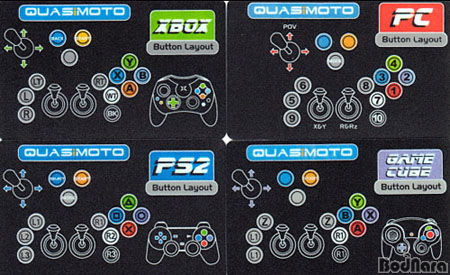
"old/retroarch-joypad-autoconfig-0~git20200622/udev/Honey Bee QuasiCON.cfg"
"new/retroarch-joypad-autoconfig-0~git20200730/udev/Honey Bee QuasiCON.cfg"
--- "old/retroarch-joypad-autoconfig-0~git20200622/udev/Honey Bee QuasiCON.cfg"
1970-01-01 01:00:00.000000000 +0100
+++ "new/retroarch-joypad-autoconfig-0~git20200730/udev/Honey Bee QuasiCON.cfg"
2020-07-30 14:47:39.000000000 +0200
@@ -0,0 +1,80 @@
+# QuasiCON 2P Control Panel
+# Arcade Control Panel
+# Button Layout Image:
http://file.bodnara.co.kr/logo/insidelogo.php?image=%2Fhttp%3A%2F%2Ffile.bodnara.co.kr%2Fwebedit%2Fnews%2F2005%2F1145581286-fx4.jpg
+
+#Controller Setup
+input_driver = "udev"
+input_device = "Honey Bee QuasiCON"
+input_device_display_name = "QuasiCON 2P"
+
+# Hex vid:pid is found using "dmesg -w" or "tail -f /var/log/syslog" and
converted to Decimal using
http://www.binaryhexconverter.com/hex-to-decimal-converter
+# Hex vid:pid = 2717:3144 -> Decimal vid:pid = 10007:12612
+input_vendor_id = "4779"
+input_product_id = "2"
+
+#Joystick Mappings
+input_up_btn = "h0up"
+input_down_btn = "h0down"
+input_left_btn = "h0left"
+input_right_btn = "h0right"
+
+input_up_btn_label = "Joy Up"
+input_down_btn_label = "Joy Down"
+input_left_btn_label = "Joy Left"
+input_right_btn_label = "Joy Right"
+
+#Button Mappings
+input_a_btn = "1"
+input_b_btn = "0"
+input_x_btn = "3"
+input_y_btn = "2"
+
+input_a_btn_label = "Bottom Right Button 2 (PC)"
+input_b_btn_label = "Bottom Center Button 1 (PC)"
+input_x_btn_label = "Top Right Button 4 (PC)"
+input_y_btn_label = "Top Center Button 3 (PC)"
+
+#L and R Shoulder Buttons
+input_l_btn = "7"
+input_r_btn = "6"
+
+input_l_btn_label = "Top Left Button 8 (PC)"
+input_r_btn_label = "Bottom Right Button 7 (PC)"
+
+#L2 and R2 triggers
+input_l2_btn = "8"
+input_r2_btn = "9"
+
+input_l2_btn_label = "Left Bottom Button 9 (PC)"
+input_r2_btn_label = "Right Bottom Button 10 (PC)"
+
+# Start and Select Button
+input_start_btn = "5"
+input_select_btn = "4"
+input_menu_toggle_btn = "8"
+
+input_start_btn_label = "Left Top Button 6 (PC)"
+input_select_btn_label = "Left Center Button 5 (PC)"
+input_menu_toggle_btn_label = "Left Bottom Button 9 (PC)"
+
+# Left Analog Stick
+input_l_x_minus_axis = "-0"
+input_l_x_plus_axis = "+0"
+input_l_y_minus_axis = "-1"
+input_l_y_plus_axis = "+1"
+
+input_l_x_plus_axis_label = "Left Analog (Right)"
+input_l_x_minus_axis_label = "Left Analog (Left)"
+input_l_y_plus_axis_label = "Left Analog (Up)"
+input_l_y_minus_axis_label = "Left Analog (Down)"
+
+# Right Analog Stick
+input_r_x_minus_axis = "-3"
+input_r_x_plus_axis = "+3"
+input_r_y_minus_axis = "-2"
+input_r_y_plus_axis = "+2"
+
+input_r_x_plus_axis_label = "Right Analog (Right)"
+input_r_x_minus_axis_label = "Right Analog (Left)"
+input_r_y_plus_axis_label = "Right Analog (Up)"
+input_r_y_minus_axis_label = "Right Analog (Down)"