Hi Tim -
/tftpboot/pxelinux.cfg/ is empty

The  inventory mac_address matches the BMC MAC address.(see below)
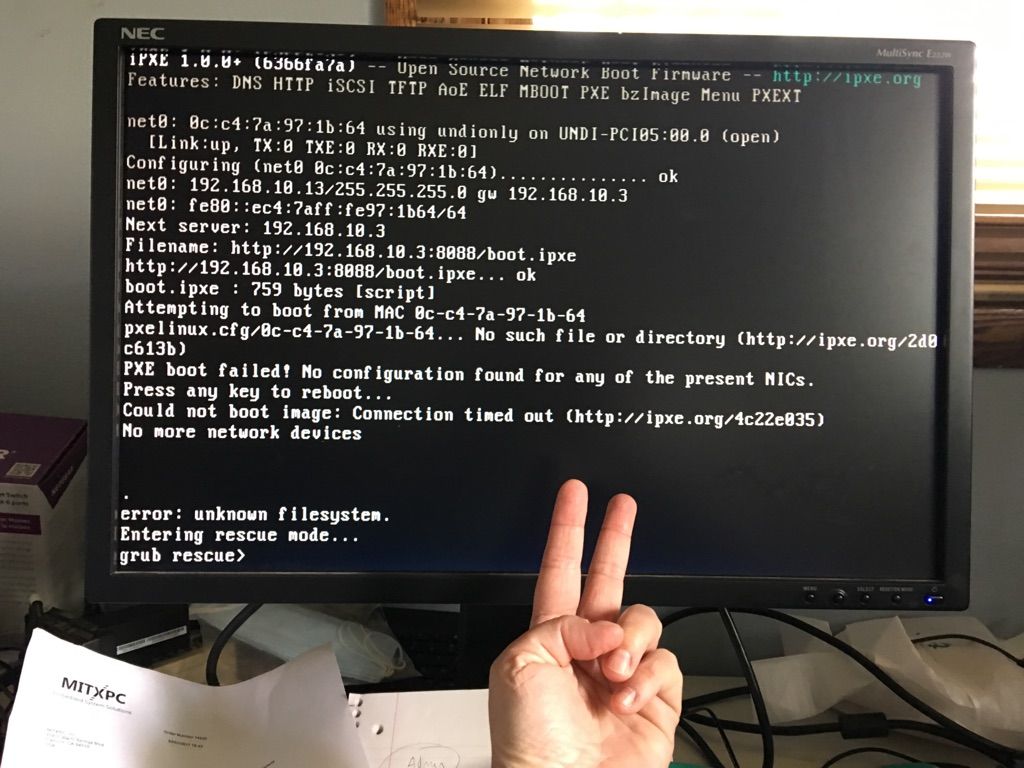
BUT I just noticed in the photos that Ironic is trying to boot via LAN
1, not the IPMI port, on both nodes.
Node 1 photo: attempting to boot from MAC 0c:c4:7a:9d:7b:d0
Node 2 photo: attempting to boot from MAC 0c:c4:7a:97:1b:64

Each Super Micro has 5 LAN ports. LAN port 0 is dedicated in the BIOS to IPMI.
On the Super Micro:
LAN port 0 (IPMI) plugged into admin router
LAN port 1 plugged into admin router
LAN port 2 plugged into public router

SOOOO.... Based on what I'm seeing, maybe I am not understanding the
purpose of the dedicated IMPI port - is that solely for console usage?
I can log into the IMPI management console by point a browser at
https://192.168.10.220 or https://192.168.10.230
Should I designate LAN port 1 as the mac_address for Ironic to use
(since it seems to be using that port)? should I not have 2 LAN ports
connected to the Admin router?

Since you're in France, I'm going to try changing the MAC address in
the inventory file to match LAN port 1.


----------------------------------------------------------------------------------
Firmware Revision : 03.46
Firmware Build Time : 10/14/2016
BIOS Version: 1.1c
BIOS Build Time: 10/03/2016
Redfish Version : 1.0.1
IP Address: 192.168.010.220
BMC MAC Address: 0c:c4:7a:9d:77:eb
System LAN1 MAC address : 0c:c4:7a:9d:7b:d0
System LAN2 MAC address : 0c:c4:7a:9d:7b:d1
System LAN3 MAC address : 0c:c4:7a:9d:80:44
System LAN4 MAC address : 0c:c4:7a:9d:80:45
------------------------------------------
Firmware Revision : 03.26
Firmware Build Time : 12/18/2015
BIOS Version : 1.1c
BIOS Build Time : 10/03/2016
Redfish Version : 1.0.0
IP address : 192.168.010.230
BMC MAC address : 0c:c4:7a:97:18:28
System LAN1 MAC address : 0c:c4:7a:97:1b:64
System LAN2 MAC address : 0c:c4:7a:97:1b:65
System LAN3 MAC address : 0c:c4:7a:97:1f:5c
System LAN4 MAC address : 0c:c4:7a:97:1f:5d
-------------------------------------------

nodes:
  node1:
    mac_address: "0c:c4:7a:9d:77:eb"
    ipmi_ip: 192.168.10.220
    ipmi_user: ADMIN
    ipmi_pass: ADMIN
    pm_type: "pxe_ipmitool"
    cpus: 16
    memory: 131072
    disk: 1000
    disk_device: sdb
    arch: "x86_64"
    capabilities: "profile:control"
  node2:
    mac_address: "0c:c4:7a:97:18:28"
    ipmi_ip: 192.168.10.230
    ipmi_user: ADMIN
    ipmi_pass: ADMIN
    pm_type: "pxe_ipmitool"
    cpus: 16
    memory: 131072
    disk: 1000
    disk_device: sdb
    arch: "x86_64"
    capabilities: "profile:compute"
Aimee Ukasick
Open Source Engagement OPNFV, OpenStack, ONAP


On Mon, Apr 24, 2017 at 5:00 PM, Tim Rozet <[email protected]> wrote:
> Hi Aimee,
> On your undercloud can you go to /tftpboot/pxelinux.cfg/ when you deploy?
> What folders/files are in there?  Did you verify 0c-c4-7a-9d-7b-d0 matches
> the mac you entered in your inventory file?
>
> Thanks,
>
> Tim Rozet
> Red Hat SDN Team
>
> ----- Original Message -----
> From: "Aimee Ukasick" <[email protected]>
> To: "TECH-DISCUSS OPNFV" <[email protected]>
> Sent: Monday, April 24, 2017 5:03:58 PM
> Subject: [opnfv-tech-discuss] [Apex] Bare Metal Failure: pxelinux.cfg empty
>   dir
>
> Hi all - I'm trying to deploy Apex on a NUC (Jumphost) and 2 Super
> Micros (control, compute). Tim helped me through a networking issue
> last week, but now the process is running into a snag with Ironic. It
> looks like Ironic is trying to boot the nodes but is failing to find
> the relevant file in pxelinux.cfg on the installer vm.
> http://192.168.10.3:8088/pxelinux.cfg    is an empty directory
> but
> http://192.168.10.3:8088/boot.ipxe displays the boot.ipxe file in the browser
>
> screenshot of monitor connected to node 2:
> https://usercontent.irccloud-cdn.com/file/JDlEy7dW/1493059053.JPG
> screenshot of monitor connected to node 1:
> https://www.dropbox.com/s/18zhpxa4f547qwa/node1error.jpg?dl=0
>
> ipxe_vhost_access.log:
> http://paste.openstack.org/show/607771/
>
> ironic-conductor.log:
> http://paste.openstack.org/show/607775/
>
> ironic-inspector.log
> http://paste.openstack.org/show/607781/
>
> I am able to connect to the nodes from the undercloud (192.168.10.3)
> using ipmitool, and I'm able to ping the outside world from the
> undercloud.
>
> I'm at a loss - can anyone shed some light and/or point me in the
> right direction?
>
> Thanks in advance!
>
> aimee
>
> -----
> Aimee Ukasick
> Open Source Engagement OPNFV, OpenStack, ONAP
> _______________________________________________
> opnfv-tech-discuss mailing list
> [email protected]
> https://lists.opnfv.org/mailman/listinfo/opnfv-tech-discuss
_______________________________________________
opnfv-tech-discuss mailing list
[email protected]
https://lists.opnfv.org/mailman/listinfo/opnfv-tech-discuss