Dear Carlos,
I am not an expert for this method, but I used it for two projects so
all I can give is an "educated guess" on what the parameters mean. Here
it comes - in the first step, the smoothing step, the aim is to get rid
of small scale noise and to make the edges smoother (but keep them
visible, this is what "edge-preserving" is all about. The smoothing is
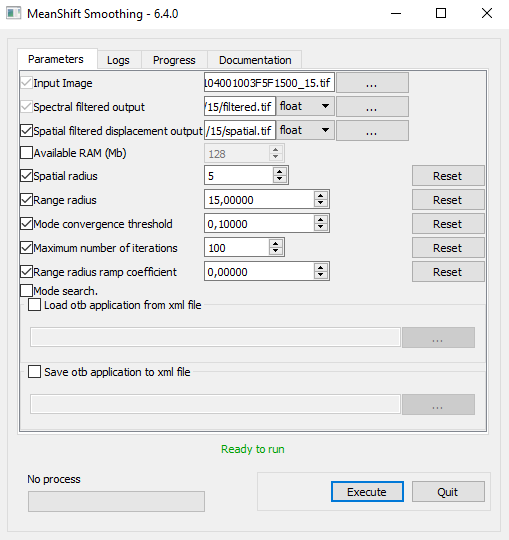
working spatially as well as spectrally, so spatial radius of 5
considers everything within 5 pixel; range radius refers to 15 units in
euclidean distance. Let´s think that your image values are on the scale
0-255 then a neighboring pixel that has a value less then 15 units from
your is considered in the smoothing (of the focal cell of your spatial
radius). If the pixel has values more dissimialr than your focal pixel
than 15 units then it will not contribute to the smoothing. In the orfeo
toolbox cookbook
(https://www.orfeo-toolbox.org/CookBook/Applications/app_MeanShiftSmoothing.html)
they write
... the filtered value correspond to the average spectral signature
of neighborhood pixels that are both spatially closer than the spatial
radiusparameter (spatialr) and with spectral signature that have an
euclidean distance to the input pixel lower than the range radius (ranger)
Keep in mind that if you image is not 8 bit (256 values) but 16 bit
(65536 values), the value 15 might be too small. In the cookbook, there
are also hints that colorspace transformation (e.g. RGB->HSL) and that
the noise model of aerial imagery is usually not following a gaussian
curve but is skewed. This can be accounted for switching the "range
radius ramp option" on - but it is off by default. I never tried this. I
also have no clue how to easily switch from RGB to HSV. :/
So the filted value is based on these radii. The small spatial radius
might make sense if the objects are not very large.
The second step invovles the same parameters and the cookbook suggests
to use "half the values used in the LSMS step 1". You used quite
different values, -spatialr 2000 -ranger 200. I can only guess but 2000
means that 2000 pixel radius which would be 1km radius if your pixel has
a size of 0.5m! I guess this would include the whole image? The large
size of ranger (spectral range) means that nearly all pixels will lump
together, if your image is not 16-bit. If it is in 16-bit, this might
explain why the spectral classes or rather "clear". I am curious to know
whether the segments were much more numerous when the spatial range was
smaller?
I hope that helped!

cheers

Jens


Am 11.02.2019 um 17:57 schrieb Carlos Alberto Toranzo Mediero:
Hi everyone.
when i use the tools Mean ShiftSmothing (step1) and LSMSSegmentation
(step2) there are quite parameters that i don’t know how to complet them.
In the first hand whe i tried with the step 1 I leave all the defect
parameters, I don’t change them as you can see in the comand and in
the image
    otbcli_MeanShiftSmoothing -in
    I:\carlos\Imagery\nuevas_img\15\104001003F5F1500_15.tif -fout
    I:\carlos\Imagery\nuevas_img\ok\smooth.tif -foutpos
    I:\carlos\Imagery\nuevas_img\ok\smooth_pos.tif -spatialr 15
    -ranger 0.25 -thres 0.1 -maxiter 100

image
image.png509×540 13.4 KB
<https://forum.orfeo-toolbox.org/uploads/default/original/1X/54f81c1a2381d775c2120d927bcef48e4ea6fa09.png>
By the other hand, to complete Step2, i’ve tried tons of numbers in
spatial radius and range radius parameters, finally i found the
correct ones but I don’t know why these numbers are the correct ones.
I don’t know why but 2000 and 200 always fix whit my images, as you
can check in the pic and in the code.
otbcli_LSMSSegmentation -in
I:\carlos\Imagery\nuevas_img\15\filtered.tif -inpos
I:\carlos\Imagery\nuevas_img\15\spatial.tif -out
I:\carlos\Imagery\nuevas_img\15\segmentation.tif -spatialr 2000
-ranger 200 -minsize 1 -tilesizex 4728 -tilesizey 6359
image
image.png508×561 14.4 KB
<https://forum.orfeo-toolbox.org/uploads/default/original/1X/05817c1798223cd2113263ee032b1c072cd4b62b.png>

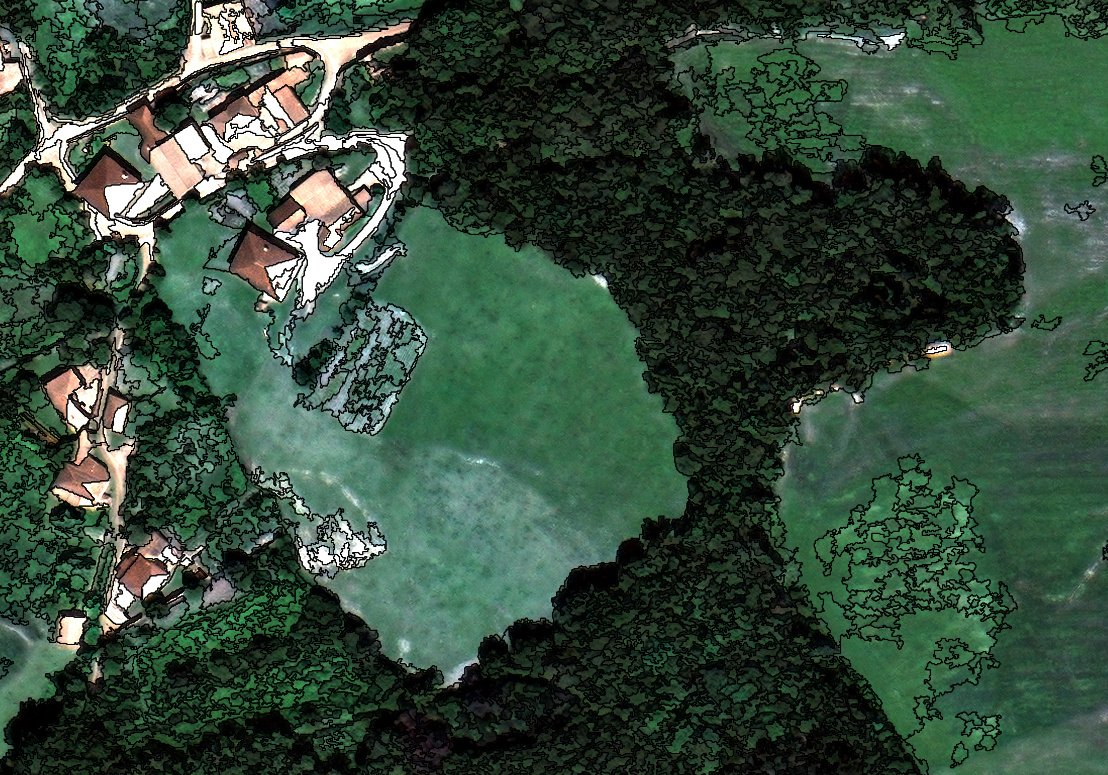
And the result is always quite good whit this parameters

image
image.jpg1108×775 635 KB
<https://forum.orfeo-toolbox.org/uploads/default/original/1X/42cdce04cbc67bb75eed8fcb17b3e86dae924684.jpeg>
If someone could explain me why i don’t have to change the parameters
in the first step, and how can i now which value use to the range
radius and spatial radius I will appreciate a lot (probably the
problem is tha i dont understand at all the meaning of this both
parameters even reading the meaning of the cook-book)
Thanks in advance.

--
This mailing will be abandoned soon in favor of a more friendly forum:
https://forum.orfeo-toolbox.org
Thanks to visit it for any question related to Orfeo Toolbox (OTB)
usage, or to check the OTB FAQ:
http://www.orfeo-toolbox.org/FAQ.html
---
You received this message because you are subscribed to the Google
Groups "otb-users" group.
To unsubscribe from this group and stop receiving emails from it, send
an email to [email protected]
<mailto:[email protected]>.
For more options, visit https://groups.google.com/d/optout.
--
###################
Dr. Jens Oldeland
Hammer Landstr. 24
20537 Hamburg

0049-(0)40-27806997
0049-(0)170-2116164
###################

--
This mailing will be abandoned soon in favor of a more friendly forum:
https://forum.orfeo-toolbox.org
Thanks to visit it for any question related to Orfeo Toolbox (OTB) usage, or to
check the OTB FAQ:
http://www.orfeo-toolbox.org/FAQ.html
---
You received this message because you are subscribed to the Google Groups "otb-users" group.
To unsubscribe from this group and stop receiving emails from it, send an email
to [email protected].
For more options, visit https://groups.google.com/d/optout.