Hi,

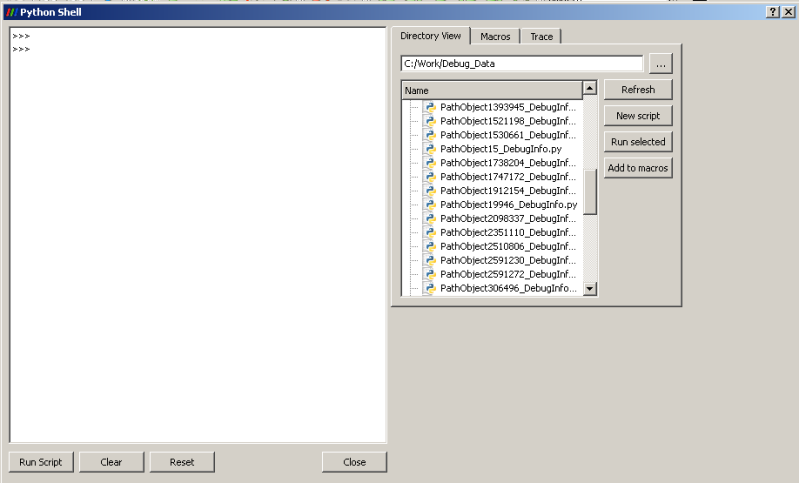
The following screenshot is self-explanatory:
http://i17.photobucket.com/albums/b52/videohead/ParaviewScriptDialog.png
- Olumide

---------------- Possible memory leak in script dialog ----------------
I typically use python to load groups (sometimes up to a dozen) of VTK
files generated by each run of my experiment -- opening files manually
is very tiring. However, whenever I clear the currently displayed files
(using the "delete all" Edit menu option) Paraview never seems to give
back all the memory it allocated. As such, after loading and unloading
10-20 simulations, Paraview's memory consumption is so high that I
either have to terminate the program or it crashes.

Here's the result of my typical run. I saved a small simulation to a
state file and tried opening it and then clearing the data. The reported
data is from the Windows Task manager (for some weird reason the task
manager lists that the memory allocated to the Paraview process is
greater than the process' virtual memory!?)

Initial (new instance of Paraview):
Mem usage: 75,272Kb VM: 56,256Kb

After loading state file:
Mem usage: 89,512Kb VM: 70,224Kb

After deleting all objects
Mem usage: 84,476Kb VM: 65,132Kb

Another run, this time the python scripts are used to load the two
simulation datasets. Growth in memory usage is more aggressive:

Initial (new instance of Paraview):
Mem usage: 75,304Kb VM: 56,276Kb

After loading data set 1 via Python shell/script:
Mem usage: 113,264Kb VM: 88,704Kb

After deleting all objects
Mem usage: 114,456Kb VM: 89,688Kb

After loading dataset 2 via Python shell/script:
Mem usage: 126,116Kb VM: 101,196Kb

After deleting all objects
Mem usage: 126,284Kb VM: 101,388Kb

I'm aware that memory is dynamically allocated for the python shell and
GUI, and their corresponding objects are probably kept in memory to make
future launches of the python shell faster. This would explain why some
memory isn't returned after the initial launch. However as this should
done just once, the memory consumption should not grow each time a
dataset is loaded using a Python script/GUI.

Also, after deleting a dataset and a new one is loaded, the following
the message is frequently displayed.

qDrawShadeRect: Invalid parameters
qDrawShadeRect: Invalid parameters
qDrawShadeRect: Invalid parameters
..
qDrawShadeRect: Invalid parameters
qDrawShadeRect: Invalid parameters

A few other questions/suggestions:

1. Does the python command shell have a "run python script" command? For
example: RunPythonScript("C:/Work/Data/Foo.py"). Such a feature would be
a productivity boost. Clicking on the Tools menu and pressing the run
script button is okay for loading a few datasets but tiring when there
are lots of datasets to be evaluated. Also, it would be nice if the
python command were dockable, with an autohide feature like Visual
studio. Again this would be productivity boost. In fact it would be nice
if most views had an autohide feature. This would be a quick way of
increasing the size of the view window.

2. Does Paraview 3.6.2 have a disable offset feature as
proposed/discussed here (I've searched but I can't find one):
http://tinyurl.com/yf86vwy

3. When can we expect to be able to have an external program send data
to a Paraview, in the manner suggested in the following thread:
http://tinyurl.com/yfdyp7w

I hope I'm not being too greedy. I believe I speak for the entire
community when I say we appreciate all your hard work.

Thanks,

- Olumide

-------- Original Message --------
Subject: Re: [Paraview] Memory leak in Paraview 3.6.1(?)
Date: Mon, 18 Jan 2010 18:30:41 GMT
From: Utkarsh Ayachit ([email protected])
List: org.paraview.paraview

Is it reproducible without using Python for creating the objects?
Easiest way to try that is create the objects using python, then save
the state out, then restart paraview and load the state file to create
the objects.

Utkarsh

On Sat, Jan 16, 2010 at 1:34 AM, Olumide <[email protected]> wrote:

This issue persists in Paraview 3.6.2, with which I've just viewed a
relatively small data set (one polysphere and about a 40 line segments).
However, after disconnecting the server, thereby unloading the data,
Paraview's memory consumption remains at 103Kb -- that's not right. Why
isn't Paraview releasing memory from purged objects. If it matters, the
objects were imported using a python script.

- Olumide
_______________________________________________
Powered by www.kitware.com

Visit other Kitware open-source projects at
http://www.kitware.com/opensource/opensource.html

Please keep messages on-topic and check the ParaView Wiki at:
http://paraview.org/Wiki/ParaView

Follow this link to subscribe/unsubscribe:
http://www.paraview.org/mailman/listinfo/paraview