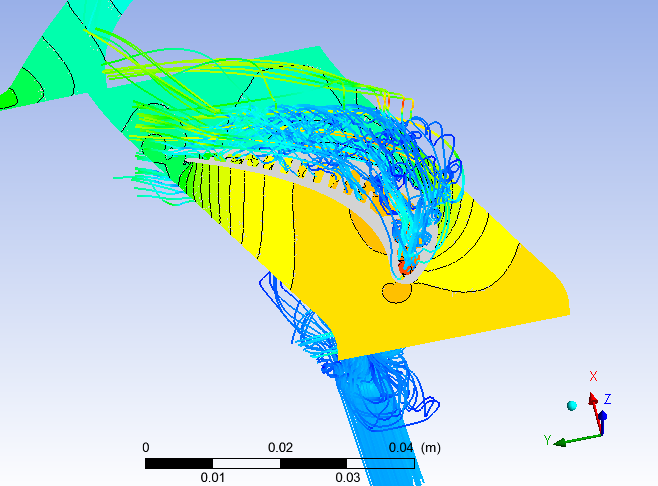
To color the slice, highlight that in the pipeline browser and select the
pressure variable from the middle toolbar (near the top left of the GUI). To
get a contour-like effect with the colors, click the edit colors button (next
to that chooser box you just used) turn on advanced options, and lower the
resolution parameter.
If you want to see black lines on your colored slice, use the contour filter on
the slice as you described, then change the lines' color to black. (Set
variable to solid color, click on edit colors and pick black.) Then turn the
visibility of the slice back on (eyeball button in the pipeline browser).

-Ken

Sent from my iPad so blame autocorrect.

On Aug 17, 2013, at 2:27 AM, "Петров Александр"
<[email protected]<mailto:[email protected]>> wrote:

Hello,

please, advise me - what filter I should use to achieve such results in
ParaView:

images from Ansys CFX-post:
http://files.rsdn.ru/39468/1.png
http://files.rsdn.ru/39468/2.png

In CFX I do so: slice the 3D model by plane and then place a contour of
pressure on that slice.

When I do so in ParaView I get only contour line on slice not a map.
I try to find filter, that somehow project all contours of 3D model on plane,
but don't find anything useful

Thank you,
Alexander Petrov
_______________________________________________
Powered by www.kitware.com<http://www.kitware.com>

Visit other Kitware open-source projects at
http://www.kitware.com/opensource/opensource.html

Please keep messages on-topic and check the ParaView Wiki at:
http://paraview.org/Wiki/ParaView

Follow this link to subscribe/unsubscribe:
http://www.paraview.org/mailman/listinfo/paraview
_______________________________________________
Powered by www.kitware.com

Visit other Kitware open-source projects at
http://www.kitware.com/opensource/opensource.html

Please keep messages on-topic and check the ParaView Wiki at:
http://paraview.org/Wiki/ParaView

Follow this link to subscribe/unsubscribe:
http://www.paraview.org/mailman/listinfo/paraview