Thanks for the reply - the ‘Shade’ setting was the key.  Am I right in
inferring this property is not exposed for unstructured grids?  If I threshold
or clip the image data I can no longer turn ‘Shade’ on.
Does GPU acceleration work on OS X presently?  Whenever I switch to GPU the
image disappears; rendering on the CPU takes a long time.  Would this be more
likely to work if I compiled the OpenGL2 version?

Cheers
> On 25 Sep 2015, at 05:05, Aashish Chaudhary <[email protected]>
> wrote:
>
>
>
> On Wed, Sep 23, 2015 at 3:34 PM, Mathew Guilfoyle <[email protected]
> <mailto:[email protected]>> wrote:
> Aashish - thanks for the reply
>
> I am using the latest OS X binary download (4.4.0) - is this OpenGL2?  When I
> switch ‘Volume Rendering Mode’ to GPU rendering all images disappear so I
> presume I’m only able to use CPU rendering.  I am on a 2014 Macbook Pro with
> Nvidia GT750M.
>
> No it would be OpenGL old version VTK. It would be nice if you can try
> OpenGL2 version although I don't think your problem is related to GL version.
>
>
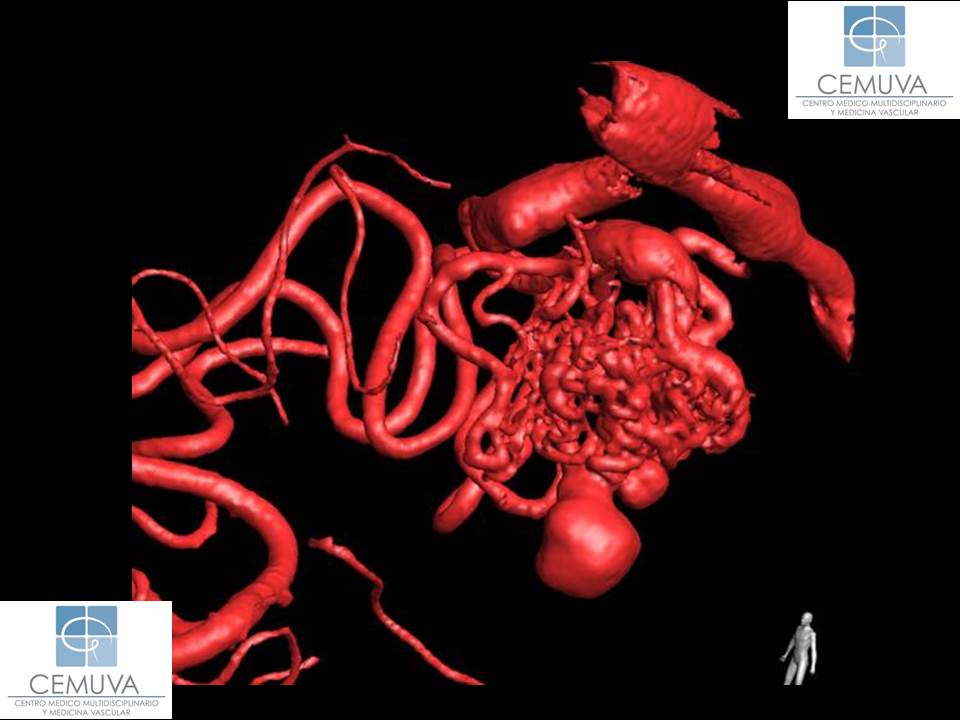
> I’m using contrast enhanced volumetric CT imaging.  I want to render blood
> vessels in red; within the scan they appear in approximately the 100-200
> Hounsfield unit range. The full range of scalar data is [-1024, 3071]. On
> this basis I’ve set up the following colour and opacity mappings:
>
> Colour:
> Value R-G-B
> -1024 0-0-0
> 99            0-0-0
> 100           1-0-0
> 200           1-0-0
> 201           0-0-0
> 3071  0-0-0
>
> Opacity:
> Value Opacity
> -1024 0
> 99            0
> 100           1
> 200           1
> 201           0
> 3071  0
>
> None of the voxels appear to be fully opaque in the rendering.  When I
> increase the specular from 0 to 1 it has no effect at all on the image.
>
> Have you enabled the lighting?
> http://www.vtk.org/doc/nightly/html/classvtkVolumeProperty.html
> <http://www.vtk.org/doc/nightly/html/classvtkVolumeProperty.html>(ShadeOn) on
> volume property?
>
> - Aashish
>
> Ideally, I would want to emulate something along the lines of this:
> http://www.cemuva.com/img/uploads/malformacion-arteriovenosa-cerebral-3d.jpg
> <http://www.cemuva.com/img/uploads/malformacion-arteriovenosa-cerebral-3d.jpg>
>
> Again, cheers for the help
> Mathew
>
>> On 23 Sep 2015, at 18:24, Aashish Chaudhary <[email protected]
>> <mailto:[email protected]>> wrote:
>>
>> Matthew,
>>
>> * Can you send us the exact number you are putting in for the transfer
>> function? Make sure that you have values for the entire range of scalar
>> values?
>>
>> * Are you using OpenGL2 version?
>>
>> - Aashish
>>
>> On Wed, Sep 23, 2015 at 1:18 PM, Mathew Guilfoyle <[email protected]
>> <mailto:[email protected]>> wrote:
>> Thanks for the suggestions.  After looking into it further the type of
>> visualisation I am after is volume rendering of the data with an opacity
>> transfer function based on the scalar data values.
>>
>> I have set up my volume rendering to have full (i.e =1) opacity through the
>> range of scalar values I’m interested in, reducing to near transparency
>> either side of this.  I also want specular highlighting of the opaque
>> tissues.
>>
>> However, despite these settings Paraview does not seem to render any voxels
>> as fully opaque and there is certainly no specular highlighting.  Is this a
>> known limitation?
>>
>> Many thanks
>>> On 21 Sep 2015, at 15:10, David E DeMarle <[email protected]
>>> <mailto:[email protected]>> wrote:
>>>
>>> Two suggestions:
>>> * try contour filter instead of threshold if contour isn't available, apply
>>> cell to point first.
>>> * try the clip filter with the clip type set to scalar.
>>> hth
>>>
>>> David E DeMarle
>>> Kitware, Inc.
>>> R&D Engineer
>>> 21 Corporate Drive
>>> Clifton Park, NY 12065-8662
>>> Phone: 518-881-4909 <tel:518-881-4909>
>>> On Mon, Sep 21, 2015 at 9:40 AM, Mathew Guilfoyle <[email protected]
>>> <mailto:[email protected]>> wrote:
>>> I would be grateful for some advice on volume and surface rendering in
>>> Paraview.
>>>
>>> I am trying to generate 3D skull models from CT data.  The reason for using
>>> Paraview is to take advantage of the detailed fly-through/movie capability.
>>>  I can generate an acceptable 3D model that I can interact with in OsiriX
>>> and 3D Slicer, both of which I believe use VTK.  However, in Paraview I am
>>> struggling to create a 3D model that looks any good.
>>>
>>> When I apply a threshold filter and view as a ‘Surface’ the image is a lot
>>> more ‘blocky’ than in the other two applications.  The image is dominated
>>> by the artifactual lines due to the original data being acquired as axial
>>> slices; whereas in OsiriX and 3D Slicer this gets smoothed out and the
>>> ‘genuine’ surface skull features (sutures etc) stand out.
>>>
>>> I realise this is probably question of apply the correct series of filters
>>> and that the other two apps do this ‘under the hood’.  However, i have
>>> tried to apply Decimation and Smooth to the extracted surface and am not
>>> making any headway.
>>>
>>> Any pointers would be very welcome
>>>
>>> M
>>> _______________________________________________
>>> Powered by www.kitware.com <http://www.kitware.com/>
>>>
>>> Visit other Kitware open-source projects at
>>> http://www.kitware.com/opensource/opensource.html
>>> <http://www.kitware.com/opensource/opensource.html>
>>>
>>> Please keep messages on-topic and check the ParaView Wiki at:
>>> http://paraview.org/Wiki/ParaView <http://paraview.org/Wiki/ParaView>
>>>
>>> Search the list archives at: http://markmail.org/search/?q=ParaView
>>> <http://markmail.org/search/?q=ParaView>
>>>
>>> Follow this link to subscribe/unsubscribe:
>>> http://public.kitware.com/mailman/listinfo/paraview
>>> <http://public.kitware.com/mailman/listinfo/paraview>
>>>
>>
>>
>> _______________________________________________
>> Powered by www.kitware.com <http://www.kitware.com/>
>>
>> Visit other Kitware open-source projects at
>> http://www.kitware.com/opensource/opensource.html
>> <http://www.kitware.com/opensource/opensource.html>
>>
>> Please keep messages on-topic and check the ParaView Wiki at:
>> http://paraview.org/Wiki/ParaView <http://paraview.org/Wiki/ParaView>
>>
>> Search the list archives at: http://markmail.org/search/?q=ParaView
>> <http://markmail.org/search/?q=ParaView>
>>
>> Follow this link to subscribe/unsubscribe:
>> http://public.kitware.com/mailman/listinfo/paraview
>> <http://public.kitware.com/mailman/listinfo/paraview>
>>
>>
>>
>>
>> --
>> | Aashish Chaudhary
>> | Technical Leader
>> | Kitware Inc.
>> | http://www.kitware.com/company/team/chaudhary.html
>> <http://www.kitware.com/company/team/chaudhary.html>
>
>
>
> --
> | Aashish Chaudhary
> | Technical Leader
> | Kitware Inc.
> | http://www.kitware.com/company/team/chaudhary.html
> <http://www.kitware.com/company/team/chaudhary.html>
_______________________________________________
Powered by www.kitware.com

Visit other Kitware open-source projects at
http://www.kitware.com/opensource/opensource.html

Please keep messages on-topic and check the ParaView Wiki at:
http://paraview.org/Wiki/ParaView

Search the list archives at: http://markmail.org/search/?q=ParaView

Follow this link to subscribe/unsubscribe:
http://public.kitware.com/mailman/listinfo/paraview