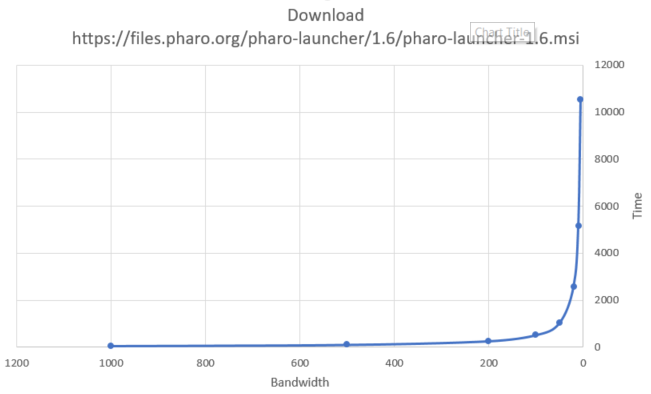
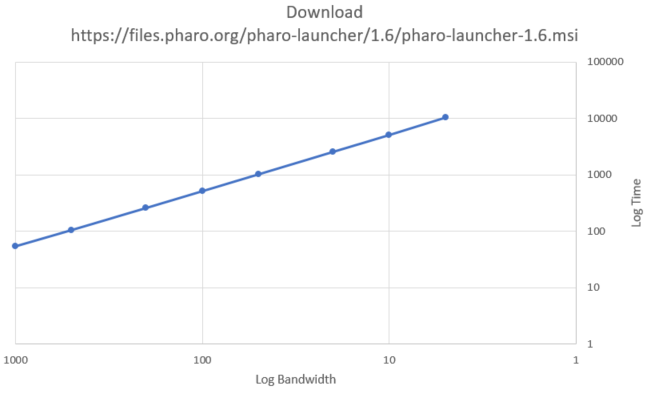
On Sun, 3 Feb 2019 at 23:25, webwarrior <[email protected]> wrote: > Ben Coman wrote > > On Sat, 2 Feb 2019 at 18:54, ducasse < > > > stepharo@ > > > > wrote: > > > > ... > > > > 3. Ticked "Free tier only" filter. > > + Selected "Amazon Linux 2 AMI (HVM), SSD Volume Type" > > + Clicked > > <Review and Launch> > > (used default t2.micro) > > + Clicked > > <Launch> > > + From the pull-down selected "Create a new key pair", > > gave it a name and clicked > > <Download Keypair> > > saved as > > "SydneyPharoSpeedTest.pem" > > + Clicked > > <Launch Instance> > > + Clicked > > <View Instances> > > noted instance... > > * IP address: 54.252.136.78 > > * Zone: ap-southeast-2b > > * Security Group: Launch Wizard 1 > > > > 4. On my Windows 10 box, in WSL did... > > $ cd ~/.ssh # if it doesn't exist, first do... mkdir -m 700 > ~/.ssh > > $ cp /mnt/c/Users/Ben/Downloads/SydneyPharoSpeedTest.pem ~/.ssh > > $ chmod 400 ~/.ssh/SydneyPharoSpeedTest.pem > > $ ssh -i ~/.ssh/SydneyPharoSpeedTest.pem [email protected]$ cat > > /etc/os-release > > ID="amzn" > > ID_LIKE="centos rhel fedora" > > > > > > GOOD NETWORK BASELINE TEST... > > Ignoring any packet loss on poor networks, first testing low bandwidths > on > > a good network > > $ vi test.sh > > #!/bin/sh > > if [ -d out ]; then > > dirdate=`stat -c %z out | awk '{print $1"-"$2}' ` > > mv out out.${dirdate} > > fi > > mkdir out > > for RATE in 1000k 500k 200k 100k 50k 20k 10k 5k 2k 1k > > do > > echo $RATE > > /usr/bin/time -f "%e" -o out/time.$RATE \ > > wget --quiet --limit-rate $RATE > > https://files.pharo.org/pharo-launcher/1.6/pharo-launcher-1.6.msi -O > > out/file.$RATE & > > done > > > > $ sh test.sh > > monitoring with... > > $ cat out/time* | sort -n > > $ ls -lS out > > > > results in following table and graphs... > > $RATE > > (kb/s) TIME > > (s) TIME > > (min) TIME > > (hr) > > 1000 54 1 0.0 > > 500 105 2 0.0 > > 200 259 4 0.1 > > 100 515 9 0.1 > > 50 1029 17 0.3 > > 20 2576 43 0.7 > > 10 5149 86 1.4 > > 5 10527 175 2.9 > > > > [image: download-speed.png] > > > > Wow that surprised me. I'm not sure what the behaviour of file servers > at > > low bandwidth should be, > > but intuitively the above seems odd. In the past troubleshooting seems > to > > have been > > focused on the cause of slow speeds, but these can occur for many reasons > > unrelated to the > > the file server. The above test ignores cause to isolate behaviour at > > slow > > speeds. > > > > I forgot my own download speed yesterday (today is okay), but here is > > another sample... > > "(in Argentina) it is really slow ... 3.5KB/s ... average 10KB/s". > > http://forum.world.st/Pharo-Downloads-are-sluggish-td5084963.html > > > > I would hope that download time was near linear with speed all the way > > down > > to 1kb/s. > > Anyone have some sysadmins they can lean on to understand if that is > > realistic? > > > > The straightness of the line using a log-log axis makes it seem like > > policy > > rather than physics. > > [image: download-speed(log).png] > > > > HTH, > > cheers -ben > > > > > > download-speed.png (39K) > > <http://forum.world.st/attachment/5094677/0/download-speed.png> > > download-speed(log).png (34K) > > < > http://forum.world.st/attachment/5094677/1/download-speed%28log%29.png> > > Why does that surprise you? > > Download time [s] = amount of data [B] / bandwidth [B/s]. > Your data and graphs look exactly like they should. When bandwidth -> 0, > time > -> +infinity. >
Hey! Thanks for that reality check.
100kb ==> 515s
10kb ==>  5149s
duh! makes perfect sense.  I was sure I had checked that simple scaling
and it had been out by another magnitude, but I must have had a screw loose
from being too caught up in the graph.
It was just meant to be a prelude baseline before playing with random
packet loss.
Sorry for the noise.

cheers -ben