Hi,
On Thu, Nov 6, 2014 at 10:50 PM, Peter Uhnák <[email protected]> wrote:

> > It is indeed known that Pharo cannot open files larger than 4GB (even
> that after you setup the VM specifically).
> It seems like Pharo bug
>
> 1. FileReference>>gtInspectorItemsIn: composite
> ...
> column: 'Size' evaluated: [:each | each humanReadableSize] width: 100;
> ...
>
> 2. FileReference>>humanReadableSize
> ^ self size humanReadableSIByteSize
>
> 3. MessageNotUnderstood: False>>humanReadableSIByteSize
> because "self size" returns false for files > 4GB so it fails and thus I
> cannot navigate to folders with such files (for example my home directory).
>

Ok. Could you please open a bug report on that for the inspector?


> >
> http://www.humane-assessment.com/blog/creating-custom-browsers-out-of-inspector-extensions/
> Thank you that looks interesting, however I would still have to add
> somehow "favorite folders"
>

No problem. Here you go:
GLMTabulator new with: [ :tabulator |
tabulator column: #favorites; column: #files span: 5.
tabulator transmit to: #favorites; andShow: [ :a |
a list
title: 'Favorites';
display: { 'test' asFileReference . 'tmp' asFileReference };
format: #fullName ].
tabulator transmit from: #favorites; to: #files; andShow: [ :a |
a custom: (GLMPager new with: [ :pager |
     pager show: [ :composite :file |
          composite title: file basename.
          file gtInspectorItemsIn: composite.
          file gtInspectorContentsIn: composite ] ]) ] ];
     openOn: FileSystem disk workingDirectory


> Let's start from use cases. What do you need to achieve?
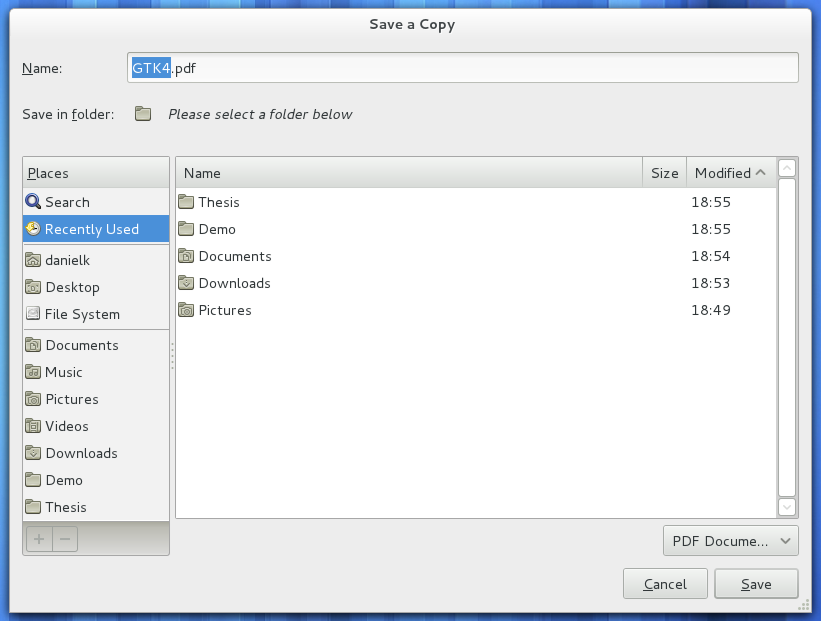
> For example I want to export a picture from Roassal and want to save it
> somewhere. So I would expect a reasonable file save dialog to open so I can
> choose a place to store it in and not a bare text input.
>
The same would go for opening... I want to open some file so I would open
> file dialog, click on a favorite folder then the file and done... not crawl
> hundred places.
>
> I mean this is nothing unusual, every
> https://help.gnome.org/misc/release-notes/3.2/figures/file-save-dialog.png.en_GB
> operating https://msdn.microsoft.com/dynimg/IC394766.png system
> http://www.productivityorchard.com/wp-content/uploads/File-Save-Dialog.png
> can do it and it is very handy.
>

Both of these facilities exist (except for the favorites part):

UITheme builder fileOpen: 'Import model from MSE file' extensions: #('mse').
UITheme builder fileSave: 'Your title here' extensions: #('mse') path: nil.

They would just need to be hooked in the right place instead of the funny
text field.

Cheers,
Doru


Peter
>
>
>
>
>
>
> On Thu, Nov 6, 2014 at 10:09 PM, Tudor Girba <[email protected]> wrote:
>
>> Hi,
>>
>>
>> On Thu, Nov 6, 2014 at 7:49 PM, Peter Uhnák <[email protected]> wrote:
>>
>>> I checked out the file browser GT Inspector (I hope that is what you
>>> were referring to), unfortunately it's crashing a lot for me (it seems it
>>> can't figure out file size for large files (~4GB) and some other stuff
>>> (sockets?)).
>>>
>>
>> What do you mean by a lot? Could you detail the crashing scenarios?
>> It is indeed known that Pharo cannot open files larger than 4GB (even
>> that after you setup the VM specifically).
>>
>>
>>> However I don't know if Glamour is planning to turn it into full file
>>> browser or just keep for quick inspection (especially considering that most
>>> people apparently don't really need such thing).
>>>
>>
>> Glamour is not the same as GT. Glamour is an engine for building
>> browsers. GT is the IDE that is built on top of Glamour. The interesting
>> thing with Glamour is that it allows you to build your own browser
>> succinctly. Take a look here:
>>
>> http://www.humane-assessment.com/blog/creating-custom-browsers-out-of-inspector-extensions/
>>
>>
>>> At least to me it seems that right now enhancing the FileBrowser would
>>> be simpler.
>>>
>> But thank you for the responses, I'll try to play with it a bit and
>>> perhaps something good will come out of it.
>>>
>>
>>
>> Let's start from use cases. What do you need to achieve?
>>
>> Cheers,
>> Doru
>>
>>
>>
>>> Peter
>>>
>>> On Thu, Nov 6, 2014 at 4:41 PM, [email protected] <[email protected]>
>>> wrote:
>>>
>>>> On Thu, Nov 6, 2014 at 3:55 PM, Peter Uhnák <[email protected]> wrote:
>>>>
>>>>> Is anyone actually using FileBrowser? Because either no one does or I
>>>>> doing something wrong.
>>>>>
>>>>> My problem is that it is very uncomfortable to navigate filesystem.
>>>>> There is no way to quickly navigate to common folders (like roots of
>>>>> system
>>>>> drives and home directory). Also hidden files/folders are shown by default
>>>>> which means there is always hundred folders.
>>>>> I would love to have these things streamlined, ideally with the option
>>>>> to add custom shortcuts (see picture)... so much for opening files.
>>>>>
>>>>> As far as saving goes the only way I found to actually save file is to
>>>>> manually type the full path without the option to choose a folder through
>>>>> GUI. But since this is the way the "Save image as..." works it leads me to
>>>>> believe that no one is actually using it regularly, because outside of
>>>>> saving a file to same folder as image such behavior seems useless.
>>>>>
>>>>> So is this something that has been considered or no one really needs
>>>>> this?
>>>>>
>>>>
>>>> I do use the FileBrowser but it is indeed in need of serious love. But
>>>> on Linux, I am on Midnight Commander, and there is nothing to the beat it.
>>>>
>>>> Most of the time, I use the FileBrowser to deal with my project files
>>>> which are in the image directory or subfolders.
>>>> But there are quite a number of hooks (for files and directories) in
>>>> the tool so one can extend it in a couple hours.
>>>>
>>>> It is worth a try.
>>>>
>>>> Phil
>>>>
>>>>
>>>>>
>>>>> Thanks,
>>>>> Peter
>>>>>
>>>>
>>>>
>>>
>>
>>
>> --
>> www.tudorgirba.com
>>
>> "Every thing has its own flow"
>>
>
>


--
www.tudorgirba.com

"Every thing has its own flow"