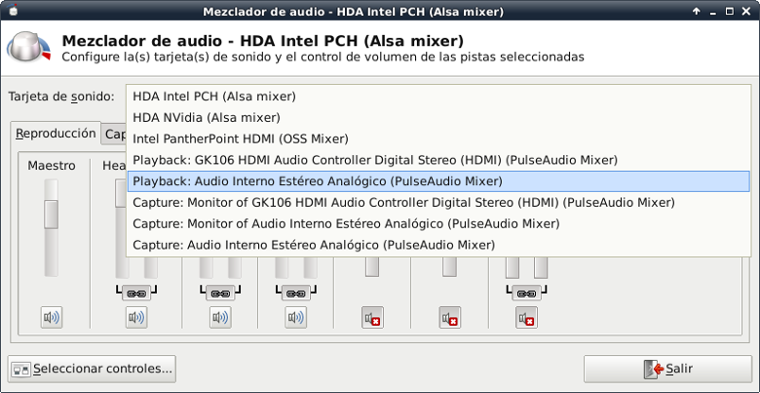
The solution to this bug:

  1.- Install gstreamer0.10-pulseaudio (if it's not installed)
  2.- Logoff from yout Xfce session and login again (this is to make
      Xfce aware of the change)
  3.- Choose the "PulseAudio Mixer" you want to use from the mixer
      selection list[1] of xfce4-mixer (if xfce4-mixer doesn't let you
      change the mixer, that's because you skipped step 2.)
Now the volume and mute multimedia keys should work as intended, but they **only work with the selected PulseAudio device**, not with any PA sink (specifically not with a global scope). Also, if you have pluggable devices (like a bluetooth headset), the device is listed when it's on, but xfce4-mixer doesn't going to let you select it. The device should be connected **before** you log in the Xfce session in order to xfce4-mixer let you choose its mixer. This of course is not very useful with a dynamic pluggable-style device. [1]: http://www.escomposlinux.org/jcantero/ld/images/xfce4-mixer-pulseaudio-choice.png -- Saludos de Javier <[email protected]>
 signature.asc
Description: Digital signature
_______________________________________________
Pkg-xfce-devel mailing list
[email protected]
http://lists.alioth.debian.org/cgi-bin/mailman/listinfo/pkg-xfce-devel