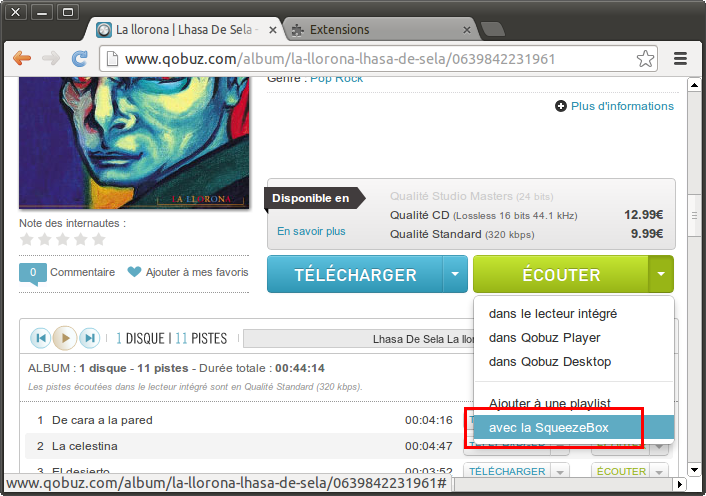
pierrepoulpe wrote:
> [image:
> http://www.pierrebeck.fr/SqueezeboxQobuz/doc_install/userscript.png]
> See the new button? cool uh...?
>
> It's kind of dirty hack. But it works... If Qobuz dev team reads this,
> why not integrate that in the website, as an accout option of course,
> disabled by default.
>
> Tested with Opera 12.10, Chrome 23.0, Firefox 11.0, should be compatible
> with Safari.
> Should not be compatible with IE, unless someone knows a trick.
> <troll>(but seriously, you care about IE?)</troll>
>
> Needs plugin v1.70
>
> 1/ Download SqueezeboxQobuz.user.js from
> https://github.com/pierrepoulpe/SqueezeboxQobuz/blob/master/SqueezeboxQobuz.user.js
>
> 2/ Edit the file with any text editor to replace the example IP with
> your squeezebox server one, line 14. (Delete line 13, uncomment 14)
>
> 3/ Set-up the script
> Opera : Preferences > Advanced > Content > JS Options > User
> Javascript folder : browse to the directory you save the script
> Chrome : drag'n'drop the file on Chrome, accept the warning
> message.
> Firefox : install greasemonkey,
> https://addons.mozilla.org/fr/firefox/addon/greasemonkey/, then
> drag'n'drop the file to firefox
>
> 4/ Open qobuz.com on any album page, click 'Ecouter', you should see the
> new menu, and clicking it should launch the play on squeezebox. If you
> click again on 'écouter', you'll see the dirty iframe.
>
> Tell me if there is a bone.
Hi
Does anyone knows how to install the SqueezeboxQobuz.user.js addon in
Chrome ?
it works perfectly on Firefox with greasemonkey but I did not succeed
with chrome.
The procedure indicated above does not work anymore apparently
pnaga


------------------------------------------------------------------------
pnaga's Profile: http://forums.slimdevices.com/member.php?userid=58031
View this thread: http://forums.slimdevices.com/showthread.php?t=97146
_______________________________________________
plugins mailing list
[email protected]
http://lists.slimdevices.com/mailman/listinfo/plugins