Smooth scrolling is coming to the native DOM APIs:
https://www.chromestatus.com/features/5812155903377408
On Thu, Nov 13, 2014 at 1:05 PM, Gee Jay Almestas <[email protected]>
wrote:

> thanks alot this solved my problem... can i request one more thing? to add
> a smooth scroll effect :) many thanks
>
> On Thursday, November 13, 2014 9:36:56 AM UTC+8, Frankie Fu wrote:
>>
>> Your code is not correct about where you can use Polymer({... }); I
>> suggest to read the "Understanding Polymer" section here:
>> https://www.polymer-project.org/docs/start/everything.html
>>
>> Here is a simple example (doesn't use jquery) that demonstrates how you
>> can scroll to section.  Hopefully that gives you some ideas to proceed:
>> http://jsbin.com/yusafewoto/1/edit
>>
>>
>> On Wed, Nov 12, 2014 at 5:25 PM, Gee Jay Almestas <[email protected]>
>> wrote:
>>
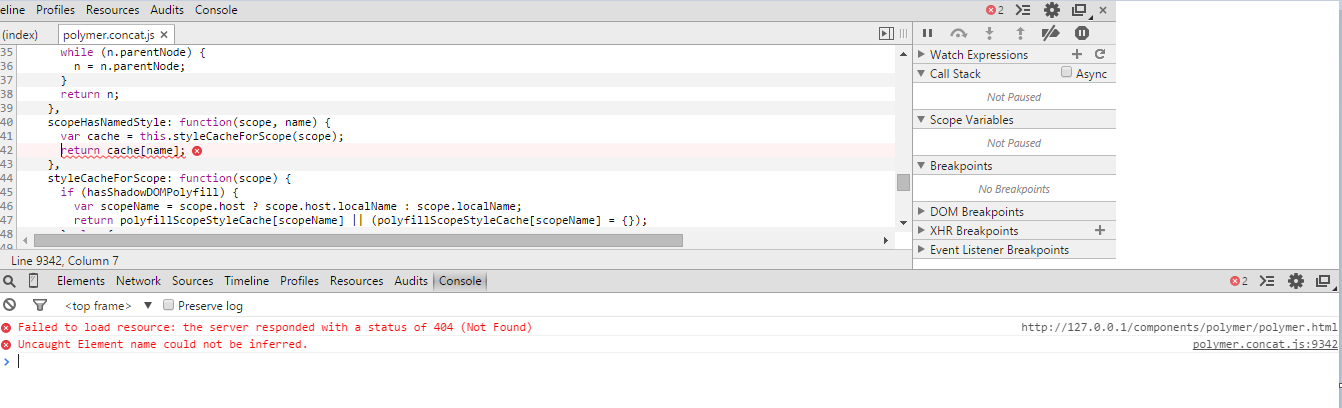
>>> *ok here's my new error now*
>>>
>>> <http://i.gyazo.com/d2988af58b82ef7744e00a6e8301b749.png>
>>>
>>> http://i.gyazo.com/d2988af58b82ef7744e00a6e8301b749.png
>>>
>>>
>>> *and here's my full index.html*
>>> <!DOCTYPE html>
>>> <head>
>>> <title>Test Site</title>
>>> <meta charset="utf-8">
>>> <meta http-equiv="X-UA-Compatible" content="chrome=1" />
>>> <meta name="viewport" content="width=device-width, initial-scale=1.0">
>>> <link rel="stylesheet" href="css/style.css">
>>> <script src="//ajax.googleapis.com/ajax/libs/jquery/1.11.0/jquery.min.js
>>> "></script>
>>> <script src="js/viewportchecker.js?v=20120206"></script>
>>> <script src="components/platform/platform.js"></script>
>>> <link rel="stylesheet" type="text/css" href="css/animate.css" />
>>>     <link rel="import" href="components/polymer/polymer.html">
>>>     <link rel="import" href="components/core-
>>> scaffold/core-scaffold.html">
>>>     <link rel="import" href="components/core-header-
>>> panel/core-header-panel.html">
>>>     <link rel="import" href="components/core-item/core-item.html">
>>>     <link rel="import" href="components/core-menu/core-menu.html">
>>>     <link rel="import" href="components/core-toolbar/core-toolbar.html">
>>>     <link rel="import" href="components/core-icon/core-icon.html">
>>>     <link rel="import" href="elements/header-koh.html">
>>>     <link rel="import" href="elements/toolbar-koh.html">
>>>     <link rel="import" href="elements/about-koh.html">
>>>     <link rel="import" href="elements/works-koh.html">
>>>     <link rel="import" href="elements/skills-koh.html">
>>> <link rel="import" href="elements/contacts-koh.html">
>>>     <link rel="import" href="components/paper-icon-
>>> button/paper-icon-button.html">
>>>     <link rel="import" href="components/paper-fab/paper-fab.html">
>>>     <link rel="import"
>>>     href="components/font-roboto/roboto.html">
>>>
>>>     <link rel="stylesheet" href="foundation/css/foundation.css" />
>>>     <script src="foundation/js/vendor/modernizr.js"></script>
>>>     <link href="css/hover-min.css" rel="stylesheet" media="all">
>>>
>>> <!-- load icons -->
>>>   <link rel="import" href="components/core-icons/av-icons.html">
>>>   <link rel="import" href="components/core-icons/
>>> communication-icons.html">
>>>   <link rel="import" href="components/core-icons/device-icons.html">
>>>   <link rel="import" href="components/core-icons/editor-icons.html">
>>>   <link rel="import" href="components/core-icons/hardware-icons.html">
>>>   <link rel="import" href="components/core-icons/image-icons.html">
>>>   <link rel="import" href="components/core-icons/maps-icons.html">
>>>   <link rel="import" href="components/core-icons/
>>> notification-icons.html">
>>>   <link rel="import" href="components/core-icons/social-icons.html">
>>> </head>
>>> <body unresolved>
>>> <toolbar-koh></toolbar-koh>
>>> <a href="http://google.com"; target="_blank"><paper-fab
>>> icon="assignment-ind" class="cv"></paper-fab></a>
>>> *<core-scaffold responsiveWidth="600px">*
>>> *  <core-header-panel navigation flex mode="scroll">*
>>> *    <core-toolbar>Navigation</core-toolbar>*
>>> *    <core-menu theme="core-light-theme">*
>>> *      <core-item icon="home" label="Home"></core-item>*
>>> * <core-item icon="account-circle" label="Who am i"></core-item> *
>>> *      <core-item icon="work" label="Works"></core-item>*
>>> * <core-item icon="gesture" label="Skills" name="skills"
>>> on-tap="{{scrollToTopic}}"><a href="#skill"></a></core-item>      *
>>> *        <core-item icon="settings-phone" label="Contacts"
>>> name="contacts" on-tap="{{scrollToTopic}}"><a
>>> href="#contacts"></a></core-item>*
>>> *        <core-item icon="link" label="v8"></core-item>*
>>> *        <core-item icon="link" label="v7"></core-item>*
>>> *        <core-item icon="link" label="v6"></core-item>*
>>> *    </core-menu>*
>>> *  </core-header-panel>*
>>>
>>> <div tool><strong>Test</strong> <span style="font-weight:300;">Site<
>>> /span></div>
>>> <div><header-koh></header-koh></div>
>>> <div class="ab-effect">
>>> <div id="about"><about-koh></about-koh></div>
>>> </div>
>>> <div class="wk-effect">
>>> <div id="works" touch-action="pan-y">
>>> <works-koh></works-koh>
>>> </div>
>>> </div>
>>> <div class="sk-effect">
>>> *<div id="skills">    *
>>> * <skills-koh></skills-koh>*
>>> * </div>*
>>> </div>
>>> <div class="ct-effect">
>>> *<div id="contacts">    *
>>> * <contacts-koh></contacts-koh>*
>>> * </div>*
>>> </div>
>>>
>>> </core-scaffold>
>>>
>>>  <script src="foundation/js/vendor/jquery.js"></script>
>>>     <script src="foundation/js/foundation.min.js"></script>
>>>     <script>
>>>       $(document).foundation();
>>>     </script>
>>>  *<script>*
>>> *    Polymer({     *
>>> *        scrollToTopic: function(e) {*
>>> *         var id = e.target.getAttribute('name');*
>>> *         if (id) {*
>>> *           this.$.core_scaffold.scroller.scrollTop =
>>> this.$[id].offsetTop - 75;*
>>> *         }*
>>> *       }*
>>>
>>> *    });*
>>> *  </script>*
>>>
>>>
>>>
>>> </body>
>>> </html>
>>>
>>>
>>>
>>> can anyone do it on jsfiddle? thanks
>>>
>>>
>>>
>>>
>>> On Wednesday, November 12, 2014 11:30:28 AM UTC+8, Gee Jay Almestas
>>> wrote:
>>>>
>>>> im using *core-scaffold* and *core-item* for my menu i also have *my
>>>> own element wrapped by a div id* i want my core-item menu to scroll to
>>>> that div when i click it... what will i do to do it? tried to use jquery
>>>> but its not working... see info below
>>>>
>>>> *here's my header panel*
>>>> <core-scaffold responsiveWidth="600px">
>>>>   <core-header-panel navigation flex mode="scroll">
>>>>     <core-toolbar>Navigation</core-toolbar>
>>>>     <core-menu theme="core-light-theme">
>>>>       <core-item icon="home" label="Home"></core-item>
>>>> <core-item icon="assignment-ind" label="Who am i"></core-item>
>>>>       <core-item icon="work" label="Works"></core-item>
>>>> *<core-item icon="work" label="Skills"><a class="nav"
>>>> href="#skill"></a></core-item*> *<!-- WHEN CLICK WILL GO TO SKILL ID
>>>> DIV -->*
>>>>         <core-item icon="settings-phone" label="Contacts"></core-item>
>>>>         <core-item icon="link" label="v8"></core-item>
>>>>         <core-item icon="link" label="v7"></core-item>
>>>>         <core-item icon="link" label="v6"></core-item>
>>>>     </core-menu>
>>>>   </core-header-panel>
>>>>
>>>> *my element*
>>>>
>>>>
>>>>
>>>> *<div id="skills"> <!-- should scroll on this part -->
>>>> <skills-koh></skills-koh> <!-- my element --></div></core-scaffold>im
>>>> trying to use a js script but its not working*
>>>>
>>>>
>>>> *jQuery(".nav").on("click", function(event){
>>>> event.preventDefault();      var dest=null;
>>>>  if(($($(this.hash)).offset().top) >
>>>> ($(document).height()-$(window).height())){          dest=
>>>> $(document).height()-$(window).height();     }else{
>>>> dest=$($(this.hash)).offset().top;     }
>>>> $($(this.hash)).trigger("click");
>>>> $('html,body').animate({scrollTop:dest}, 500, 'swing' );      });*
>>>>
>>>>
>>>> *also added on my index.html<script
>>>> src="//ajax.googleapis.com/ajax/libs/jquery/1.11.0/jquery.min.js
>>>> <http://ajax.googleapis.com/ajax/libs/jquery/1.11.0/jquery.min.js>"></script>*
>>>>
>>>>  Follow Polymer on Google+: plus.google.com/107187849809354688692
>>> ---
>>> You received this message because you are subscribed to the Google
>>> Groups "Polymer" group.
>>> To unsubscribe from this group and stop receiving emails from it, send
>>> an email to [email protected].
>>> To view this discussion on the web visit https://groups.google.com/d/
>>> msgid/polymer-dev/f8323ede-d4f6-43cd-8ccc-17569390e2b0%
>>> 40googlegroups.com
>>> <https://groups.google.com/d/msgid/polymer-dev/f8323ede-d4f6-43cd-8ccc-17569390e2b0%40googlegroups.com?utm_medium=email&utm_source=footer>
>>> .
>>>
>>> For more options, visit https://groups.google.com/d/optout.
>>>
>>
>>  Follow Polymer on Google+: plus.google.com/107187849809354688692
> ---
> You received this message because you are subscribed to the Google Groups
> "Polymer" group.
> To unsubscribe from this group and stop receiving emails from it, send an
> email to [email protected].
> To view this discussion on the web visit
> https://groups.google.com/d/msgid/polymer-dev/cf9433e4-7568-4b34-b010-08d1f46e0014%40googlegroups.com
> <https://groups.google.com/d/msgid/polymer-dev/cf9433e4-7568-4b34-b010-08d1f46e0014%40googlegroups.com?utm_medium=email&utm_source=footer>
> .
>
> For more options, visit https://groups.google.com/d/optout.
>

Follow Polymer on Google+: plus.google.com/107187849809354688692
---
You received this message because you are subscribed to the Google Groups
"Polymer" group.
To unsubscribe from this group and stop receiving emails from it, send an email
to [email protected].
To view this discussion on the web visit
https://groups.google.com/d/msgid/polymer-dev/CACGqRCBhCvmUfP0njsUhr1ZoWnNSH7YDS2cQa0-K0YDEL%3D9dcA%40mail.gmail.com.
For more options, visit https://groups.google.com/d/optout.