Sounds good. I will start with them. POXDesk sounds like a great idea. Thanks
again for the pointers. :)
Eric


On Apr 22, 2013, at 10:13 PM, Murphy McCauley <[email protected]> wrote:

> No other docs than the pydoc and code at this point.  I think the only
> substantial released example which uses it is POXDesk, which is a quickly
> hacked together mess, but more or less works. ;)
> https://github.com/MurphyMc/poxdesk
>
> There are a couple messenger "services" in POX which use the messenger (e.g.,
> log service and OpenFlow service); looking at those is maybe equally valuable
> as looking at the messenger code itself.
>
> Especially if you can reuse some of the bot code, writing services can be
> pretty easy.  There's some fairly trivial examples in messenger/example.py.
>
> Also, if you use the TCP transport, see the test_client code for an example
> that handles "deframing" JSON messages.
>
> -- Murphy
>
> On Apr 22, 2013, at 9:58 PM, Eric Chou wrote:
>
>> Thanks Murphy. Definitely helps. Messenger seems to be much more elegant and
>> worth the time investment. I am starting with reading
>> pox/messenger/example.py and in interactive prompt 'from pox.messenger
>> import *' then reading help(Channel) or what not. Wondering if there are
>> other documentations of example that I can get quickly up to speed on usage?
>>
>> Eric
>>
>>
>> On Apr 22, 2013, at 9:27 PM, Murphy McCauley <[email protected]>
>> wrote:
>>
>>> There are any number of ways you might do this.  Two examples...
>>>
>>> One would be to have your POX component just watch the config file to see
>>> if it changes.  When it changes, reconfigure.
>>>
>>> POX also contains the messenger subsystem which is infrastructure for
>>> communicating with outside applications over JSON, which it can do over TCP
>>> or HTTP (further "transports" can be added).  The POXDesk web UI uses this
>>> to configure POX logging and switch flow tables "live" without restarting
>>> POX.
>>>
>>> Hope that helps.
>>>
>>> -- Murphy
>>>
>>> On Apr 22, 2013, at 9:13 PM, Eric Chou wrote:
>>>
>>>> Hi, apologies if this has been asked before, seems this should've been
>>>> asked but I couldn't find it in the pox-dev archive.
>>>>
>>>> Can somebody point me the direction on how to update the component without
>>>> restarting the controller? For example, I wrote a component that redirect
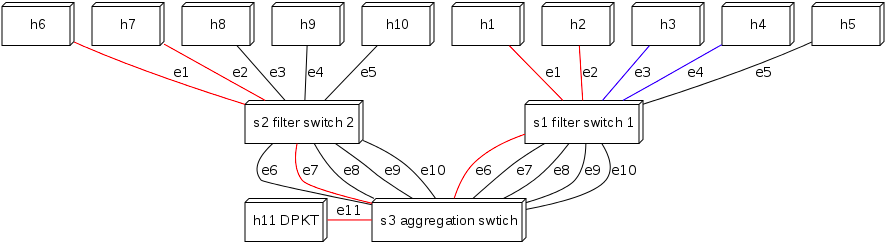
>>>> flow traffic to a 'sniffer' port thru several switches. This is the
>>>> topology,
>>>> http://3.bp.blogspot.com/-BWiv9Kvn_-c/UXQVIT67p0I/AAAAAAAAAOA/8WEdV_TlasY/s1600/Topology_Simulation.png,
>>>>  h1 <> h2, h3 <> h4, h6 <> h7 all have bi-dir flows installed based on
>>>> ports. Then I carbon copy the traffic on h1 to e6 on s1, traffic on h6 to
>>>> e7 on s2, then both traffic redirects to e11 on s3 that connects to an
>>>> analysis host. This is all running fine, the code is here
>>>> https://github.com/ericchou-python/PyTapDEMON/blob/master/ext/echou_pytapFinal.py.
>>>>
>>>>
>>>> But suppose I have a web frontend that allows user to pick and choose
>>>> which source port to start/stop sniff traffic. Currently I take the input
>>>> and put that into a text file, the component reads that file and parse it
>>>> out into the specific mirror ports/destination. Every time I make a
>>>> change, I need to:
>>>>
>>>> 1. write the updated information to that text file.
>>>> 2. restart the pox controller: "./pox.py <myComponent>"
>>>>
>>>> The switch usually registers pretty fast, but there is still a delay. I
>>>> wonder if there is a to dynamically write that information somewhere and
>>>> do an in-place update without restarting the controller?
>>>>
>>>> Thanks in advance for your help, :)
>>>>
>>>> Eric
>>>
>>
>