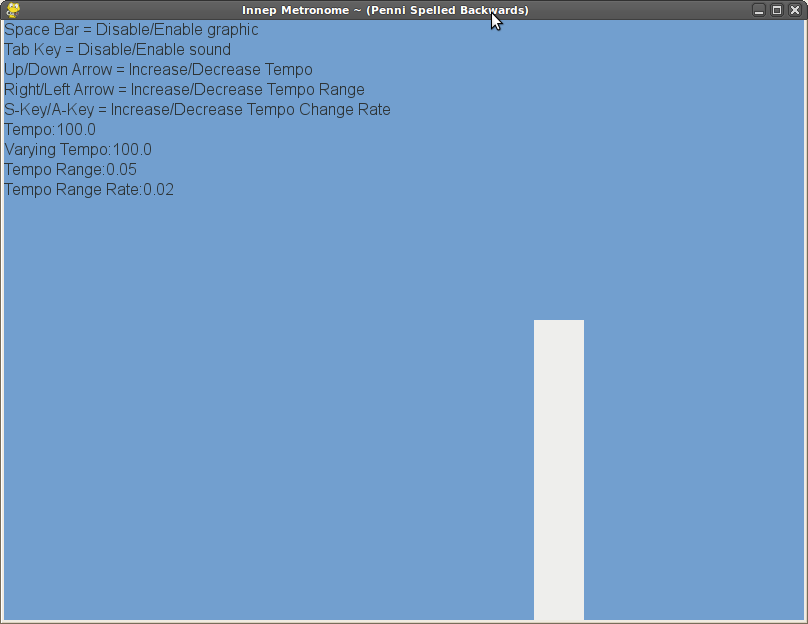
I am working on writing a metronome with Pygame.
http://www.pygame.org/project-Innep+Metronome-1594-2808.html
Here is a screenshot:
http://www.pygame.org/shots/1594.png

I am using "print \a" as the metronome click sound. I am using the
pygame.time.Clock() to move the position of the metronome meter (called x)
left and right across the screen. Occasionally the program will stutter and
the sound with play a little early or late. Is this because I am using
"print \a" instead of playing a wav file with the pygame library? Any
suggestions for improvement?

~Thank you
Brian

here is my code:
############## start innep.py #########
import pygame
from pygame.locals import *
from sys import exit

instr1 = "Up/Down Arrow = Increase/Decrease Tempo"
instr2 = "Right/Left Arrow = Increase/Decrease Tempo Range "
instr3 = "Space Bar = Disable/Enable graphic"
instr4 = "Tab Key = Disable/Enable sound"
instr5 = "S-Key/A-Key = Increase/Decrease Tempo Change Rate"

screenwidth = 800
screenheight = 600
bpm = 100.0
orgbpm = bpm
direction = "right"
tempochange = "increase"
showelements = "all"
tempochangerange = 0.05
tempochangerate = 0.02
green = (138,226,52)
blue = (114,159,207)
black = (46,52,54)
white = (238,238,236)
backgroundcolor = (0,0,255)
mute = False


pygame.init()
SCREEN_SIZE = (screenwidth, screenheight)
linestart = (0,0)
lineend = (0,screenheight)
screen = pygame.display.set_mode(SCREEN_SIZE, RESIZABLE, 32)
pygame.display.set_caption("Innep Metronome ~ (Penni Spelled Backwards)")

font = pygame.font.SysFont("arial",16);

distance_moved = 0.0

clock = pygame.time.Clock()

# X coordinate of our sprite
x = 0.0

# Speed in pixels per second  screenwidth = 1 bps or 60 bpm
#speed = screenwidth * bpm / 60
timer_seconds = 0.0

while True:

for event in pygame.event.get():
if event.type == QUIT:
exit()
if event.type == VIDEORESIZE:
SCREEN_SIZE = event.size
screenwidth,screenheight = SCREEN_SIZE
screen = pygame.display.set_mode(SCREEN_SIZE, RESIZABLE, 32)
if event.type == KEYDOWN:
if event.key == K_UP:
orgbpm = orgbpm + 1.
print "increasing orgbpm"
if event.key == K_DOWN:
orgbpm = orgbpm - 1.
print "decreasing orgbpm"
if event.key == K_LEFT:
tempochangerange = tempochangerange - 1.
print "decreasing tempochangerange"
if event.key == K_RIGHT:
tempochangerange = tempochangerange + 1.
print "increasing tempochangerange"
if event.key == K_a:
tempochangerate = tempochangerate - .01
print "decreasing tempochangerate"
if event.key == K_s:
tempochangerate = tempochangerate + .01
print "increasing tempochangerate"
if event.key == K_SPACE:
if showelements == "all":
showelements = "none"
print "showelements = none"
elif showelements == "none":
showelements = "all"
print "showelements = all"
if event.key == K_TAB:
if mute == False:
mute = True
print "muted"
elif mute == True:
mute = False
print "unmuted"
 speed = screenwidth * (bpm / 60)
time_passed = clock.tick(30)
time_passed_seconds = time_passed / 1000.0
timer_seconds = timer_seconds + time_passed_seconds

if x >= screenwidth:
if mute == False:
print "\a"
direction = "left"
if x < 0:
if mute == False:
print "\a"
direction = "right"
 if direction == "left":
distance_moved = time_passed_seconds * speed * -1
backgroundcolor = green
linestart = (x,0)
lineend = (x,(screenheight/2))
 if direction == "right":
distance_moved = time_passed_seconds * speed * 1
backgroundcolor = blue
linestart = (x,(screenheight/2))
lineend = (x,screenheight)

if bpm > (orgbpm + tempochangerange):
tempochange = "decrease"
if bpm < (orgbpm - tempochangerange):
tempochange = "increase"
if bpm == orgbpm:
tempochange = "nochange"
 if tempochange == "increase":
bpm = bpm + tempochangerate
 if tempochange == "decrease":
bpm = bpm - tempochangerate
 x = x + distance_moved

if showelements == "all":
screen.fill(backgroundcolor)
screen.blit(font.render(instr3,True,black),(0,0) )
screen.blit(font.render(instr4,True,black),(0,20) )
screen.blit(font.render(instr1,True,black),(0,40) )
screen.blit(font.render(instr2,True,black),(0,60) )
screen.blit(font.render(instr5,True,black),(0,80) )
screen.blit(font.render("Tempo:"+str(orgbpm),True,black),(0,100) )
screen.blit(font.render("Varying Tempo:"+str(bpm),True,black),(0,120) )
screen.blit(font.render("Tempo Range:" + \
 str(tempochangerange),True,black),(0,140) )
screen.blit(font.render("Tempo Range Rate:" + \
 str(tempochangerate),True,black),(0,160) )

pygame.draw.line(screen, white, linestart, lineend, 50)
pygame.display.update()

############### end innep.py  #########