System: Ubuntu 8.10, Python 2.5.2, PyQt 4.4.3
Book "Rapid GUI Programming with Python and Qt", example from chap13
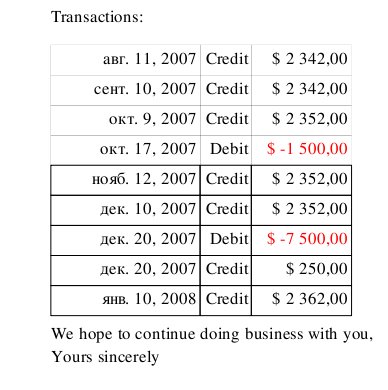
Faded cells in first table after printing to pdf (before changing pen
color).
See screenshot in attachment or here:
http://img404.imageshack.us/done.php?l=img404/1899/75073848lv9.jpg
Everything ok after adding yet another painter.setPen(Qt.color):
<...>
y += serifLineHeight
if balance < 0:
    painter.setPen(Qt.red)
    text = "Please remit the amount owing immediately."
else:
    text = ("We are delighted to have done business "
                        "with you.")
painter.drawText(x, y, text)
painter.setPen(Qt.red)             #added
painter.setPen(Qt.black)
y += int(serifLineHeight * 1.5)
painter.drawText(x, y, "Transactions:")
y += serifLineHeight
option = QTextOption(Qt.AlignRight|Qt.AlignVCenter)
for date, amount in statement.transactions:
<...>

mysticism?

Denis


> Message: 2
> Date: Thu, 8 Jan 2009 20:59:35 +0300
> From: "Denis Konchekov" <[email protected]>
> Subject: [PyQt] QPainter bug(?) in printing.pyw example from PyQt book
> To: [email protected]
> Message-ID:
>        <[email protected]>
> Content-Type: text/plain; charset="utf-8"
>
> Skipped content of type multipart/alternative-------------- next part
> --------------
> A non-text attachment was scrubbed...
> Name: 1.jpg
> Type: image/jpeg
> Size: 33943 bytes
> Desc: not available
> Url :
> http://www.riverbankcomputing.com/pipermail/pyqt/attachments/20090108/ca38076d/1.jpg
>
> ------------------------------
>
> _______________________________________________
> PyQt mailing list
> [email protected]
> http://www.riverbankcomputing.com/mailman/listinfo/pyqt
>
> End of PyQt Digest, Vol 54, Issue 10
> ************************************
>
_______________________________________________
PyQt mailing list    [email protected]
http://www.riverbankcomputing.com/mailman/listinfo/pyqt