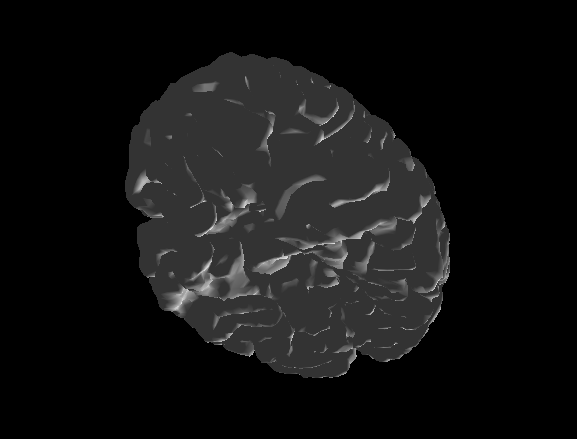
Hi Luke,

I'm currently trying to render an STL object in a glViewWidget, and
everything seems to be working fine except for the lighting. All of the
shaders except "shaded" are fine. When I use the "shaded" shader, the
outside of my object is very dark and the inside is well-lit. It's almost
as if the light is inside the object (no matter how I scale the object
either before or after adding the item to the glViewWidget). I would like
to add some lighting functionality to this shader, but I am not very
familiar with modern OpenGL (I've never used a shader). I've used older
OpenGL (ie. glBegin and glEnd) and was able to add lights, and I was hoping
that you would be able either help me fix the current lighting situation or
add my own lighting tools. When I run the shaders example, the lighting
appears to be working fine on the "shaded" object (the light moves with the
camera, correct?), so I don't know why it isn't working for my object. Is
there something simple I could do to ensure that the outside of my object
receives more light? Below are some screenshots. The first two are view
from the outside (very dark and difficult to see details) and the third is
a view from the inside (well-lit)
<https://lh3.googleusercontent.com/-aPzkwuV7MTU/V7inDfcWJHI/AAAAAAAAXS0/3Kpi-OzJckMZr_5kUs03DBYOlqWg5JgeQCLcB/s1600/Screen%2BShot%2B2016-08-20%2Bat%2B11.51.39%2BAM.png>

<https://lh3.googleusercontent.com/-RQIax14L-Fs/V7im16a5i6I/AAAAAAAAXSw/nGOSuC9xnfop_uvdacPH4UvZF0TiYfeHQCLcB/s1600/Screen%2BShot%2B2016-08-20%2Bat%2B11.51.30%2BAM.png>

<https://lh3.googleusercontent.com/-vkTPIggprf8/V7inKEDFFlI/AAAAAAAAXS4/bFtFjv7jML4E0xAzhVnjrzwMA0vvSoquwCLcB/s1600/Screen%2BShot%2B2016-08-20%2Bat%2B11.51.48%2BAM.png>

I would appreciate any advice, and I would be open to learning and adding
more lighting/shading tools with some help (where to start, what functions
to modify, etc.).

Thanks,

Barrett


On Wednesday, March 20, 2013 at 7:44:50 AM UTC-7, Luke Campagnola wrote:
>
>
>
> On Wed, Mar 20, 2013 at 9:37 AM, <[email protected] <javascript:>>
> wrote:
>
>> Hi,
>>
>> I am trying to use GLMeshItem for displaying a 3d object based on
>> vertexes and triangles. I have difficultly to define shading on the object.
>> I would like to use for istance phong shading but can not find any
>> reference to this. In addition, where do I define a light source for this
>> scene? Any help or clear examples would be appreciated.
>>
>> Hi,
> There is no lighting in pyqtgraph at present; the 3D system is still
> pretty rudimentary. If you run the 'shaders' example, though, you can see
> some of the surface shaders that are currently available. One of these does
> a very basic lighting scheme with fixed light location. It wouldn't be too
> difficult to modify the shader to use a variable light location. There are
> also many examples of phong shaders implemented in GLSL on the web (here
> one: http://www.ozone3d.net/tutorials/glsl_lighting_phong_p2.php). If you
> would like to try to implement something like this, I'd be happy to walk
> you through the shader system in pyqtgraph.
>
> Luke
>
>
>

--
You received this message because you are subscribed to the Google Groups
"pyqtgraph" group.
To unsubscribe from this group and stop receiving emails from it, send an email
to [email protected].
To view this discussion on the web visit
https://groups.google.com/d/msgid/pyqtgraph/ba6c4b48-d403-4abc-83dc-acb009603e29%40googlegroups.com.
For more options, visit https://groups.google.com/d/optout.