Hi everybody,

*TL; DR I need to figure out how to add a pan-/zoomable globe to a
GLScatterPlot without outside packages*
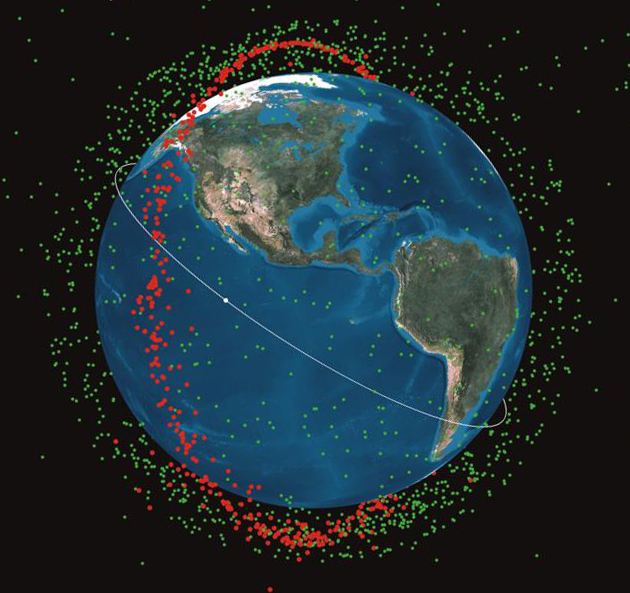
I'm looking to make a 3d scatter plot overlaid onto a globe that plots the
positions of overhead satellites as points in the scatter plot.
Specifically I want to be able to pan around the globe in a google
earth-esque manner and have the satellites update in the correct locations.
Packages like basemap can handle this type of goal without too much
difficulty, but I am restricted in the packages that I'm allowed to install
because ~reasons~, and it was a hassle just to get pyqtgraph allowed, so
I'd like to do it with just the built in 3d plotting features. It should
look something like this
<http://www.compadre.org/Informal/images/features/satelliteChinalarge-2-26-08.jpg?w=240>,

but probably be zoomed in a bit closer. Think view from the ISS. Also,
it'll only have a few satellites, but it will show a trail of points for
where it has been.

My thought was to find some type of 3d mesh or surface of the earth, plot
that as a sphere of some fixed size, add dots where the satellites are, do
some type of fancy camera angling to make it look right, and then possibly
adjust the left/right/middle mouse drag events. I'm most confused about
where I would get the earth skin/mesh/surface/whatever and how I add that
onto a scatter plot. Performance issues are also something of a concern. I
could refresh the plot fast enough with a buttload of points (~1 million)
before I noticed any amount of slowdown, but I don't know how having a
globe in there will affect performance. Any help would be greatly
appreciated.

Thanks!
James

--
You received this message because you are subscribed to the Google Groups
"pyqtgraph" group.
To unsubscribe from this group and stop receiving emails from it, send an email
to [email protected].
To view this discussion on the web visit
https://groups.google.com/d/msgid/pyqtgraph/02033ecb-e8be-47f4-b7ae-2e57115c2c6a%40googlegroups.com.
For more options, visit https://groups.google.com/d/optout.