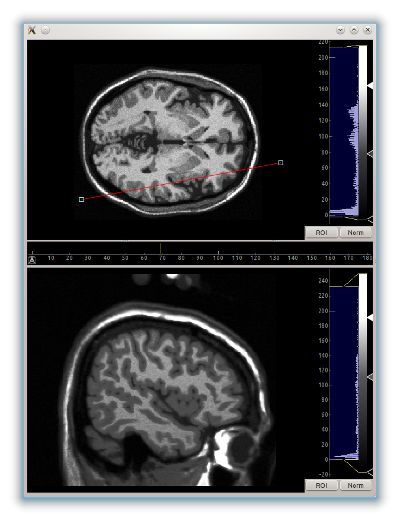
Here's how I'd probably do it. The ImageView is a subclass of QWidget, so
using them in regular Qt layouts works something like this:
import pyqtgraph as pg
from pyqtgraph.Qt import QtGui
import numpy as np

app = pg.mkQApp()

win = QtGui.QMainWindow()

# container widget with a layout to add QWidgets to
cw = QtGui.QWidget()
win.setCentralWidget(cw)
layout = QtGui.QVBoxLayout()
cw.setLayout(layout)

im1 = pg.ImageView()
im1.setImage(np.random.rand(10, 10))
layout.addWidget(im1)

im2 = pg.ImageView()
im2.setImage(np.random.rand(100, 100))
layout.addWidget(im2)

win.show()
app.exec_()

There's a bit of documentation on this here that might bring up some other
topics to look into: http://pyqtgraph.org/documentation/qtcrashcourse.html

On Saturday, April 4, 2020 at 11:17:25 AM UTC-7, Ruben Padial wrote:
>
>
> Hello,
>
> I'm new in python and Qt. I'm working in aproject for plotting 2 medical
> images at the same time in real time (~10fps). For this goal i use ImageVew
> since I ned plot the 2 image with colormaps. I'm wondering if it is
> possible to have both images in the same window.
> I found an example similar to my westion in pyqtprah website but I connot
> fin the code.
>
> <http://www.pyqtgraph.org/images/data_slicing_sm.png>
>
>
> Do you hae any suggestions? Thank you in advance
>

--
You received this message because you are subscribed to the Google Groups
"pyqtgraph" group.
To unsubscribe from this group and stop receiving emails from it, send an email
to [email protected].
To view this discussion on the web visit
https://groups.google.com/d/msgid/pyqtgraph/a0c9a82e-1007-4134-92d5-269809ff6ee6%40googlegroups.com.