Hey,

I am sorry you're having such a difficult time with my application.
Especially the crashing is something that is most often happening in the
MediaBackend and thus out of my control ( or at least I have not been
able to find a solution yet ).
So here is what you can try first
Go to [ Tools -> Setup -> select media engine ] and try either
QMPlayerWidget of KXineWidget ( whichever is not currently used. If you
only see QMplayerWidget, then this indicates that QDVDAuthor was
compiled without Xine support. Usually choosing QMPlayerWidget gives the
most accurate results.

The you might want to start a project from scratch. The idea behind both
[Add organize Videos ...], and [Add organize Images ...]  is to group
the source material together. THat means you should create groups on the
[groups] tab, and then drag the sources into the different groups.

if you do not need groups ( that is if you only have a few videos ), you
can simply drag them all in the default group.

Another way if you have few video files is to simply click on the white
space on the [All sources] tab which will allow you to select one video
file at a time.

Once you have selected your videos they are either displayed with a blue
background, which means they do not need to be transcoded or they show
up purple, in which case QDVDAuthor will transcode them for you into the
proper video format. Please note, sometimes you need to retranscode
mpeg2 videos to add VOBs to it, which is required for DVDs, so don't be
too surprised if QDVDAuthor wants to transcode your files.

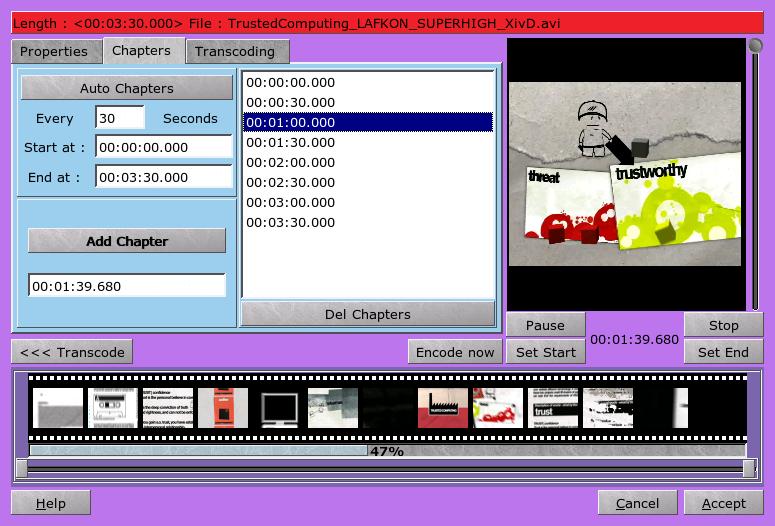
The chapter import filter is very basic and understands only timestamps
in the following format ( one per line )
  // 1 ) 0,0:0:14.0,0:0:22.0
  // 2 ) 00:00:00:00  -> DVDLab  style
  // 3 ) 00:00:00.000 -> Default style
so if you can get the chapters into this format you are good to go.


Oh, and you don't have to create the V IDEO_TS, and AUDIO_TS folders.
QDVDAuthor does that for you.

Please let us know if you could get any closer to your DVD.

Varol :)
Ps. once you learn QDVDAuthor you should be able to create DVDs in a
matter of minutes instead of hours.


On 10/03/2010 10:09 AM, Gary Dale wrote:
> On 03/10/10 12:22 AM, Felix Miata wrote:
>
>> On 2010/10/02 19:51 (GMT-0700) Z F composed:
>>
>>
>>
>>> Felix Miata wrote:
>>>
>>>
>>
>>
>>>> I looked on http://qdvdauthor.sourceforge.net/ and could not find this
>>>> subject. I tried the search box on
>>>> http://sourceforge.net/mailarchive/forum.php?forum_name=qdvdauthor-users
>>>> but it seemed interested in finding results only elsewhere on
>>>> the web.
>>>>
>>>>
>>
>>
>>>> I figured out how to find frames to set as chapter starts using dvbcut. Can
>>>> these be used by qdvdauthor somehow? If so, how? If not, is there some
>>>> other
>>>> method using qdvdauthor to set chapters in logical places instead of at
>>>> fixed
>>>> intervals?
>>>>
>>>>
>>
>>
>>> Once you have loaded the video file, right click on it and
>>> select properties and a properties window with open
>>> In the properties you will see the "chapters" tab.
>>> You can either make automatic chapters, set the chapters
>>> manually (by setting the time of the chapter and pressing
>>> the "add" button) or you can load the chapter times from a file
>>> using "import"
>>>
>>>
>>
>>
>>> See this image:
>>> http://qdvdauthor.sourceforge.net/images/dialogmovie_2.jpg
>>>
>>>
>> I can't even get a video loaded. First of all, I've been trying too many
>> different ways to make some progress and getting pointed in too many
>> directions to keep straight on a single path that might lead to success. I've
>> installed virtually every GUI tool in openSUSE (11.2) repos (Bombono, DeVeDe,
>> dvdrip, dvbcut, MPEG Parser, ProjectX, QDVDAuthor, Tovid), and each has its
>> own vexing obstacles to success.
>>
>> I've created a .mpg file using the first dvbcut export option, and I've
>> created a .mpg dir containing an empty AUDIO_TS dir and a VIDEO_TS dir
>> containing 7 files.
>>
>> I've tried qdvdauthor's wizard, which either crashed, or in source selection
>> ignored the selection of the .mpg file, or the selection of the contents of
>> VIDEO_TS. I tried manually, but got similarly vexing results.
>>
>> After each click that opens another window, I have to make the window bigger,
>> then move the pane divider bar to the right so that the left pane is wide
>> enough to not have a horizontal scrollbar. The window size and divider
>> position is never remembered.
>>
>> Both Kaffeine&  my settop box player play the .mpg created by dvbcut, just
>> without any of the chapters I selected with dvbcut. Dvbcut made two different
>> types of chapter lists, one contained in XML that looks like rows of frame
>> numbers (e.g.<chapter picture="64573" />), the other in the success report
>> (not written to any file), rows of times, then a simple XML file.
>>
>> Is there any hope for me?
>>
>>
> The simple answer is no.  :)
>
>
> It's been a while since I've used qdvdauthor, because my distro doesn't
> include it and it doesn't work easily with the libraries the distro
> uses. However, the advice given earlier on how to use it works.
>
> Stop trying so hard. Forget abut dvbcut and the other tools and just use
> qdvdauthor to separate your video into chapters. Also, your .mpg dir, if
> that is the name, might be causing some problems because any file or
> directory starting with a . is hidden. I used to call it DVD or the
> DVD's name - the latter works better if you are working on multiple
> projects.
>
> If your original video file is in some weird format or has errors in it,
> you may want to try avidemux to convert it to a progressive scan DVD
> compatible format first. This removes the need for qdvdauthor to do it
> later. Avidemux is really easy to use and gives you lots of options for
> both sound and video output.
>
>
>
>
>
>
> ------------------------------------------------------------------------------
> Start uncovering the many advantages of virtual appliances
> and start using them to simplify application deployment and
> accelerate your shift to cloud computing.
> http://p.sf.net/sfu/novell-sfdev2dev
> _______________________________________________
> QDVDAuthor-users mailing list
> [email protected]
> https://lists.sourceforge.net/lists/listinfo/qdvdauthor-users
>


------------------------------------------------------------------------------
Start uncovering the many advantages of virtual appliances
and start using them to simplify application deployment and
accelerate your shift to cloud computing.
http://p.sf.net/sfu/novell-sfdev2dev
_______________________________________________
QDVDAuthor-users mailing list
[email protected]
https://lists.sourceforge.net/lists/listinfo/qdvdauthor-users