Hi List,

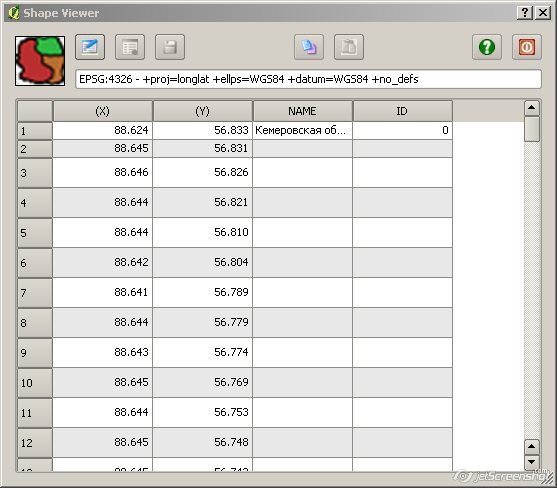
Following suggestions from Maxim and Joe a new version (0.0.4) of the above
plugin is available in the QGIS contributed repo (still under Experimental).
The new features are listed in [1].
Enjoy and comments welcome.
Benoit

[1] http://www.bc-consult.com/free/bccshpv.html#hist


> -----Original Message-----
> From: [email protected]
> [mailto:[email protected]]on Behalf Of Benoit de
> Cabissole
> Sent: Thursday, 26 August 2010 20:26
> To: Maxim Dubinin
> Cc: [email protected]
> Subject: RE: [Qgis-user] RE: Shapefile structure viewer and editor
> plugin
>
>
> Maxim,
>
> Thanks for the suggestions.
> I will work toward implementing them in the next couple of weeks,
> depending on other priorities.
>
> I've also noticed the row height problem, I'm using default Qt
> settings, so, some tweaking is required...
>
> Cheers,
> Benoit
>
> > -----Original Message-----
> > From: Maxim Dubinin [mailto:[email protected]]
> > Sent: Thursday, 26 August 2010 19:16
> > To: Benoit de Cabissole
> > Cc: [email protected]
> > Subject: Re: [Qgis-user] RE: Shapefile structure viewer and editor
> > plugin
> >
> >
> > Benoit,
> >
> > thanks for very useful plugin, I've started developing something like
> > this sometime ago, glad I didn't go very far! My idea was to replicate
> > Arcview GIS 'shape properties' tool that I missed a lot. Let me give
> > several comment to consider adding to your plugin to make it even
> > more useful (IMHO of course):
> >
> > 1. Please consider working (or showing) only selected feature(s).
> > It is not of much
> > use if there are many polygons with many vertexes, you have to scroll
> > up&down a lot to find needed feature. I can still see that seeing
> > everythig is useful when you're working with empty layer (adding
> > features), but a switch 'show only selected feature(s)' would these
> > both suggestions.
> > 2. Is it possible to shrink row height? May be its Windows, but mine
> > are extra inflated occupying valuable space. Check this
> > screenshot [1] (first two rows I shrank
> > manually)
> > 3. It would be really nice if node selected in the table would
> > highlight in map canvas, thus allowing us to track were are they
> > exactly.
> > 4. I think 'close' button and little graphic on the left are
> > unnecessary. I'd add current layer name and its type right in the window
> > title.
> > 5. It would be nice to able to delete a node(s) as well.
> > 6. Please consider moving 'start|stop editing' functionality to QGIS
> > itself, so that you'd have to start and stop editing in QGIS, I think
> > it will be more straightforward.
> >
> > Thanks again,
> > Maxim
> >
> >
> > [1] http://gis-lab.info/images/screenshots/20100826-e65-51kb.jpg
> >
> > Вы писали 26 августа 2010 г., 3:49:38:
> >
> > BdC> Hi Alister, André,
> >
> > BdC> Thanks for the response to the plugin.
> >
> > BdC> Alister, a new version (0.0.2) of the plugin is available
> at the same
> > BdC> address [1] with your CRS suggestion implemented.
> >
> > BdC> [1]  http://www.bc-consult.com/free/bccshpv.html
> >
> > BdC> Cheers,
> > BdC> Benoit
> >
> >
> > >> -----Original Message-----
> > >> From: [email protected]
> > >> [mailto:[email protected]]on Behalf Of Alister Hood
> > >> Sent: Thursday, 26 August 2010 06:03
> > >> To: [email protected]
> > >> Subject: [Qgis-user] RE: Shapefile structure viewer and editor plugin
> > >>
> > >>
> > >> Thanks for this Benoit; it is fantastic.
> > >> We often need to extract the coordinates (and attributes) from a
> > >> point shapefile, and put them in a spreadsheet.  This was one of
> > >> two things I still did in a proprietary GIS, but your plugin
> > >> gives me a much quicker and more straightforward way of doing it.
> > >> Have you considered displaying the CRS at the top?
> > >>
> > >> Regards,
> > >> Alister
> > >>
> > >>
> > >> 2010/8/24 Benoit de Cabissole <[email protected]>
> > >>
> > >> >  Hello List,
> > >> >
> > >> > I've created a simple plugin that allows to view the structure of a
> > >> > shapefile (X-, Y-coords alongside its attributes) and while at
> > >> it I've also
> > >> > added the capability to edit the geometry and attributes and
> > >> save back to
> > >> > the shapefile.
> > >> >
> > >> > A corollary is that if you want to add a point by typing its
> > >> coords you can
> > >> > do it with the plugin (as André aka ALT SHN has suggested).
> > You can even
> > >> > create a new shapefile in QGIS and use the plugin to type in
> > coords and
> > >> > attributes or paste them from the clipboard.
> > >> >
> > >> > Points, lines and polygons shapefiles can be manipulated.
> > >> >
> > >> > BUT, I feel it is a quite dangerous plugin to release in a
> > public repo
> > >> > because of the potential damages bad edits can do on a shapefile!
> > >> >
> > >> > I would thus be very grateful if the most intrepid amongst you
> > >> could test
> > >> > it and give comments on its usefulness...
> > >> >
> > >> > The plugin is available at the address below:
> > >> > http://www.bc-consult.com/free/bccshpv.html
> > >> >
> > >> > Cheers,
> > >> > Benoit
> > >> >
> > >> >
> > >> > _______________________________________________
> > >> > Qgis-user mailing list
> > >> > [email protected]
> > >> > http://lists.osgeo.org/mailman/listinfo/qgis-user
> > >> >
> > >> >
> > >> _______________________________________________
> > >> Qgis-user mailing list
> > >> [email protected]
> > >> http://lists.osgeo.org/mailman/listinfo/qgis-user
> >
> > BdC> _______________________________________________
> > BdC> Qgis-user mailing list
> > BdC> [email protected]
> > BdC> http://lists.osgeo.org/mailman/listinfo/qgis-user
> >
>
> _______________________________________________
> Qgis-user mailing list
> [email protected]
> http://lists.osgeo.org/mailman/listinfo/qgis-user
>

_______________________________________________
Qgis-user mailing list
[email protected]
http://lists.osgeo.org/mailman/listinfo/qgis-user