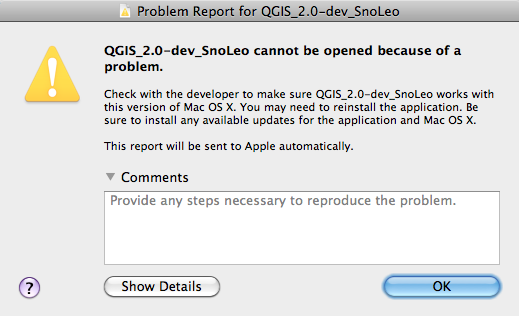
Reinstalling GDAL 1.10 and then QGIS 2.0 and then doing a cold reboot DID fix
the problem. I can now correctly use the development version on Mac OS X 10.6.8.
Thank you all


-----
Julian Bogdani
[email protected]
http://bradypus.net


On 6 Aug 2013, at 21:19 , Larry Shaffer wrote:

> Hi,
>
> I had no issues doing a fresh install of the latest nightly on Mac 10.7.5.
> QGIS had never been installed on that Mac before. Make sure you have the
> latest Kyngchaos.com frameworks installed (minimum for QGIS):
>
> GSL_Framework-1.15-2.dmg
> GDAL_Complete-1.10_2013-07-19.dmg
>
> If you want to use the GRASS tools inside QGIS (still uses GDAL_Complete-1.9):
>
> GDAL_Complete-1.9_2013-03-01.dmg
> FreeType_Framework-2.4.10-1.dmg
> cairo_Framework-1.12.2-1.dmg
> PIL-1.1.7-4.dmg
> GRASS-6.4.2-5-Snow.dmg
>
> GDAL_Complete-1.9 and 1.10 can be installed side-by-side without issue.
>
> If you still get an error please post details.
>
> Regards,
>
> Larry Shaffer
> Dakota Cartography
> Black Hills, South Dakota
>
>
> On Tue, Aug 6, 2013 at 12:30 PM, Larry Shaffer <[email protected]> wrote:
> Hi Julian and Sergio,
>
> On Tue, Aug 6, 2013 at 9:04 AM, Sergio Zárate <[email protected]> wrote:
> Hi all,
>
> had same problem today in Mountain Lion. Seems to be a GDAL issue. Will try
> to update GDAL an see if it solves the problem.
>
> If the dialog, noted by Julian, pops up again, please click the Show Details
> button and send the results to me directly (or link to a cleaned version
> here). Contacting me directly is the best means for addressing an issue with
> the nightly build(s), since I manage them and the Macs they are built on.
>
> I will test the builds on the machines today and see if I can reproduce the
> issue.
>
> I have noticed that OS X Qgis has been somewhat orphaned. In the past few
> months I have asked for solutions to problems but did not get any answers
> (had issues with Print Composer not displaying/printing GRASS rasters in
> Master).
>
> Sergio, QGIS for OS X is not at all orphaned. In fact, it has had lots of
> active development for the platform in the past 1.5 years. It just so happens
> that the current development cycle, 1.8 -> 2.0, is taking longer than
> previous version updates.
>
> Concerning your reported issues, it may be that your issues are difficult to
> fix, or maybe not even related to the Mac build. If you note which issues you
> are referring to, I can give you an opinion on maybe why they have not been
> addressed yet.
>
> Regards,
>
> Larry Shaffer
> Dakota Cartography
> Black Hills, South Dakota
>
>
> Looking forward to the release of Master.
>  Regards
>
> Sergio Zarate
>
> 2013/8/6 <[email protected]>
> Send Qgis-user mailing list submissions to
>         [email protected]
>
> To subscribe or unsubscribe via the World Wide Web, visit
>         http://lists.osgeo.org/mailman/listinfo/qgis-user
> or, via email, send a message with subject or body 'help' to
>         [email protected]
>
> You can reach the person managing the list at
>         [email protected]
>
> When replying, please edit your Subject line so it is more specific
> than "Re: Contents of Qgis-user digest..."
>
>
> Today's Topics:
>
>    1. Problems installing nightly build on Mac OS X 10.6.8      (Snow
>       Leopard) (Julian Bogdani)
>
>
> ----------------------------------------------------------------------
>
> Message: 1
> Date: Tue, 6 Aug 2013 16:28:18 +0200
> From: Julian Bogdani <[email protected]>
> To: qgis-user <[email protected]>
> Subject: [Qgis-user] Problems installing nightly build on Mac OS X
>         10.6.8  (Snow Leopard)
> Message-ID: <[email protected]>
> Content-Type: text/plain; charset="us-ascii"
>
> Hello all,
> I'm having problems getting QGIS nightly build run on MacOS X 10.6.8 (Snow
> Leopard).
> I downloaded the ZIP file qgis-mac-nightly_snoleo.zip from
> http://qgis.dakotacarto.com/ and installed it in the Application folder, but
> when I try to run it I get the following error: QGIS_2.0-dev_SnoLeo cannot be
> opened because of a problem. Check with the developer to make sure
> QGIS_2.0-dev_SnoLeo works with this version of Mac OS X.
> I had a old version of the 2.0 branch correctly running, but I erased it to
> install the most recent development version.
> I installed, removed and reinstalled everything10 days ago and today but I'm
> having the same problem.
> Is this a known issue? How can i get a working of the development build?
>
> Thank you
>
>
> -----
> Julian Bogdani
> [email protected]
> http://bradypus.net
>
>
>
>
> -------------- next part --------------
> A non-text attachment was scrubbed...
> Name: Screen shot 2013-08-06 at 16.16.09 .png
> Type: image/png
> Size: 49128 bytes
> Desc: not available
> URL:
> <http://lists.osgeo.org/pipermail/qgis-user/attachments/20130806/045c373c/attachment.png>
>
> ------------------------------
>
> _______________________________________________
> Qgis-user mailing list
> [email protected]
> http://lists.osgeo.org/mailman/listinfo/qgis-user
>
>
> End of Qgis-user Digest, Vol 90, Issue 13
> *****************************************
>
>
>
> --
> Dr. Sergio Zárate Pedroche
> José María Arroyo 228
> Col. 22 de octubre
> Morelia, Michoacán
> C.P. 58341
> México
> Teléfono: (443) 352-5307
> Celular: (443)  438-6212
> ...................................................................................................
> http://independent.academia.edu/SergioZ%C3%A1ratePedroche
>
> _______________________________________________
> Qgis-user mailing list
> [email protected]
> http://lists.osgeo.org/mailman/listinfo/qgis-user
>
>
>
> _______________________________________________
> Qgis-user mailing list
> [email protected]
> http://lists.osgeo.org/mailman/listinfo/qgis-user
_______________________________________________
Qgis-user mailing list
[email protected]
http://lists.osgeo.org/mailman/listinfo/qgis-user