Hi I guess you want to add non-geometric data to a already existing qgis data. In that case you will need to Join Attributes. You can find this option in the Vector menu. The prerequisite for this is that you should have one column common to both data tables, such as the ID column. This will ensure that the attributes of corresponding IDs will get joined.
Hope this helps.

Abhijit

  Original Message
From: [email protected]
Sent: Friday 1 May 2015 19:00
To: [email protected]
Reply To: [email protected]
Subject: Qgis-user Digest, Vol 111, Issue 1

Send Qgis-user mailing list submissions to
[email protected]

To subscribe or unsubscribe via the World Wide Web, visit
http://lists.osgeo.org/mailman/listinfo/qgis-user
or, via email, send a message with subject or body 'help' to
[email protected]

You can reach the person managing the list at
[email protected]

When replying, please edit your Subject line so it is more specific
than "Re: Contents of Qgis-user digest..."


Today's Topics:

1. Add mssql non-geometric tables (Peter Sch?rch)
2. Re: [QGIS-UX] QGIS fonts in print composer (Anita Graser)
3. Field expression for file name? ([email protected])
4. Problem with loading layers from a project (James Keener)
5. How to get a subset of polygons crossed by lines?
(Patrick Giraudoux)
6. Composite satellite images (Susan Iremonger)


----------------------------------------------------------------------

Message: 1
Date: Thu, 30 Apr 2015 18:55:43 +0000
From: Peter Sch?rch <[email protected]>
To: "[email protected]" <[email protected]>
Subject: [Qgis-user] Add mssql non-geometric tables
Message-ID: <[email protected]>
Content-Type: text/plain; charset="utf-8"

Hi
Does anybody know how to add a non-geometric table from an mssql database to a
qgis project?
Do I need to add it in the table "geometry_columns"? If yes what would be the
appropriate attribute values there?

Thanks
Peter Sch?rch
--
Meier und Partner AG
Freiestrasse 26<x-apple-data-detectors://1/0>
8570 Weinfelden<x-apple-data-detectors://1/0>
www.meierpartner.ch<http://www.meierpartner.ch/>
T +41 71 626 5115<tel:+41%2071%20626%205115>
-------------- next part --------------
An HTML attachment was scrubbed...
URL:
<http://lists.osgeo.org/pipermail/qgis-user/attachments/20150430/f0318f2f/attachment-0001.html>

------------------------------

Message: 2
Date: Thu, 30 Apr 2015 21:48:35 +0200
From: Anita Graser <[email protected]>
To: Sarah Van Vliet <[email protected]>
Cc: "[email protected]" <[email protected]>,        qgis-user
<[email protected]>
Subject: Re: [Qgis-user] [QGIS-UX] QGIS fonts in print composer
Message-ID:
<caffv8fjtsawic7ptsfj+w7j+jgcm3tdusqvb6-5+tcm64u7...@mail.gmail.com>
Content-Type: text/plain; charset="utf-8"

Hi Sarah,
I'm afraid this does not seem like a question for the usability mailing
list. Please use the user mailing list for problems relating to the use of
certain QGIS features. Also, can you provide the font you mentioned for
debugging purposes?
Best wishes,
Anita


On Thu, Apr 30, 2015 at 8:25 PM, Sarah Van Vliet <[email protected]> wrote:

> Hi qgis community,
>
> My team and I are having trouble with fonts in qgis print composer. we all
> have various versions as we all joined at different times. ( i use 2.4.0,
> while one other colleague uses 2.6.1, etc. ). We use a font set called Clan
> Pro, and only some of the fonts work at any given font size. What's more,
> which fonts work and don't seems to vary amongst all of us!
>
> does anybody know a solution? is there some version of qgis where fonts
> are better functioning?
>
> Thanks,
> Sarah
>
> _______________________________________________
> QGIS-UX mailing list
> [email protected]
> http://lists.osgeo.org/cgi-bin/mailman/listinfo/qgis-ux
>
>
-------------- next part --------------
An HTML attachment was scrubbed...
URL:
<http://lists.osgeo.org/pipermail/qgis-user/attachments/20150430/31861af5/attachment-0001.html>

------------------------------

Message: 3
Date: Thu, 30 Apr 2015 16:28:08 -0400
From: "[email protected]" <[email protected]>
To: <[email protected]>
Subject: [Qgis-user] Field expression for file name?
Message-ID: <[email protected]>
Content-Type: text/plain; charset="utf-8"; format=flowed

Hi,
I am building an index of a LiDar project (using .las files). I can use
lasboundary.exe to create .shp boundary polygon for each individual file
(using the merge option will only create one big polygon). I can then
use "vector/data management tools/merge the shapefile to one" to make
one file.

The problem is I need a field (the file names) for each polygon. Is
there an field expression for this?

This field is not created by lasboundary or my "merge the shapefile to
one". Perhaps I can use the "Advanced Python field calculator" in batch
mode in the processing plugin but I don't know how to return the files
names. Can someone help or give my and idea of how to proceed?

Thanks in advance
Nicolas


------------------------------

Message: 4
Date: Fri, 01 May 2015 01:34:14 -0400
From: James Keener <[email protected]>
To: [email protected]
Subject: [Qgis-user] Problem with loading layers from a project
Message-ID: <[email protected]>
Content-Type: text/plain; charset="utf-8"

I'm trying to load a project via python (original project and the single
shp file (the extension should be .zip), along with the project after
saving, are attached). When I load the project, there are no layers,
and if I write the project out, it doesn't contain the original layer
either.

Python transcript:
> jim@lilith {+81% } Fri 2015-05-01 01:16:00 0
> /home/jim/Desktop/test
> % export PYTHONPATH=/usr/share/qgis/python
> jim@lilith {+82% } Fri 2015-05-01 01:16:02 0
> /home/jim/Desktop/test
> % python
> Python 2.7.6 (default, Mar 22 2014, 22:59:56)
> [GCC 4.8.2] on linux2
> Type "help", "copyright", "credits" or "license" for more information.
>>>> from qgis.core import QgsProject
>>>> from PyQt4.QtCore import QFileInfo
>>>> project = QgsProject.instance()
>>>> project.read(QFileInfo('test.qgs'))
> True
>>>> map(lambda i: i.name(), project.layerTreeRoot().children())
> []
>>>> project.write()
> True

Before and After sizes:
> jim@lilith {+81% } Fri 2015-05-01 01:15:14 0
> /home/jim/Desktop/test
> % ls -l test.qgs
> -rw-rw-r-- 1 jim jim 14222 May 1 01:15 test.qgs
> jim@lilith {+82% } Fri 2015-05-01 01:16:20 0
> /home/jim/Desktop/test
> % ls -l test.qgs
> -rw-rw-r-- 1 jim jim 1654 May 1 01:17 test.qgs

I'm sure (or at least hope!) that I'm just doing something little (and
non-obvious?) wrong.

As an aside: this is a condensed test. If you add a group into the
project, the group will show up in the layer list and will be written
back out, but no other layers will be found.

Thank you,
Jim

PS:

contents of PYTHONPATH, in case I'm not using the right location

> jim@lilith {+90% } Fri 2015-05-01 01:28:05 0
> /home/jim/Desktop/test
> % ls -l $PYTHONPATH
> total 20
> drwxr-xr-x 2 root root 4096 Feb 26 10:46 console/
> drwxr-xr-x 6 root root 4096 Feb 26 10:46 owslib/
> drwxr-xr-x 7 root root 4096 Aug 20 2014 plugins/
> drwxr-xr-x 2 root root 4096 Feb 26 10:46 pyplugin_installer/
> drwxr-xr-x 2 root root 4096 Feb 26 10:46 qsci_apis/


I had seen somewhere about doing QgsApplication.initQgis(), so I gave
that a shot:

> % python
> Python 2.7.6 (default, Mar 22 2014, 22:59:56)
> [GCC 4.8.2] on linux2
> Type "help", "copyright", "credits" or "license" for more information.
>>>> from qgis.core import QgsApplication
>>>> from qgis.core import QgsProject
>>>> from PyQt4.QtCore import QFileInfo
>>>> QgsApplication.setPrefixPath('/usr/share/qgis', True)
>>>> QgsApplication.initQgis()
>>>> project = QgsProject.instance()
>>>> project.read(QFileInfo('test.qgs'))
> True
>>>> map(lambda i: i.name(), project.layerTreeRoot().children())
> []

to no avail :(
-------------- next part --------------
A non-text attachment was scrubbed...
Name: test.qgs
Type: application/x-qgis-project
Size: 14221 bytes
Desc: not available
URL:
<http://lists.osgeo.org/pipermail/qgis-user/attachments/20150501/d69e405b/attachment-0001.bin>
-------------- next part --------------
A non-text attachment was scrubbed...
Name: Hospitals.really-a-zip
Type: application/zip
Size: 8405 bytes
Desc: not available
URL:
<http://lists.osgeo.org/pipermail/qgis-user/attachments/20150501/d69e405b/attachment-0001.zip>
-------------- next part --------------
An HTML attachment was scrubbed...
URL:
<http://lists.osgeo.org/pipermail/qgis-user/attachments/20150501/d69e405b/attachment-0001.html>
-------------- next part --------------
A non-text attachment was scrubbed...
Name: signature.asc
Type: application/pgp-signature
Size: 836 bytes
Desc: OpenPGP digital signature
URL:
<http://lists.osgeo.org/pipermail/qgis-user/attachments/20150501/d69e405b/attachment-0001.pgp>

------------------------------

Message: 5
Date: Fri, 01 May 2015 09:10:47 +0200
From: Patrick Giraudoux <[email protected]>
To: [email protected]
Subject: [Qgis-user] How to get a subset of polygons crossed by lines?
Message-ID: <[email protected]>
Content-Type: text/plain; charset=windows-1252; format=flowed

Hello,

I have a question related to how the function "intersect" works. I have
two shapefiles, one of lines the others of polygons. I would like to get
into a shapefile the polygons that are intersected by the lines. I tried
unsuccessfully using Vector > Geoprocessing tools > intersect. In this
case, if the input is the lines and the intersect the polygon, I can
split the lines according to the border of each polygon, and each
segment is identified by the polygon name in the attribute, but this is
not what I want to. If I do the reverse, I get an empty polygon vector
file.

What I want is the shapefile of the subset of polygons that intersect
the lines...

Any idea about how to proceed ?

Patrick

PS: for info, the expected result can be easily obtained in R, package
'rgeos', function 'gIntersection'


------------------------------

Message: 6
Date: Fri, 1 May 2015 14:29:37 +0100
From: Susan Iremonger <[email protected]>
To: qgis-user <[email protected]>
Subject: [Qgis-user] Composite satellite images
Message-ID:
<caj22j7c+kz+w4r7k_t9reprqejaauq76gabdvcbbk82lywh...@mail.gmail.com>
Content-Type: text/plain; charset="utf-8"

re: item initally sent on 17 April.
Hi All, and in particular Raul Nanclares,
Many thanks to Raul for his input on my question about how to make a
multiband raster file for a Landsat image (his method attached below). I
tried this out and have got to the end of the first step, where I used
Merge(with "Stack" checked) to combine the single band files into one file.
I am doing landcover work so I am principally interested n Bands 3,4 and 5,
but hope also to sharpen the image with Band 8. The merge seemed to
succeed, and I now have bands 1-5 in the multiband raster file, and am
using bands BGR 234 and 345 in my Displays.

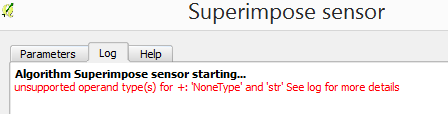
I tried to superimpose and pansharpen but kept getting this message:[image:
Inline image 1]
Perhaps "Superimpose sensor" is not the right Tool, but I couldn't see
another in the Orfeo Toolbox (?There doesn't seem to be a "search" for this
toolset?).
I got a similar message when I tried the Pansharpening Tool directly,
without doing the superimpose first, but I admit i am not sure what files I
am supposed to put in each field in these tools - I was using Ban 8 on its
own, and the multiband stack file I made.
Is there a Help for Orfeo, does anyone know? Or perhaps someone can see
where I am going wrong and what tool I should really be using?
Many thanks for any help.
--Susan.
_____________________________________
Raul Nanclares' inital reply (and thanks to Raul) to my first posting on
this subject was:
Date: Fri, 17 Apr 2015 09:26:53 -0700 (PDT)
From: RNanclares
To: [email protected]
Subject: Re: [Qgis-user] Composite satellite images
Message-ID: <[email protected]>
Content-Type: text/plain; charset=us-ascii

Hi Susan,

first you need to use the merge/combine (i don't remember the exact name of
the tool in English) located in the Raster > Miscellaneous menu. You have to
check the option 'stack layers'.

To pansharpen the image, first you have to see if you have Orfeo Toolbox
installed and configured (in the Processing menu). If it is installed you
can continue by using the sumperimpose tool (in the processing toolbox).
After the superimpose has finished you can do the pansharpening using the
pansharpening (rcs) algorithm found in the processing toolbox.
-------------- next part --------------
An HTML attachment was scrubbed...
URL:
<http://lists.osgeo.org/pipermail/qgis-user/attachments/20150501/97247e62/attachment.html>
-------------- next part --------------
A non-text attachment was scrubbed...
Name: image.png
Type: image/png
Size: 8360 bytes
Desc: not available
URL:
<http://lists.osgeo.org/pipermail/qgis-user/attachments/20150501/97247e62/attachment.png>

------------------------------

_______________________________________________
Qgis-user mailing list
[email protected]
http://lists.osgeo.org/mailman/listinfo/qgis-user

End of Qgis-user Digest, Vol 111, Issue 1
*****************************************
_______________________________________________
Qgis-user mailing list
[email protected]
http://lists.osgeo.org/mailman/listinfo/qgis-user