Hi Benoit,
It depends. Yes - you can mix transparent and opaque features. For each
color you can also set the opacity/transparency value.
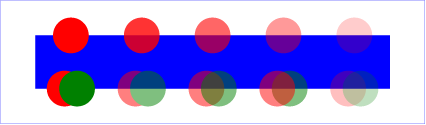
However, if two features overlap and you use transparency on the feature
level, you can see the features shine through - whereas when the
transparency would be on the symbol level (which isn't implemented yet
in QGIS) you would first composite all elements in a symbol level and
then apply the opacity on the whole group. See
http://www.w3.org/TR/2011/REC-SVG11-20110816/masking.html#ObjectAndGroupOpacityProperties
for the difference. In
http://www.w3.org/TR/2011/REC-SVG11-20110816/images/masking/opacity01.png -
if you look at the bottom row of circles - the second pair of circles
has the opacity on the group of two circles, whereas the third pair has
opacity on every single element. I hope you can see the difference.
It would be very cool if QGIS could have a more fine-grained opacity -
new opacity on symbol level and new opacity on a whole group of layers.
It would make the cartographic options even better ;-)
Andreas

On 19.06.2015 16:40, Benoît Laurent wrote:
Hello,

I noticed this feature request : https://hub.qgis.org/issues/3438.
Is it possible to have semi-transparent and opaque features within the
same layer ?
Best regards,

Benoît

---
L'absence de virus dans ce courrier électronique a été vérifiée par le
logiciel antivirus Avast.
https://www.avast.com/antivirus

_______________________________________________
Qgis-user mailing list
[email protected]
http://lists.osgeo.org/mailman/listinfo/qgis-user
_______________________________________________
Qgis-user mailing list
[email protected]
http://lists.osgeo.org/mailman/listinfo/qgis-user