Hi Richard,
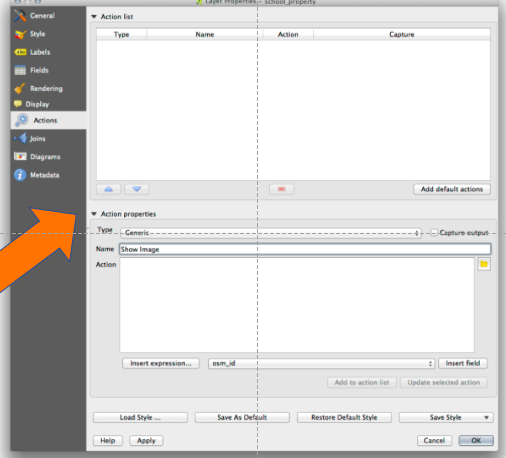
You need to click on the green plus sign to add an action, it is in the middle
of the dialog just above where it says "Show Attribute Table". The screens are
a little different from the images in the tutorial, but from there you should
be able to figure it out. Happy learning!
-Thayer
Message: 1
Date: Sat, 18 Apr 2020 11:47:35 +0000
From: Richard Morris <[email protected]>
To: "[email protected]" <[email protected]>
Subject: [Qgis-user] Action Properties missing from Mac
Message-ID: <[email protected]>
Content-Type: text/plain; charset="utf-8"

Hi
Following the training manual and stuck at 6.4 Actions
I can’t see Action Properties or find a functional equivalent so far
[A screenshot of a computer  Description automatically generated]

Thanks
Richard

-------------- next part --------------
An HTML attachment was scrubbed...
URL:
<http://lists.osgeo.org/pipermail/qgis-user/attachments/20200418/e8fa9b36/attachment.html>
-------------- next part --------------
A non-text attachment was scrubbed...
Name: image001.png
Type: image/png
Size: 67421 bytes
Desc: image001.png
URL:
<http://lists.osgeo.org/pipermail/qgis-user/attachments/20200418/e8fa9b36/attachment.png>

------------------------------
_______________________________________________
Qgis-user mailing list
[email protected]
List info: https://lists.osgeo.org/mailman/listinfo/qgis-user
Unsubscribe: https://lists.osgeo.org/mailman/listinfo/qgis-user