Hey Ashwin,

On Sat, Mar 28, 2020 at 07:42:20PM +0530, Ashwin Mahantha wrote:
> Hi All,
> I am a new user of Qute browser. I was looking for help with some basic
> issues.
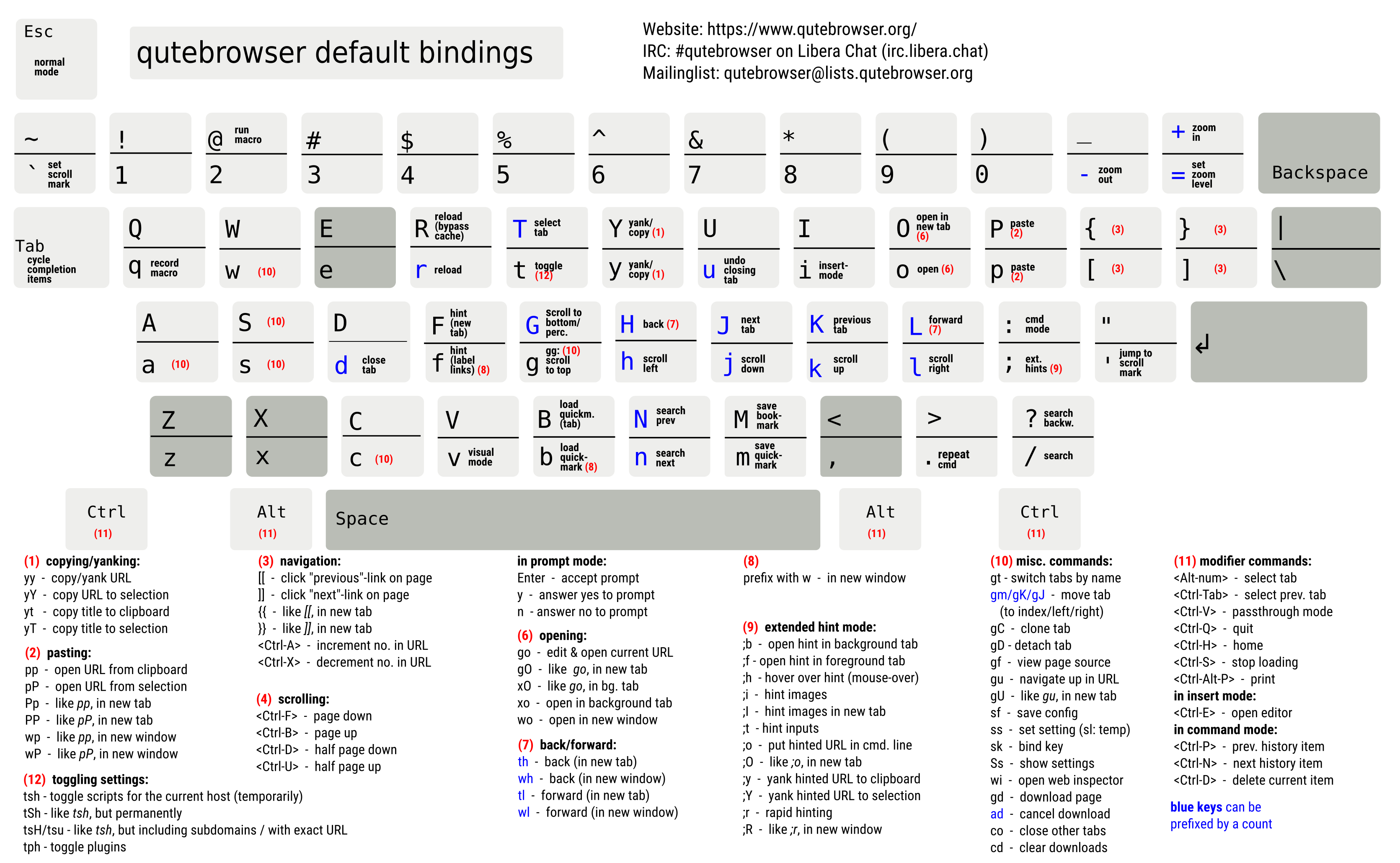
> How to use extended hint modes? I want exact steps to be followed to use
> extended hint modes once a website is opened.
> I am following Qutebrowser cheat sheet
> <https://raw.githubusercontent.com/qutebrowser/qutebrowser/master/doc/img/cheatsheet-big.png>
> .
You press e.g. the ";" key, then the "y" key and type the letters for a link
you want to yank (copy) to clipboard. Same for the other extended hint
bindings.

Florian

--
[email protected] (Mail/XMPP) | https://www.qutebrowser.org
       https://bruhin.software/ | https://github.com/sponsors/The-Compiler/
       GPG: 916E B0C8 FD55 A072 | https://the-compiler.org/pubkey.asc
             I love long mails! | https://email.is-not-s.ms/
 signature.asc
Description: PGP signature