Friday, December 02, 2016

Tip of the Day: Using Form Default Settings for the Form Wizard
Product.......: R:BASE X/X Enterprise (Version 10)
Build.........: 10.0.2.11130 or higher
Section.......: Forms
Keywords......: Form Wizard, Default Settings
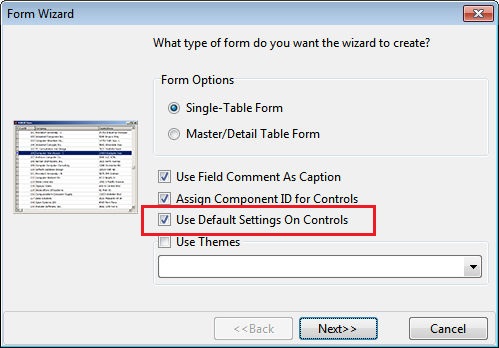
Did you know when creating a new form with the Form Wizard, a newly added
"Use Default Settings on Controls" check box is available, so the new form
will use the customized defaults established by the user/developer.

http://www.razzak.com/tips/FormWizard_UseDefaultSettings.jpg

To customize the default settings for form and controls, select "Settings" >
"Form Designer" from the main menu bar.

The defined settings will be enforced for new forms, and newly added controls
for the Form Designer, and now the Form Wizard!

Very Best R:egards,

Razzak.

www.rbase.com
www.facebook.com/rbase
--
33 years of continuous innovation!
18 Years of R:BASE Technologies, Inc. making R:BASE what it is today!
--


--
You received this message because you are subscribed to the Google Groups
"RBASE-L" group.
To unsubscribe from this group and stop receiving emails from it, send an email
to [email protected].
For more options, visit https://groups.google.com/d/optout.