Thursday, September 14, 2017

Tip of the Day: Enhanced "Select Columns" dialog in the Query Builder
Product.......: R:BASE X and R:BASE X Enterprise (Version 10)
Build.........: 10.0.3.10907 or higher
Section.......: Query Builder
Keywords......: Queries, Views, SELECT, QBE
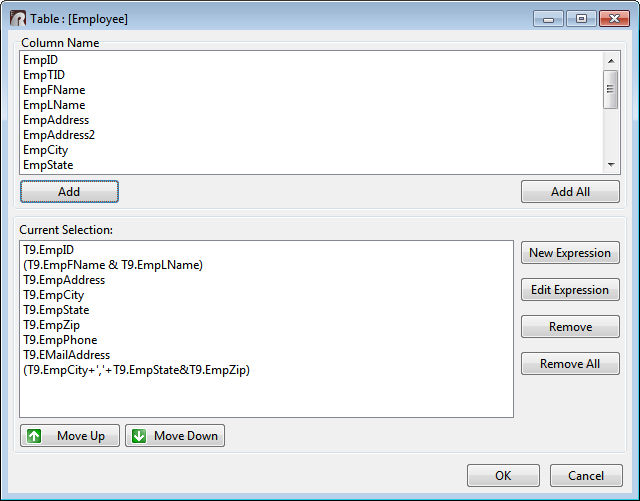
Did you know that Query Builder was enhanced allowing easier display
of columns and
expressions when choosing the "Select Columns" menu option?
The dialog window was enhanced to better display additional columns
and longer names
with increased size, along with resize support.

http://www.razzak.com/tips/QueryBuilder_SelectColumns.jpg
When building queries in the Query Builder columns can be added to
and removed from
R:BASE queries/views. The "Select Columns" basically is a graphic
representation of
the SELECT command. When working with columns in your queries,
expressions can also
be added to the columns to perform calculations.
One of the most important aspects in business growth is your
company's data, and no
one else has more invested in your success than R:BASE Technologies.
Invest forward
with R:BASE!

Very Best R:egards,

Razzak.

www.rbase.com
www.facebook.com/rbase
--
34 years of continuous innovation!
19 Years of R:BASE Technologies, Inc. making R:BASE what it is today!
--

--
For group guidelines, visit
http://www.rbase.com/support/usersgroup_guidelines.php
---
You received this message because you are subscribed to the Google Groups "RBASE-L" group.
To unsubscribe from this group and stop receiving emails from it, send an email
to [email protected].
For more options, visit https://groups.google.com/d/optout.