Wednesday, August 08, 2018

Tip of the Day: Enhanced Case Sensitive and Whole Word Search Options
Product.......: R:BASE X and R:BASE X Enterprise (Version 10)
Build.........: 10.0.4.10808 or higher
Sections......: Database Explorer, Forms, Reports, Labels, External Forms
Keywords......: Search, EEPs, Expressions, Control Properties, Case
Sensitive, Whole Word
Did you know the search capabilities for finding text in Custom EEPs,
Control Properties, and
Expressions has been enhanced to include "case sensitive" and "whole
word" criteria?
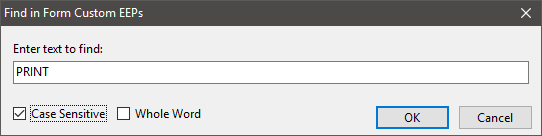
When searching for text in Custom EEPs, Control Properties, and
Expressions, for database Forms,
Reports, Labels, External Forms, and Applications, the "Find in"
dialog now includes the "Match
Case" and "Whole Word" options for more detailed searches.

Emacs!


http://www.razzak.com/tips/RBGX_FindInCustomEEPsForms_Options.png
The added capability adds to the existing search capabilities built
into R:BASE X/X Enterprise
(Version 10) for users to locate text within the database modules and
within external files,
including:

01. Find in Database Explorer
02. Find in Stored Procedures
03. Find in Custom EEPs - [Ctrl] + F
    . Find in Form Custom EEPs
    . Find in Report Custom EEPs
    . Find in Label Custom EEPs
    . Find in Application Custom EEPs
    . Find in External Form Custom EEPs
04. Find in Control Properties - [Ctrl] + L
    . Find in Form Control Properties
    . Find in Report Control Properties
    . Find in Label Control Properties
    . Find External Form Control Properties
05. Find in Expressions - [Ctrl] + [Shift] + F
    . Find in Form Expressions
    . Find in Report Expressions
    . Find in Label Expressions
06. Find in Files
07. Find in R> Prompt Output

From The Edge: http://www.razzak.com/fte
Topic........: Searching in R:BASE X and R:BASE X Enterprise (Version 10)

Very Best R:egards,

Razzak.

https://www.rbase.com
http://www.facebook.com/rbase/

--
For group guidelines, visit
http://www.rbase.com/support/usersgroup_guidelines.php
---
You received this message because you are subscribed to the Google Groups "RBASE-L" group.
To unsubscribe from this group and stop receiving emails from it, send an email
to [email protected].
For more options, visit https://groups.google.com/d/optout.