Friday, April 29, 2011

Tip of the Day - Using Enhanced (GETDATE(' ')) Options
Product: R:BASE eXtreme 9.1 (32/64)
Update.: 3 (Maintenance Release)
Build..: 9.1.3.10428 or higher http://www.rupdates.com
Section: Enhanced Functions
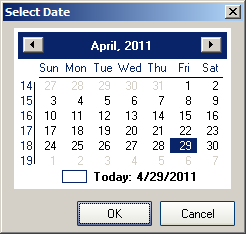
Traditionally, (GETDATE(' ')) will bring up the Windows GUI Calendar
with today's date circled in red. Either you can click on [OK] to
accept the circled date or click on any other date on the calendar
using the current month or scrolling months.

-- Example 01 (Traditional Calendar):
   SET VAR vDate DATE = NULL
   SET VAR vDate = (GETDATE('Select Date'))
   RETURN
   http://www.razzak.com/tips/GetDate_01.png

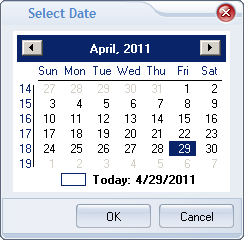
-- Example 02 (Traditional Calendar with R:BASE Themes):
   SET VAR vDate DATE = NULL
   SET VAR vDate = (GETDATE('Select Date|THEMENAME Soft Blue'))
   RETURN
   http://www.razzak.com/tips/GetDate_02.png

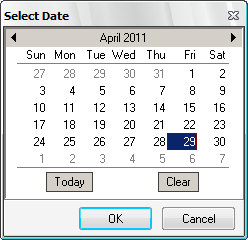
Did you know that now you can use the new "CALENDAR_TYPE ENHANCED"
option to display an enhanced calendar?

-- Example 03 (Enhanced Calendar with R:BASE Theme):
   SET VAR vDate DATE = NULL
   SET VAR vDate = +
   (GETDATE('Select Date|CALENDAR_TYPE ENHANCED|THEMENAME Vista CG'))
   RETURN
   http://www.razzak.com/tips/GetDate_03.png

   Using the enhanced calendar, additional [Clear] button will clear
   the selection and use today's date as default.

   Clicking on [OK] will populate the selected date into a variable,
   such as vDate.

   Clicking on [Cancel] will ignore to populate any value into a
   variable, such as vDate. Pre-Defined value, if used, will not
   be overwritten.

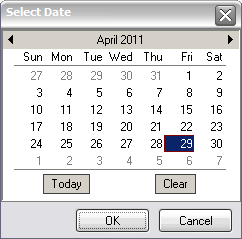
-- Example 04 (Dynamic Approach using Global Variables)
   SET VAR vDate DATE = NULL
   SET VAR vCaption TEXT = 'Select Date'
   SET VAR vCalendarType TEXT = 'ENHANCED'
   SET VAR vThemeName TEXT = 'XP Grey Scale'
   SET VAR vQuotes = (CVAL('QUOTES'))
   SET VAR vString TEXT = +
   ('SET VAR vDate = (GETDATE('+.vQuotes+.vCaption+ +
    '|CALENDAR_TYPE'+.vCalendarType+ +
    '|THEMENAME'&.vThemeName+.vQuotes+'))')
   &vString
   CLEAR VARIABLE vCaption,vCalendarType,vThemeName,vQuotes,vString
   RETURN
   http://www.razzak.com/tips/GetDate_04.png

Have fun!

Very Best R:egards,

Razzak.

--- RBASE-L
================================================
TO POST A MESSAGE TO ALL MEMBERS:
Send a plain text email to [email protected]

(Don't use any of these words as your Subject:
INTRO, SUBSCRIBE, UNSUBSCRIBE, SEARCH,
REMOVE, SUSPEND, RESUME, DIGEST, RESEND, HELP)
================================================
TO SEE MESSAGE POSTING GUIDELINES:
Send a plain text email to [email protected]
In the message SUBJECT, put just one word: INTRO
================================================
TO UNSUBSCRIBE:
Send a plain text email to [email protected]
In the message SUBJECT, put just one word: UNSUBSCRIBE
================================================
TO SEARCH ARCHIVES:
Send a plain text email to [email protected]
In the message SUBJECT, put just one word: SEARCH-n
(where n is the number of days). In the message body,
place any
text to search for.
================================================