Thursday, October 13, 2011

Tip of the Day: Duplicating Your Personalized R:BASE Settings
Product: R:BASE eXtreme 9.1/9.5 (32/64)
Build..: 9.1.4.11012 or higher http://www.rupdates.com
Section: Custom Settings
When installing R:BASE eXtreme 9.1 (32/64) on your computer, the default
settings are automatically installed and initiated when you first start
R:BASE eXtreme 9.1. Then, you may further customize R:BASE Settings on
your working desktop, including the look and feel, as well as all default
settings when designing a new database, tables, forms, labels, reports,
external form files, and applications as follows:

. Startup Options
. Database Explorer
. R:BASE Editor
. R> Prompt
. Data Browser
. Data Designer
. Form Designer
. Report/Label Designer
. Application Designer
. BLOB Editor
. Hint Settings
. Walkmenu Time Interval
. Default Printer Font
. Custom Colors
. Registry Settings
. Show Main Toolbar
. Warn When Closing R:BASE Session
. Show Check Box to Suppress Error Messages
. Clean Scratch Files on Exit
. Configuration Settings

These custom settings are saved and are effective when you are the same
logged in user on that particular workstation. Any change in the layout
afterwards is also updated immediately, including Favorite Folders.

If you are in a situation with many workstations, such as office, home,
two notebooks for the road, remote client(s) workstations, etc., you
will have to either customize each individual workstation to match your
favorite settings, custom colors, layouts, etc., one at a time, or live
with what you have and customize as you go. This is not a productive
R:BASE development environment, wouldn't you agree?

Did you know that you can export your favorite R:BASE eXtreme 9.1 (32/64)
settings (not including the license, of course) from one workstation to
another by simply using the new "Registry Settings | Save to File" option?

Here's how:

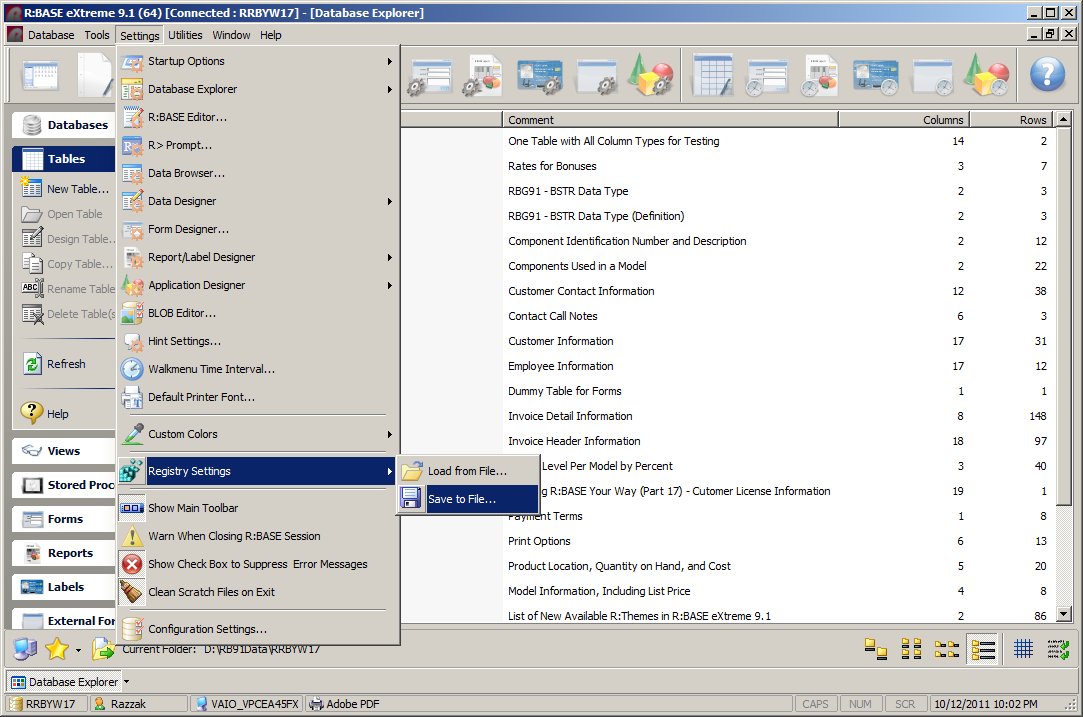
01. Database Explorer | Main Menu | Settings ...

02. Select Registry Settings ...

03. Click on Save to File ...

    http://www.razzak.com/tips/RBG91_Saving_Registry_Settings.jpg

04. Assign the file name and click on the [Save] button to save.

    The binary file will be saved as filename.bin

Keep this binary file handy when re-setting R:BASE eXtreme 9.1 settings
on the same computer or duplicating your personalized settings on other
computer(s). Use "Load From File ..." option to load settings.

Database Explorer | Main Menu | Settings ...

Registry Settings | Load From File ...

Have fun!

Very Best R:egards,

Razzak.

--- RBASE-L
================================================
TO POST A MESSAGE TO ALL MEMBERS:
Send a plain text email to [email protected]

(Don't use any of these words as your Subject:
INTRO, SUBSCRIBE, UNSUBSCRIBE, SEARCH,
REMOVE, SUSPEND, RESUME, DIGEST, RESEND, HELP)
================================================
TO SEE MESSAGE POSTING GUIDELINES:
Send a plain text email to [email protected]
In the message SUBJECT, put just one word: INTRO
================================================
TO UNSUBSCRIBE:
Send a plain text email to [email protected]
In the message SUBJECT, put just one word: UNSUBSCRIBE
================================================
TO SEARCH ARCHIVES:
Send a plain text email to [email protected]
In the message SUBJECT, put just one word: SEARCH-n
(where n is the number of days). In the message body,
place any
text to search for.
================================================