Wow!  Super slick!
Doug

A. Razzak Memon wrote:
Friday, October 14, 2011
Tip of the Day: Data Dictionary and Selecting Color Value
Product: R:BASE eXtreme 9.1/9.5 (32/64)
Build..: 9.1.4.11012 or higher http://www.rupdates.com
Section: Data Dictionary [F3] Key

Data Dictionary [F3] Key in R:BASE eXtreme 9.1/9.5 (32/64) provides the
following valuable information at your fingertips:

. Databases
. Tables *
. Columns *
. Key/Indexes *
. Variables
. Views *
. Forms *
. Reports *
. Labels *
. Functions
. Stored Procedures *
. System Tables *
. System Columns *
. Form Component IDs **
. Form Actions **
. Report Component IDs ***
. Label Component IDs ****
. Themes
. Printers
. External Forms
. Applications
. Colors
. Control Types
. Database Settings
. Files

*    = Connected Database
**   = While in Form Designer
***  = While in Report Designer
**** = While in Label Designer

These are very slick and handy options that allow users to capture
information about the R:BASE environment and/or connected database.

These options can be accessed from anywhere in R:BASE by pressing
the [F3] key or selecting "Data Dictionary" option from the Menu
Bar under "Tools".

While programming and customizing applications, if you wish to
use custom font color, background color, for CHOOSE, DIALOG, or
PAUSE commands you can press the [F3] key, select the color you
like and then either double-click for single item or [OK] button
for multi-select items. Using this approach, you can capture the
name of the color listed in the first column.

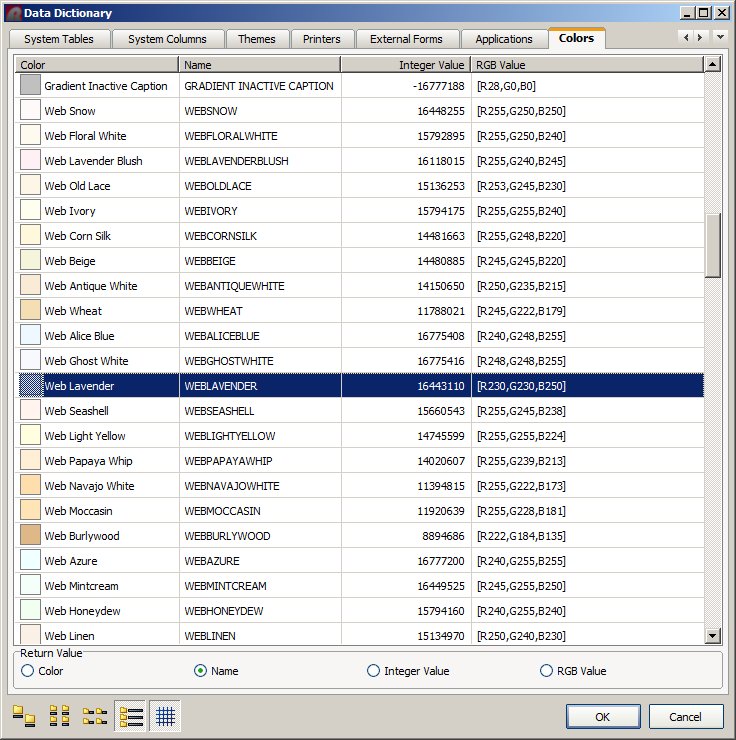
The Data Dictionary | Color tab includes a list of 190 colors.

Did you know that now you can choose which option you want as
the return value?

Here's how:

Press [F3] Data Dictionary Key and notice the additional option
for [Return Value].

Data Dictionary | Colors

http://www.razzak.com/tips/DataDictionary_SelectingColorValue.jpg

You now have four (4) options to pick from.

[ ] Color [ ] Name [ ] Integer Value [ ] RGB Value

Have fun!

Very Best R:egards,

Razzak.

--- RBASE-L
================================================
TO POST A MESSAGE TO ALL MEMBERS:
Send a plain text email to [email protected]

(Don't use any of these words as your Subject:
INTRO, SUBSCRIBE, UNSUBSCRIBE, SEARCH,
REMOVE, SUSPEND, RESUME, DIGEST, RESEND, HELP)
================================================
TO SEE MESSAGE POSTING GUIDELINES:
Send a plain text email to [email protected]
In the message SUBJECT, put just one word: INTRO
================================================
TO UNSUBSCRIBE: Send a plain text email to [email protected]
In the message SUBJECT, put just one word: UNSUBSCRIBE
================================================
TO SEARCH ARCHIVES:
Send a plain text email to [email protected]
In the message SUBJECT, put just one word: SEARCH-n
(where n is the number of days). In the message body, place any text
to search for.
================================================