Tuesday, November 15, 2011

Tip of the Day: Copy and Paste Expression Builder Variables
Product: R:BASE eXtreme 9.1/9.5 (32/64)
Build..: 9.1.5.11111 or higher http://www.rupdates.com
Section: Form, Report, and Label Expression Builder
Did you know that you can copy a form variable from the Expression
Builder, and paste it into another form? Did you know that you can
copy a report/label variable from the Expression Builder, and paste
it into another report/label?

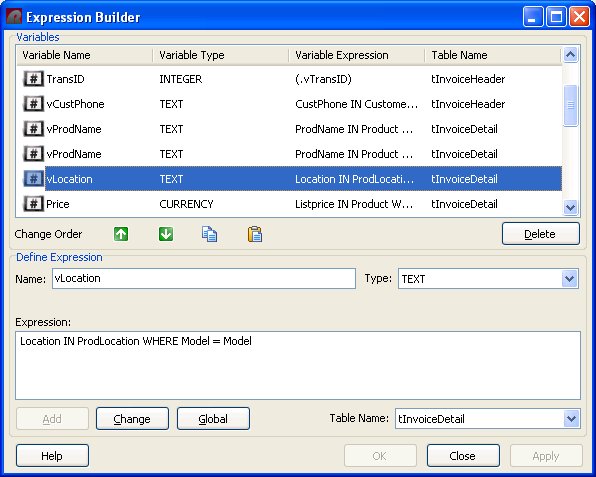
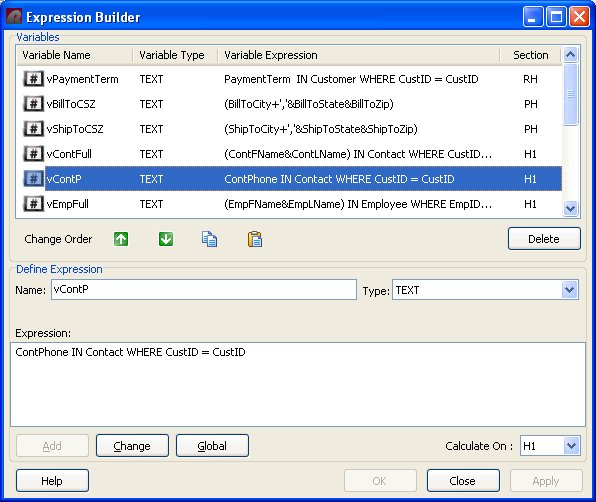
Buttons for "Copy" and "Paste" have been added to the Expression
Builders for the Form, Report, and Label modules, to allow users
to copy and paste selected, or all, variables.

Please note the "Copy" and "Paste" buttons are located next to
the "Up" and "Down" arrow buttons, which reorder the location
of a variable in the Expression Builder.

In addition, you may also use [Ctrl+C] to copy selected expression(s)
and [Ctrl+V] to paste expression(s) while placing the cursor over
the expression builder window.

Form Designer Expression Builder:
http://www.razzak.com/tips/ExpressionBuilder.jpg

Report Designer Expression Builder:
http://www.razzak.com/tips/ExpressionBuilder_R.jpg

Variables and Expressions can now be easily moved from form to form,
label to label, and report to report!

Have fun!

Very Best R:egards,

Razzak.