At 05:17 PM 1/10/2012, Dennis McGrath wrote:
RBWIN 9.1
On XP computer I can import activex controls
On Win7 computer I cannot

Any blues clues?
Here's how:

01. While in R:BASE eXtreme 9.x Form Designer:

    Main Menu | Form | Import ActiveX Control ...

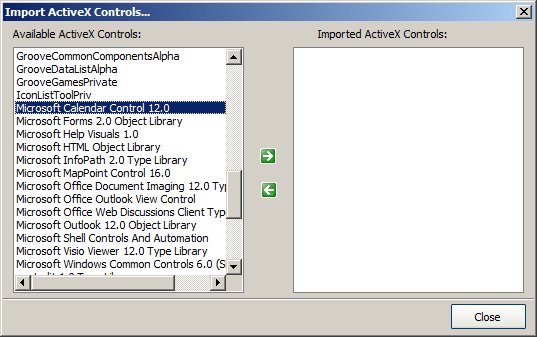
02. Notice the first empty page under Available ActiveX Controls
    (MS Windows 7 Professional, Service Pack 1)

    Scroll down or [PgDn] to start viewing the list of available
    ActiveX controls.

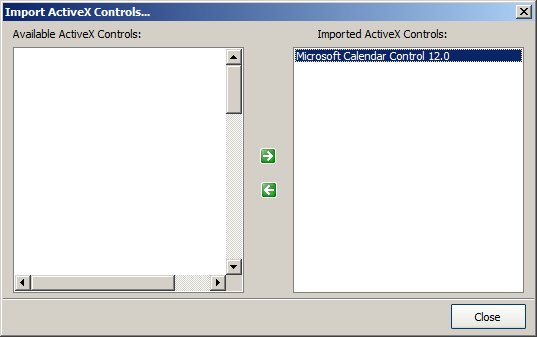
    For practice purposes, select Microsoft Calendar Control 12.0
    and click on [>] Add button to add to the list of Imported
    ActiveX Controls.

    http://www.razzak.com/tips/ImportingActiveXControls_01.jpg

    http://www.razzak.com/tips/ImportingActiveXControls_02.jpg


03. Now place the selected ActiveX Control on the form, adjust
    the height and width accordingly.

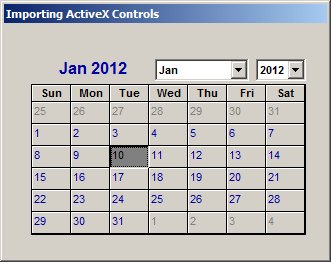
04. Run the form.

    You should be able to see the results as follows:

    http://www.razzak.com/tips/ImportingActiveXControls_03.jpg

That's all there is to it!

Have fun!

Very Best R:egards,

Razzak.
www.rbase.com
www.razzak.com
www.RazzakMemon.com