At 11:15 AM 1/27/2012, Karen Tellef wrote:
And it comes down to this -- I copied and pasted another control
and totally forgot to erase the componentid and the custom eep
code that was in the pasted control....   If I had a dime for
everytime I got into trouble from copy and paste....
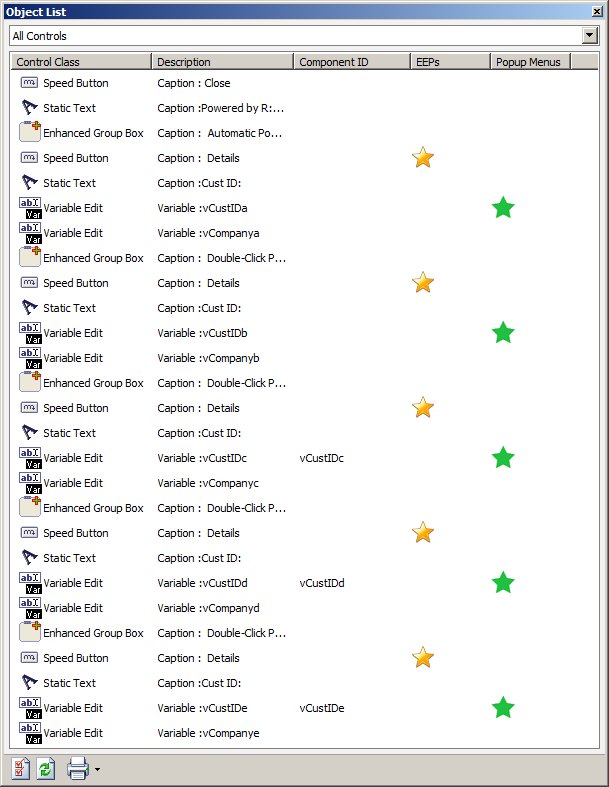
Did you know that you can visualize a list of all controls that
include Control Class, Description, Component ID, EEPs, and Pop-Up
Menus, while in Form Designer, using the Object List ToolBar?

Using the latest version and updates of R:BASE eXtreme 9.1/9.5,
now you can see a complete list of all controls and print the
entire list to Printer, Text File, PDF File, or Clipboard.

Here's how:

01. Start R:BASE eXtreme 9.1/9.5

02. CONNect RRBYW17 or RRBYW18

03. Database Explorer | Forms | CustomPopupMenus | Design ...

04. While in Form Designer ...

    Main Menu | View | Toolbars | Object List

    Notice the coooooool Object List that includes every control
    (All Controls) with "color codes stars" along with a dynamic
    presentation that includes Control Class, Description, Comp ID,
    EEPs, and Popup Menus.

    Double-Clicking on the appropriate "star" will bring up the
    object property to update EEPs, or Popup Menu properties.

    http://www.razzak.com/tips/RBG91_95_ObjectList.jpg

Remember, you are only limited by your experience and knowledge
of R:BASE!

Enjoy and make sure to have fun.

Very Best R:egards,

Razzak.

www.rbase.com
www.razzak.com
www.RazzakMemon.com
--- RBASE-L
================================================
TO POST A MESSAGE TO ALL MEMBERS:
Send a plain text email to [email protected]

(Don't use any of these words as your Subject:
INTRO, SUBSCRIBE, UNSUBSCRIBE, SEARCH,
REMOVE, SUSPEND, RESUME, DIGEST, RESEND, HELP)
================================================
TO SEE MESSAGE POSTING GUIDELINES:
Send a plain text email to [email protected]
In the message SUBJECT, put just one word: INTRO
================================================
TO UNSUBSCRIBE:
Send a plain text email to [email protected]
In the message SUBJECT, put just one word: UNSUBSCRIBE
================================================
TO SEARCH ARCHIVES:
Send a plain text email to [email protected]
In the message SUBJECT, put just one word: SEARCH-n
(where n is the number of days). In the message body,
place any
text to search for.
================================================