Friday, February 17, 2012

Tip of the Day: Customizing Form Closing Behavior
Product: R:BASE eXtreme 9.1/9.5 (32/64)
Build..: 9.1.5.20214 or higher http://www.rupdates.com
Section: Form Settings
When closing table driven forms where data has been changed or deleted,
a dialog will appear prompting "Save Changes?" or "Confirm Deletion?"

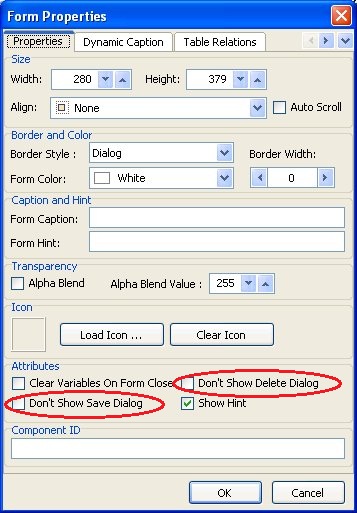
Did you know that now, in addition to the "DONTSHOWSAVEDIALOG" and
"DONTSHOWDELETEDIALOG" PROPERTY command parameters, you can use the
"Don't Show Save Dialog" and "Don't Show Delete Dialog" attributes
listed within the Form Settings?

http://www.razzak.com/tips/FormProperties_NewAttributes.jpg

[ ] Don't Show Save Dialog

    Disables the display of the "Save Changes?" dialog box upon
    closing the form

[ ] Don't Show Delete Dialog

    Disables the display of the "Confirm Deletion?" dialog box
    upon closing the form

Using these settings, you can customize how table driven forms close.

Enjoy!

Very Best R:egards,

Razzak.

www.rbase.com
www.Razzak.com
www.RazzakMemon.com

--- RBASE-L
================================================
TO POST A MESSAGE TO ALL MEMBERS:
Send a plain text email to [email protected]

(Don't use any of these words as your Subject:
INTRO, SUBSCRIBE, UNSUBSCRIBE, SEARCH,
REMOVE, SUSPEND, RESUME, DIGEST, RESEND, HELP)
================================================
TO SEE MESSAGE POSTING GUIDELINES:
Send a plain text email to [email protected]
In the message SUBJECT, put just one word: INTRO
================================================
TO UNSUBSCRIBE:
Send a plain text email to [email protected]
In the message SUBJECT, put just one word: UNSUBSCRIBE
================================================
TO SEARCH ARCHIVES:
Send a plain text email to [email protected]
In the message SUBJECT, put just one word: SEARCH-n
(where n is the number of days). In the message body,
place any
text to search for.
================================================