The samples looks great !
Any experiences which Windows Tablet is working great with R:BASE Solutions
for Mobiles (smartphone/tablet)? (I am using iPhone/iPad)
Marco
----- Original Message -----
From: "A. Razzak Memon" <[email protected]>
To: "RBASE-L Mailing List" <[email protected]>
Sent: Thursday, March 15, 2012 6:42 AM
Subject: [RBASE-L] - Tip of the Day: The R:BASE On-Screen Keyboard (ROSK)
Thursday, March 15, 2012

Tip of the Day: The R:BASE On-Screen Keyboard (ROSK)
Product: R:BASE eXtreme 9.5 (32/64)
Build..: 9.5.1.10317 or higher
Section: Productivity Tools

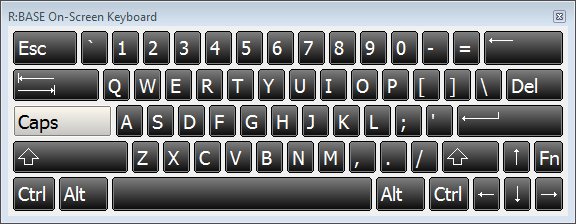
Did you know that you can display an on-screen keyboard within
R:BASE to allow users to type and enter data, without relying
on a physical keyboard?

Imagine your mobile R:BASE eXtreme 9.5 application running on
Tablet PCs in a industrial, manufacturing, or austere environments.

The R:BASE On-Screen Keyboard is a visual keyboard displayed on the
screen that provides all standard keys, where users can select keys
using the mouse or another pointing device.

http://www.razzak.com/tips/ROSK.jpg

The R:BASE On-Screen Keyboard s the ideal complement to any Handheld,
Kiosk, Mobile, Pen, Rugged, Tablet or Touchscreen based R:BASE eXtreme
applications.

The R:BASE On-Screen Keyboard (ROSK) is accessible using the following
methods:

. Selecting "Utilities" > "On Screen Keyboard" from the main Menu Bar
. Pressing the [Ctrl]+[Alt]+K key combination
. Using the PROPERTY command

Important Note: The R:BASE On-Screen Keyboard is only supported on
Windows 7, Windows 2008 Server R2, and higher operating systems.

Supported PROPERTY Commands:

--To show/hide the keyboard
  PROPERTY ROSK SHOW TRUE/FALSE

--To alter the color of the button outer edge:
  PROPERTY ROSK OUTER_EDGE_COLOR_NORMAL Value
  PROPERTY ROSK OUTER_EDGE_COLOR_PRESSED Value
  PROPERTY ROSK OUTER_EDGE_COLOR_DISABLED Value

--To alter the color of the button inner edge:
  PROPERTY ROSK INNER_EDGE_COLOR_NORMAL Value
  PROPERTY ROSK INNER_EDGE_COLOR_PRESSED Value
  PROPERTY ROSK INNER_EDGE_COLOR_DISABLED Value

--To alter the starting gradient color of the button background:
  PROPERTY ROSK BK_START_COLOR_NORMAL Value
  PROPERTY ROSK BK_START_COLOR_PRESSED Value
  PROPERTY ROSK BK_START_COLOR_DISABLED Value

--To alter the ending gradient color of the button background:
  PROPERTY ROSK BK_END_COLOR_NORMAL Value
  PROPERTY ROSK BK_END_COLOR_PRESSED Value
  PROPERTY ROSK BK_END_COLOR_DISABLED Value

--To alter the font colors of the buttons:
  PROPERTY ROSK TEXT_COLOR_NORMAL Value
  PROPERTY ROSK TEXT_COLOR_PRESSED Value
  PROPERTY ROSK TEXT_COLOR_DISABLED Value

--To alter the style of the buttons:
  PROPERTY ROSK DRAWING_STYLE NORMAL / GRADIENT
  PROPERTY ROSK GRADIENT_START_COLOR Value
  PROPERTY ROSK GRADIENT_END_COLOR Value

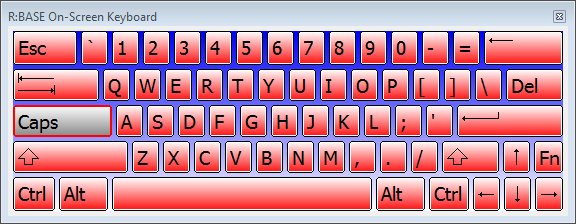
Example:

  PROPERTY ROSK SHOW TRUE
  PROPERTY ROSK BK_START_COLOR_NORMAL WHITE
  PROPERTY ROSK BK_END_COLOR_NORMAL RED
  PROPERTY ROSK BK_START_COLOR_PRESSED white
  PROPERTY ROSK BK_END_COLOR_PRESSED GRAY
  PROPERTY ROSK OUTER_EDGE_COLOR_NORMAL BLACK
  PROPERTY ROSK OUTER_EDGE_COLOR_PRESSED RED
  PROPERTY ROSK INNER_EDGE_COLOR_NORMAL WHITE
  PROPERTY ROSK INNER_EDGE_COLOR_PRESSED RED
  PROPERTY ROSK TEXT_COLOR_NORMAL BLACK
  PROPERTY ROSK TEXT_COLOR_PRESSED BLACK
  PROPERTY ROSK DRAWING_STYLE GRADIENT
  PROPERTY ROSK GRADIENT_START_COLOR BLUE
  PROPERTY ROSK GRADIENT_END_COLOR WHITE

http://www.razzak.com/tips/ROSK_Sample.jpg

Have fun adding the R:BASE On-Screen Keyboard to your custom applications!

Very Best R:egards,

Razzak.

www.razzak.com
www.Razzak.com
www.RazzakMemon.com