Tuesday, March 20, 2012

Tip of the Day: Using Find in Files Settings
Product: R:BASE eXtreme 9.5 (32/64)
Build..: 9.5.1.10317 or higher
Section: Database Explorer
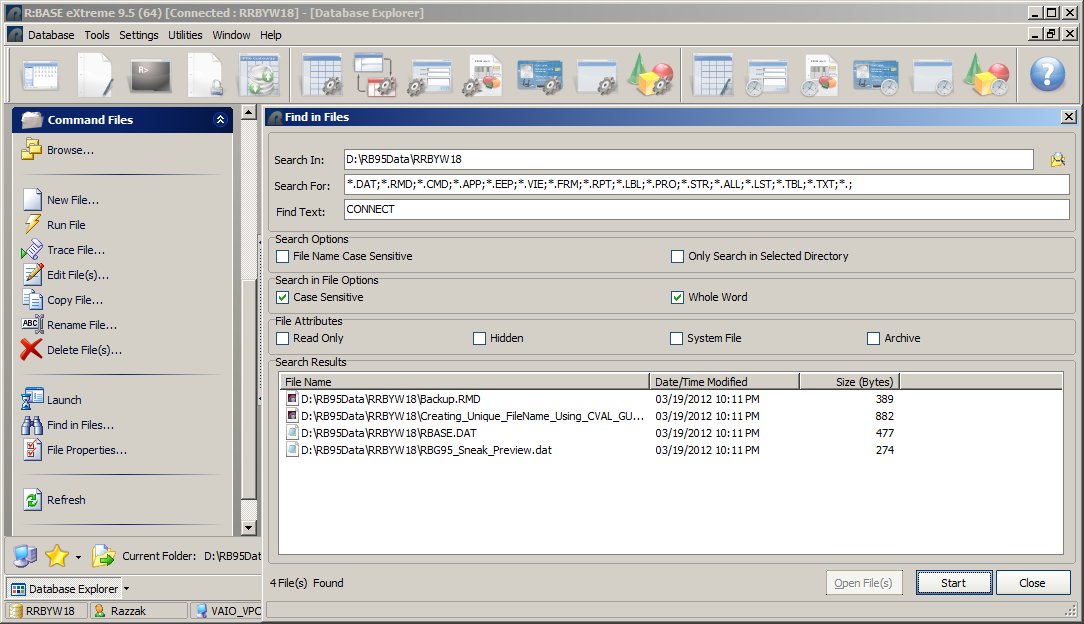
The "Find in Files" utility allows users to locate command files based upon
specific text within the files. Two new "Search" options allow the search
for text to be more precise. For example, with "Case Sensitive" and
"Whole Word" enabled, a search for the command "CONNECT" with no longer
return the unwanted results for DISCONNECT or SCONNECT, or any locations
where the word "Connect" with lower case letters is used in a DIALOG or
PAUSE as the message or caption.

Database Explorer | Command Files | Find in Files | Search in File Options

[ ] Case Sensitive    [ ] Whole Word

Example:   http://www.razzak.com/tips/Find_In_Files.jpg

Search criteria can be modified based on file extensions, case sensitivity,
sub-directory searches, and file attributes. After the search is complete,
the selected files can be opened in the R:BASE Editor.

Stay Productive, My Friends!

Very Best R:egards,

Razzak.

www.razzak.com
www.Razzak.com
www.RazzakMemon.com