Monday, April 09, 2012

Tip of the Day: Displaying a Balloon Tip in DB/Variable Edit Fields
Product: R:BASE eXtreme 9.5 (32/64)
Build..: 9.5.1.10410 (RC) or higher
Section: Forms, PROPERTY Commands
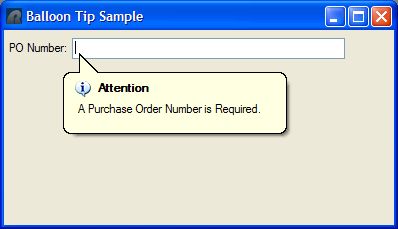
Did you know that you can display a balloon tip in DB Edit and Variable
Edit Fields?

The balloon tip displays a hint message that can be used in response to
an end user action on the form, or even to a specific form object. The
balloon tip will appear when the SHOWBALLOONTIP parameter is set to TRUE
for the field's Component ID. A title, message, and icon image can be
displayed in the balloon tip. The balloon tip is only available to DB
Edit and Variable Edit fields.

Icon options available include:

 . NONE
 . INFO
 . WARNING
 . ERROR
 . INFO_LARGE (Windows Vista, 7, and higher only)
 . WARNING_LARGE (Windows Vista, 7, and higher only)
 . ERROR_LARGE (Windows Vista, 7, and higher only)

Example: (Variable Edit On Exit EEP)

IF vPONumber IS NULL THEN
   PROPERTY PEdit_PO ShowBalloonTip TRUE
   PROPERTY PEdit_PO BalloonTipTitle 'Attention'
   PROPERTY PEdit_PO BalloonTipText 'A Purchase Order Number is Required.'
   PROPERTY PEdit_PO BalloonTipIcon INFO
   PROPERTY PEdit_PO SET_FOCUS 'TRUE'
   RETURN
ENDIF

http://www.razzak.com/tips/BalloonTipSample.jpg

Stay productive, my friends!

Very Best R:egards,

Razzak.

www.razzak.com
www.Razzak.com
www.RazzakMemon.com