C:\TEMP is very convenient for checking, but it is childs play to put a
shortcut to the folder on your desktop to point at any of the subfolders
unique to the current user, including the C:\Documents and
Settings\<currentUser>\Local Settings\Temp folder.
For that matter, you can put the shortcut in the Root of C: if it gives you
any more comfort at seeing it at that location and even if you name it
"TEMP", it will co-exist just fine with the physical directory named "TEMP"
if it exists...


----- Original Message -----
From: "jan johansen" <[email protected]>
To: "RBASE-L Mailing List" <[email protected]>
Sent: Thursday, June 14, 2012 1:24 PM
Subject: [RBASE-L] - RE: Form Designer: EEP Edits: SaveFailures:Solved


: Mike,
:
:
: I appreciate your insight. I seem to constantly fight over permission to
: C:\temp
:
: so I may explore changing back to
:
: C:\Documents and Settings\<currentUser>\
:
:
: Jan
:
: -----Original Message-----
: From: "Mike Byerley" <[email protected]>
: To: [email protected] (RBASE-L Mailing List)
: Date: Thu, 14 Jun 2012 12:02:24 -0400
: Subject: [RBASE-L] - RE: Form Designer: EEP Edits: SaveFailures:Solved
:
:
: I know Win7 (beginning with Vista) became a fussbudget over permissions,
but
: those things have not come to me yet as I am still being dragged kicking
and
: screaming along with XP.  I am due for a system wide upgrade, so I guess I
: will experience it at some juncture.  I know from the programming language
: NGs that most of those guys don't try to swim upstream and just adhere to
: the rules of the OS and do most of their tinkering (runtime) in the
: C:\Documents and Settings\<currentUser>\Application Data folder where that
: user has carte blanche...
:
:
: ----- Original Message -----
: From: "A. Razzak Memon" <[email protected]>
: To: "RBASE-L Mailing List" <[email protected]>
: Sent: Thursday, June 14, 2012 10:33 AM
: Subject: [RBASE-L] - RE: Form Designer: EEP Edits: SaveFailures:Solved
:
:
: You are very welcome, Bruce!
:
: While monitoring, specifically in Windows 7 environment, you may also want
: to revisit permissions for that specific folder and all subfolders
: underneath it.
:
: Hope that provides you with some blue's clues ...
:
: Very Best R:egards,
:
: Razzak.
:
: Sent from my iPhone
:
: On Jun 14, 2012, at 10:21 AM, "Bruce Chitiea" <[email protected]>
: wrote:
:
: > Razzak:
: >
: > Thank you very much.
: >
: > I'll monitor this and see if I can discern any underlying condition
which
: > causes this.
: >
: > Bruce
: > -------- Original Message --------
: > Subject: [RBASE-L] - RE: Form Designer: EEP Edits: SaveFailures:Solved
: > From: "A. Razzak Memon" <[email protected]>
: > Date: Thu, June 14, 2012 7:01 am
: > To: [email protected] (RBASE-L Mailing List)
: >
: > At 09:27 AM 6/14/2012, Bruce Chitiea wrote:
: >
: > >Correct and Correct:
: > >
: > >1. Glad that the underlying dataset is read only, or there'd be
: > >smoking craters all over my database after each of my form-design
: > >sorties;
: > >
: > >2. Custom EEP changes are NOT saved between form designer sessions
: > >UNLESS the form is test-RUN while WITHIN the form designer session
: > >in which the changes are made.
: > >
: > >Granted, it's good practice to RUN before exiting anyway.
: >
: >
: > Bruce,
: >
: > If you didn't already know ...
: >
: > While in Form Designer, when running or previewing the form, you have
: > the option to save or not save any changes to the form or Custom EEPs.
: >
: > You can customize these options as follows:
: >
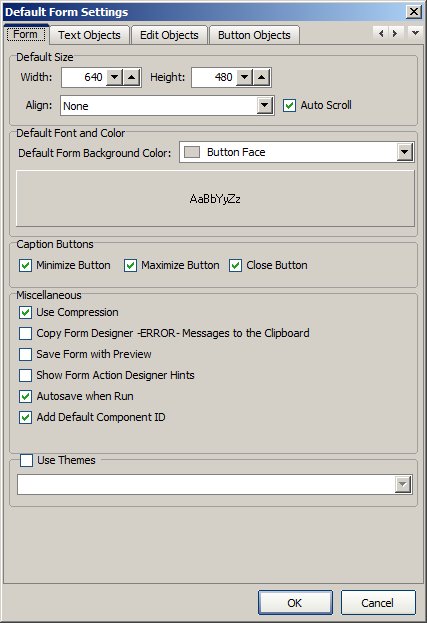
: > R:BASE eXtreme 9.1 | Database Explorer | Main Menu | Settings | Form
: > Designer | Default Form Settings ..
: > http://www.razzak.com/tips/RBG91_FormDesigner_Default_Settings.jpg
: >
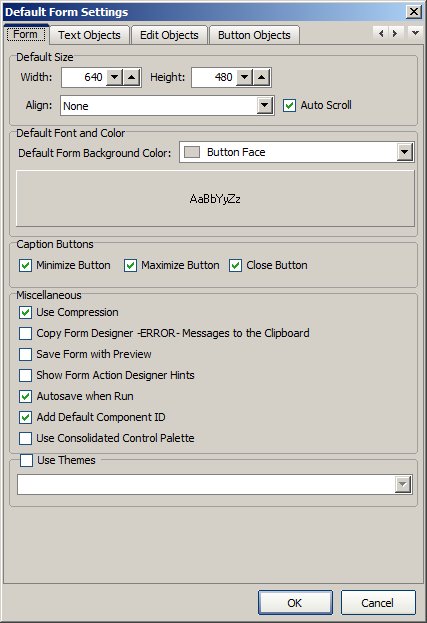
: > R:BASE eXtreme 9.5 | Database Explorer | Main Menu | Settings | Form
: > Designer | Default Form Settings ..
: > http://www.razzak.com/tips/RBG95_FormDesigner_Default_Settings.jpg
: >
: > Pay close attention to these options and set 'em accordingly to suit
: > your R:BASE development style.
: >
: > That is your tip of the day!
: >
: > Very Best R:egards,
: >
: > Razzak.
: >
: >