Thank you!
Clicking the "|+|" button works exactly as you describe.
When I push the [F2] button on a scrolling region with no data, it also works
perfectly for the first row and each additional row. Each new line appears to
be
appended to the bottom of the scrolling region, and it indeed ends up at the
end/bottom.
However, if there is already some data in the scrolling region, and I push the
[F2], then it appears that the new rows are being inserted above the last row.
Then if I exit the screen and go back in, the new rows are indeed at the the
bottom of the scrolling region in proper order.
So, the only differene I see is that when I use the "|+|" button, the row looks
like it is being added at the end and it is indeed being added at the end. If I
use the [F2] button and there are already some rows in the scrolling region,
the
new  rows appears to be added above the last row, but they are actually added
at
the end of the scrolling region. I hope I explained it properly.
Thank you for your time and a truly wonderful product!
Mike


________________________________
From: A. Razzak Memon <[email protected]>
To: RBASE-L Mailing List <[email protected]>
Sent: Mon, June 18, 2012 6:00:26 PM
Subject: [RBASE-L] - Re: Can I assign a key stroke to an Enhancednavigator
button function?

At 05:45 PM 6/18/2012, Michael J. Sinclair wrote:

> I know the [F2] already will insert a row, but it won't append the row at
> the end of the scrolling region. Or, is it possible to make the [F2] key
> do an append (instead of an insert)?

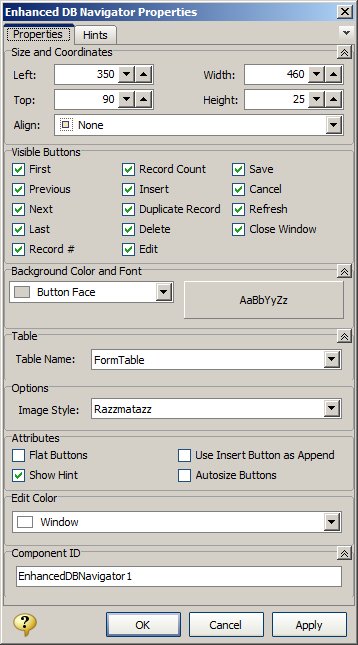
Did you know that you can use the [Insert] button as [Append]?

As easy as 1-2-3 ...

01. Start R:BASE eXtreme 9.5 (32/64)
    http://www.rupdates.com

02. While in Form Designer, select the Enhanced DB Navigator Control

03. Right-Click or [F11] for Enhanced DB Navigator Control Properties

    Notice the option ...

    [ ] Use Insert Button as Append

    http://www.razzak.com/tips/RBG95_EnhancedDBNavigatorProperties.jpg

That's all there is to it!

Very Best R:egards,

Razzak.