Monday, October 1, 2012

Tip of the Day: Using INPUT Color for DIALOG Command
Product: R:BASE eXtreme 9.5 (32/64)
Build..: 9.5.2.10920 or higher www.rupdates.com
Section: Using INPUT Color for DIALOG Command
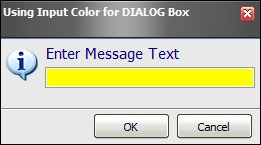
Did you know that you can use "INPUT_BACKGROUND_COLOR value" to
customize the input box background color in DIALOG command?

Example: http://www.razzak.com/tips/Dialog_Input_Color.jpg

Here's how:

-- Using_Input_Color_For_Dialog.RMD
-- Author: A. Razzak Memon
-- October 1, 2012
-- R:BASE eXtreme 9.5 (32/64), Build: 9.5.2.10920 or higher
   SET VAR vInput TEXT = NULL
   SET VAR vEndKey TEXT = NULL
   SET VAR vCaption TEXT = 'Using Input Color for DIALOG Box'
LABEL GetInput
   CLS
   SET VAR vInput = NULL
   DIALOG 'Enter Message Text' vInput=30 vEndKey 1 +
   CAPTION  .vCaption ICON INFO +
   OPTION MESSAGE_FONT_NAME Tahoma +
   |MESSAGE_FONT_COLOR NAVY +
   |MESSAGE_FONT_SIZE 11 +
   |INPUT_BACKGROUND_COLOR YELLOW +
   |THEMENAME Longhorn
IF vEndKey = '[Esc]' THEN
   GOTO Done
ENDIF
IF vInput IS NULL THEN
   PAUSE 2 USING 'Missing Message Text' +
   CAPTION .vCaption ICON WARNING +
   BUTTON 'Press any key to enter message text' +
   OPTION MESSAGE_FONT_NAME Tahoma +
   |MESSAGE_FONT_COLOR RED +
   |MESSAGE_FONT_SIZE 11 +
   |INPUT_BACKGROUND_COLOR YELLOW +
   |THEMENAME Longhorn
   GOTO GetInput
ENDIF
   -- Do what you have to do here ...
LABEL Done
   CLEAR VARIABLES vInput,vEndKey,vCaption
   RETURN

Stay productive, my friends!

Very Best R:egards,

Razzak.

www.rbase.com
www.facebook.com/rbase
www.Razzak.com
www.RazzakMemon.com