Friday, May 3, 2013

Tip of the Day: Managing Embedded Resources for Compiled Applications
Product: R:BASE eXtreme 9.5 (32/64)
Build..: 9.5.2.20430 or higher www.rupdates.com
Section: Managing Compiled Application Resources
Using the R:Compiler for R:BASE eXtreme 9.5 (32/64)
Project|Additional Resources
option, you may embed the following database and file resources in
your compiled
executable project, such as:

. External Form Files
. R:BASE Forms
. R:BASE Reports
. R:BASE Labels
. Themes (.msstyles, .theme, .uskn, .kskn, .xskn, .mskn)
. Runtime Licenses
. Plugins (.rbm)
. Misc. Files, including:
  - R:BASE Command Files
    .dat
    .rmd
    .cmd
    .app
    .eep
  - R:Charts chart files (.rbc)
  - R:BASE Gateway Import/Export Specification files (.rgw)
  - R:Mail Editor Template files (.rmt)

In addition, you may also embed the R:BASE Engine file(.dll) into the compiled
executable, as well as define the executable to allow only one instance of the
compiled application.

Once the project is deployed, managing embedded resources for your compiled
application is as critical as keeping up with the updated versions of R:BASE.

In addition to re-compiling and distributing the new compiled executables,
using the current version and update of R:Compiler 9.5, you will also need
to make sure that you have included the updated versions of all External
Form Files, Plugins, and Misc. Files, if updated.

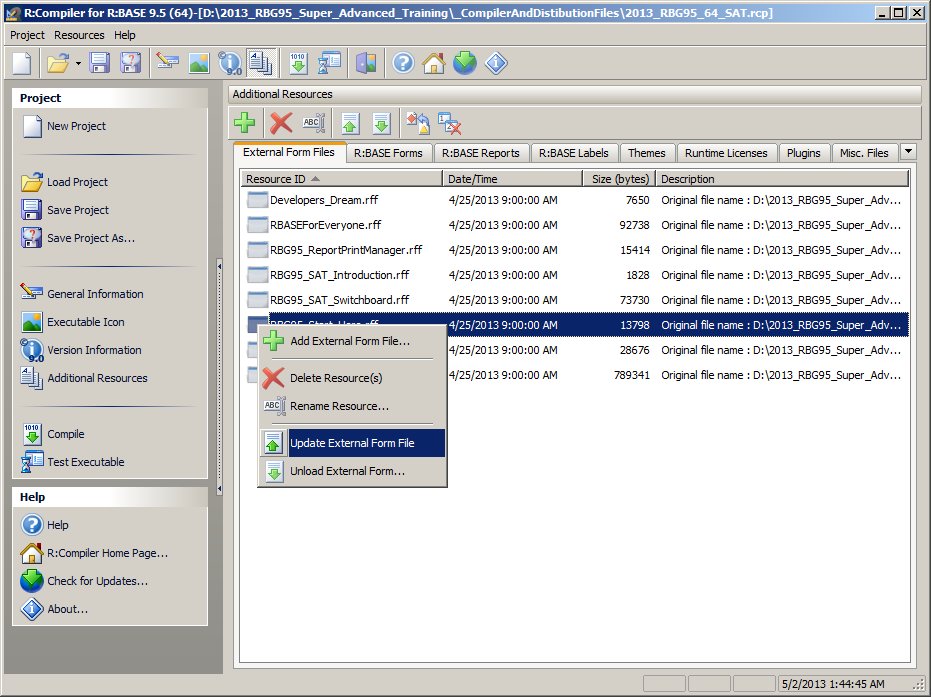
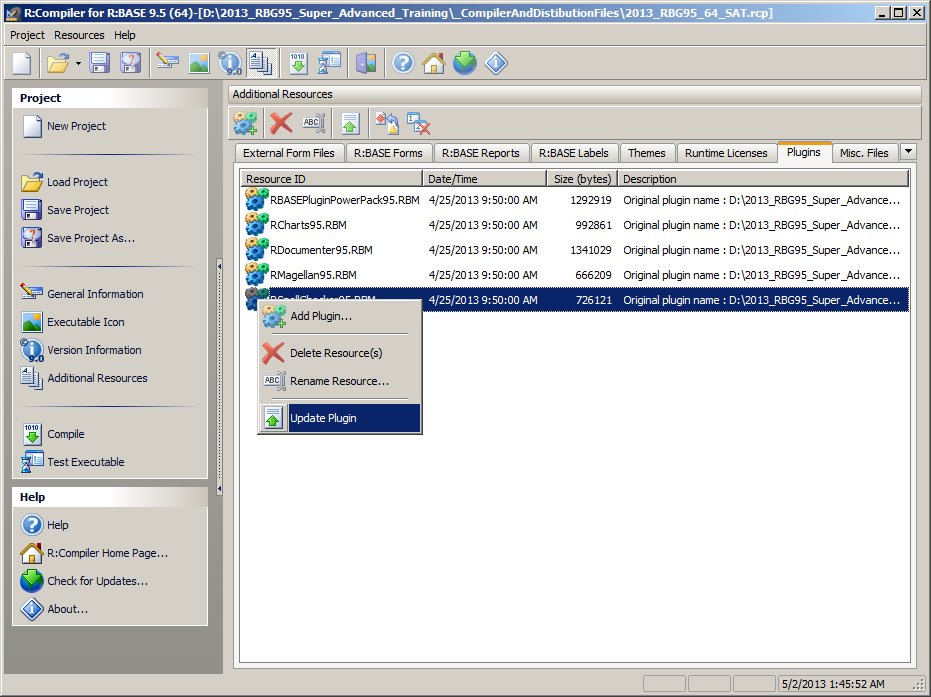
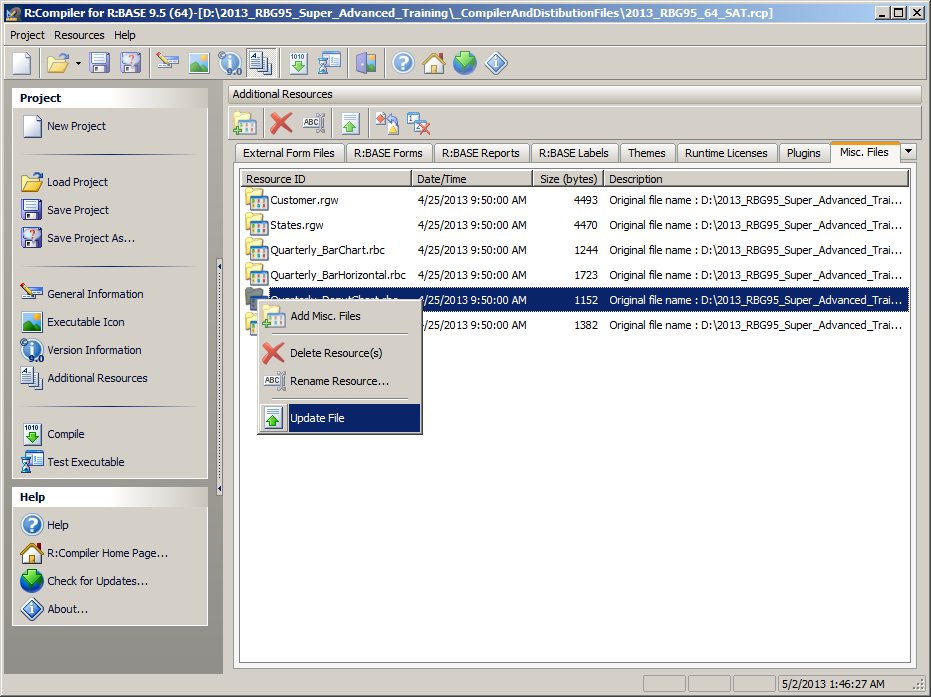
Did you that you can Update External Form Files, Plugins, and Misc. Files by
simply using the right-click and select Update option?

Here's how:

-- Updating External Form Files:
   http://www.Razzak.com/tips/RCompiler_Additional_Resources_01.jpg

-- Updating Plugins:
   http://www.Razzak.com/tips/RCompiler_Additional_Resources_02.jpg

-- Updating Misc. Files:
   http://www.Razzak.com/tips/RCompiler_Additional_Resources_03.jpg

Stay productive, my friends!

Very Best R:egards,

Razzak.

www.rbase.com
www.facebook.com/rbase
www.RazzakMemon.com

--- RBASE-L
================================================
TO POST A MESSAGE TO ALL MEMBERS:
Send a plain text email to [email protected]

(Don't use any of these words as your Subject:
INTRO, SUBSCRIBE, UNSUBSCRIBE, SEARCH,
REMOVE, SUSPEND, RESUME, DIGEST, RESEND, HELP)
================================================
TO SEE MESSAGE POSTING GUIDELINES:
Send a plain text email to [email protected]
In the message SUBJECT, put just one word: INTRO
================================================
TO UNSUBSCRIBE:
Send a plain text email to [email protected]
In the message SUBJECT, put just one word: UNSUBSCRIBE
================================================
TO SEARCH ARCHIVES:
Send a plain text email to [email protected]
In the message SUBJECT, put just one word: SEARCH-n
(where n is the number of days). In the message body,
place any
text to search for.
================================================