Wednesday, March 19, 2014

Tip of the Day: Data Dictionary - Capturing Computed Column Expression
Product.: R:BASE eXtreme 9.5 (32/64)
Build...: 9.5.4.30310 or higher www.rupdates.com
Keywords: Data Dictionary, Computed Columns, Expressions, Programming
Section.: Utilities
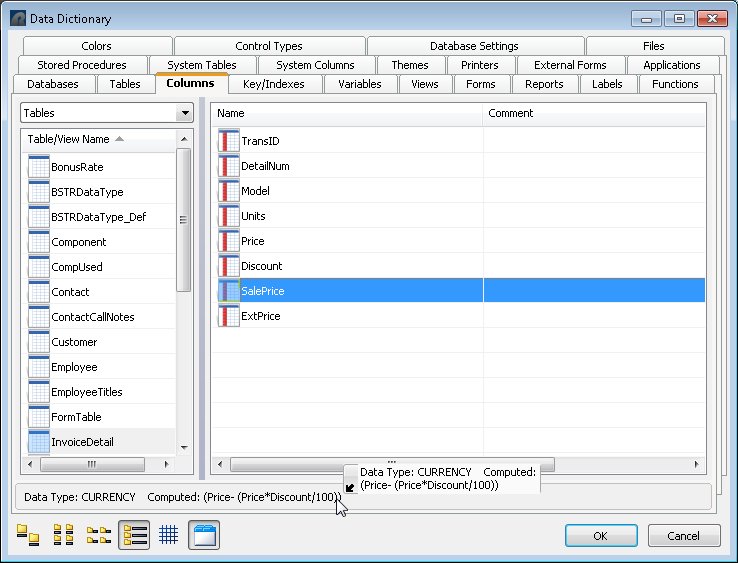
Did you know that when a computed column is displayed in the Data Dictionary,
it is possible to copy the entire column definition or just the formula?

While using the R:BASE Editor, pressing the F3 key, and selecting a specific
computed column, the expression/formula is listed.

http://www.razzak.com/tips/DD_Columns_Computed.jpg

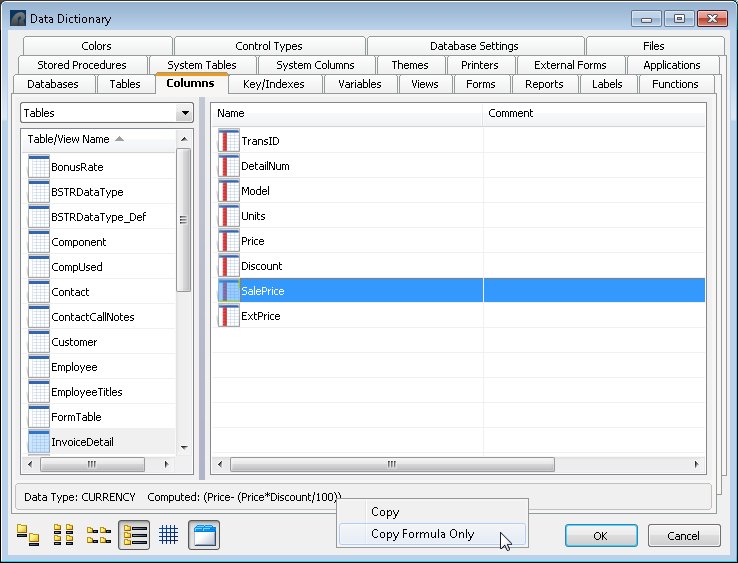
By then using the right-click mouse button, a menu is available to copy the
complete column definition or only the formula.

http://www.razzak.com/tips/DD_Columns_Computed_Formula.jpg

Selecting either option will place the text in the clipboard.

Please Note:

You will have to click on the [Cancel] button and NOT the [OK] button to
retain the copied "formula" to paste into the R:BASE Editor, or any other
source.

Pressing the [OK] button will overwrite previously copied string with
currently selected column(s), as intended with the Data Dictionary.

The latest "Using the R:BASE Data Dictionary in R:BASE eXtreme 9.5"
technical document is also available at:

From The Edge: http://www.razzak.com/fte

Enjoy the showcase and pride of our eXpanded R:Dream Team!

Very Best R:egards,

Razzak.

www.rbase.com
www.facebook.com/rbase
www.Razzak.com
www.RazzakMemon.com
--
31 years of continuous innovation!
16 Years of R:BASE Technologies, Inc. making R:BASE what it is today!
--

--- RBASE-L
================================================
TO POST A MESSAGE TO ALL MEMBERS:
Send a plain text email to [email protected]

(Don't use any of these words as your Subject:
INTRO, SUBSCRIBE, UNSUBSCRIBE, SEARCH,
REMOVE, SUSPEND, RESUME, DIGEST, RESEND, HELP)
================================================
TO SEE MESSAGE POSTING GUIDELINES:
Send a plain text email to [email protected]
In the message SUBJECT, put just one word: INTRO
================================================
TO UNSUBSCRIBE:
Send a plain text email to [email protected]
In the message SUBJECT, put just one word: UNSUBSCRIBE
================================================
TO SEARCH ARCHIVES:
Send a plain text email to [email protected]
In the message SUBJECT, put just one word: SEARCH-n
(where n is the number of days). In the message body,
place any
text to search for.
================================================