Great addition. Users should also note that for this to workyou cannot have a
popup menu defined for the field in addition to
the other restrictions.
 Jim Bentley,
 American Celiac Society
1-504-737-3293
      From: A. Razzak Memon <[email protected]>
 To: RBASE-L Mailing List <[email protected]>
 Sent: Tuesday, June 30, 2015 9:22 AM
 Subject: [RBASE-L] - Tip of the Day: Automating Date/Time Fields in Forms

Tuesday, June 30, 2015
Tip of the Day: Automating Date/Time Fields in Forms
Product: R:BASE eXtreme 9.5 (32/64)
Build..: 9.5.5.20625 or higher
www.rbaseupdates.com
www.rupdates.com (Mirror Site)
Section.: Form Controls
Keywords: Date Time

Did you know ...

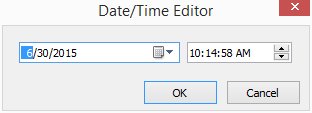
If you have a DB Edit or Variable Edit control placed on a form that is
associated with a column or variable having DATETIME data type, you can
automate the data entry by double-clicking or using the [Alt+Insert] to
bring up the Date/Time Editor to fill-in the date time value.

http://www.razzak.com/tips/Form_DateTime_Editor.jpg

The DB Edit/Variable Edit controls were enhanced to display a date/time
editor, if the control is based upon a DATETIME data type. The date/time
editor will open if the control is double clicked or if [Alt+Insert] is
pressed.

If exists, the control hint will be used as the date/time editor title bar
text.

Note:

The double click will only work if there is no EEP assigned to the double
click event.

Have fun customizing R:BASE eXtreme 9.5 and R:BASE X (ver 10) applications!

Very Best R:egards,

Razzak

www.rbase.com
www.rbaseX.com
www.facebook.com/rbase
--
32 years of continuous innovation!
17 Years of R:BASE Technologies, Inc. making R:BASE what it is today!
--