Thanks Razzak,

I actually did that with the latest RSCOPE and was able to start the maint.
Routine.
I went through the routine but was getting errors.
One at a time, as you suggest in the maint. PDF, I was able to get rid of them.
However after I had everything seemingly fixed, I continued to get this SET
error.
I looked at the .ALL file and at the very end it had this SET BLANK at the very
end.
Even if I would get rid of that before running the maint. Routine, it keeps
popping back up.
I appreciate the suggestions.

James Belisle

Making Information Systems People Friendly Since 1990


-----Original Message-----
From: [email protected] [mailto:[email protected]] On Behalf Of A. Razzak Memon
Sent: Saturday, February 20, 2016 10:32 AM
To: Jim Belisle
Subject: [RBASE-L] - Re: restoring DB

At 11:14 AM 2/20/2016, Jim Belisle wrote:

>I have made some progress in restoring the DB that was corrupted but I
>still get one constant error.
>At the very end of the reload, I get the message about a SET command.
>For some reason the last command in the file is a SET BLANK command.
>That seems to be causing the problem.
>
>Anyone have any Blues clues as to why this is showing up?


Jim,

I have been following this thread with great interest, and all responses you
have received from fellow R:BASE users on this list.

However ...

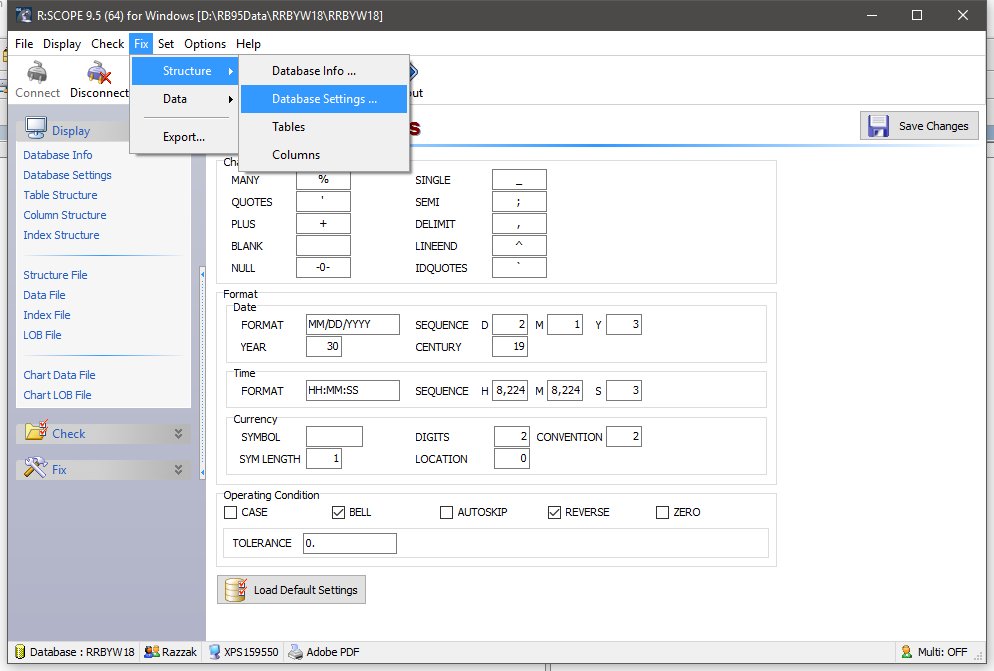
Did you know that the latest version and update of R:Scope 9.5 32/64)
(Build: 9.5.5.21222 or higher) includes a new setting to "Fix" Database
Settings?

Here's how ...

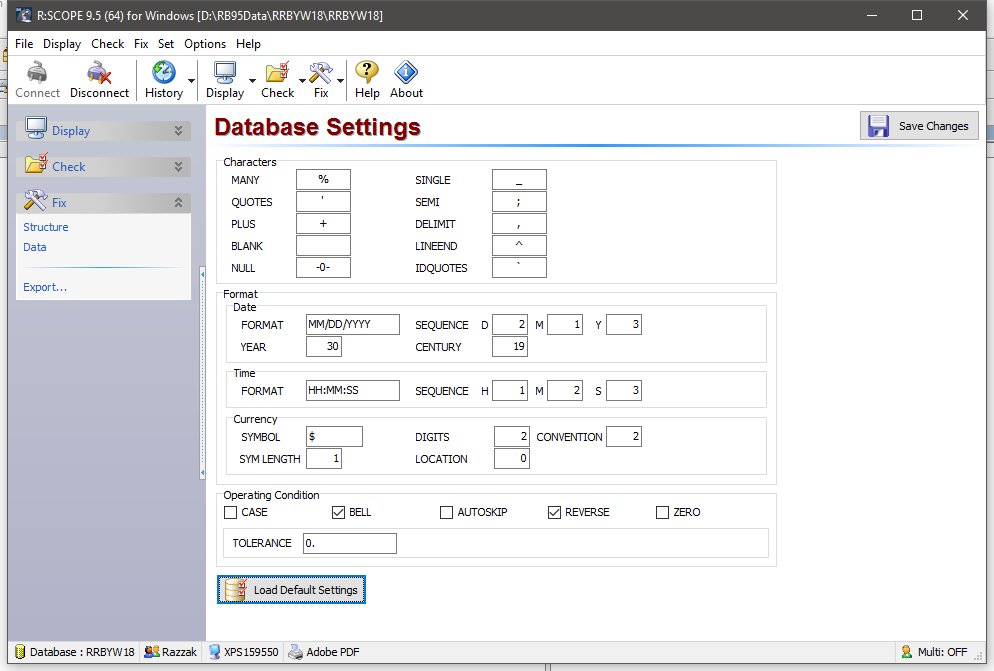
01. Start R:Scope 9.5 (64) and Connect the database 02. Main Menu | Fix |
Structure | Database Settings ...
03. Click on [Load Default Settings] button 04. Click on [Save Changes]

http://www.razzak.com/tips/RScope95_64_Fix_Database_Settings_01.jpg
http://www.razzak.com/tips/RScope95_64_Fix_Database_Settings_02.jpg

That's all there is to it!

This single step alone should get you back in business. Then, you can perform
all your database maintenance to assure the health of your DB.

Very Best R:egards,

Razzak.