I can confirm this. The URL of a page is not accessible from within
redertags.

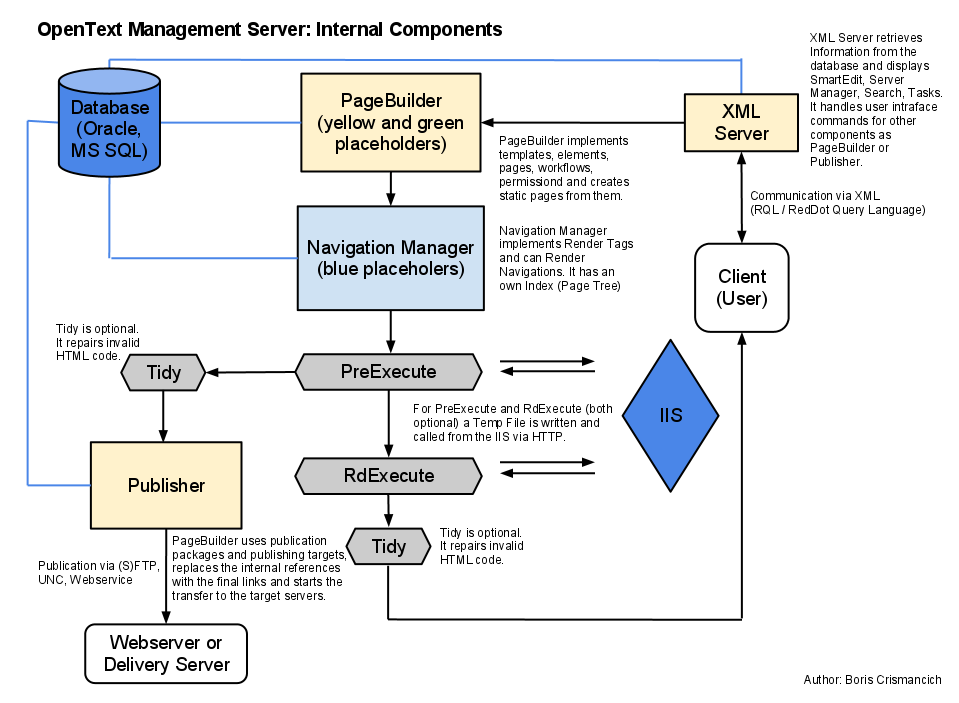
The order of things being executed in CMS is:

<https://lh4.googleusercontent.com/-DuCD6cfmdpo/U6vGabr33tI/AAAAAAAABJo/zi1lFYBWfCI/s1600/OpenTextManagementServerRedDotCMS+%281%29.png>
This is just rough and not absolutely precise. But gives a good overview of
things happening in CMS, I think.

1. PageBuilder (yellow placeholders and green blockmarks)
2. Navigation Manager (blue render tags)
3. PreExecute (active templates)

Finally the pages are requested from the publisher. On this Page, the
publisher will compute the real URLs of pages for each language variant,
considering file name settings, file names, publication packages,
publication targets and stuff like URL prefixes. So you don't have a chance
to access path and file name of a page from within rendertags or preexecute.

An exmaple: Imagine you have two identical project variants that are
published to different targets, with different prefixes. The same page
would then be published to times to different locations. E.g.
/prefixOfTarget1/pages/123.htm and /prefixOfTarget2/pages/123.htm. So it's
impossible to get path and file name before the publisher was running.

Regars,
Boris


Am Montag, 23. Juni 2014 02:24:53 UTC+2 schrieb HiRAEdd:
>
> Jian is the master of all things render taggy :) but yes, I believe the
> render tag is processed before the URL is constructed.
>
>
> On 22 June 2014 08:30, Walter <[email protected] <javascript:>> wrote:
>
>> Thanks Gavin, that puts me on the right track.  And removing the "Value"
>> works. :)
>>
>> I have another question.  I'm trying to create a multi-lingual sitemap
>> <https://support.google.com/webmasters/answer/2620865>, and would like
>> to modify the URLs in the sitemap to correspond with different language
>> variants.  I can get the following tag to work in Page Preview, but it
>> doesn't seem to work when I publish.
>>
>> <%!! Context:CurrentIndex.GetUrl().Replace(string1,string2) !!%>
>>
>> My feeling is that the Replace method is executed *before *the published
>> URL is constructed, and not after.  That's why I can get it to replace
>> things in the Preview URL, but not in the published version.  Would that be
>> a correct assumption?  Any further ideas or thoughts!
>>
>> Thanks so much,
>> Walter
>>
>>
>> On Thursday, June 19, 2014 5:13:14 PM UTC-6, HiRAEdd wrote:
>>
>>> I don't think you need the .Value in the tag above.
>>>
>>> And yes, you can use the Replace method. The Navigation Manager manual
>>> documents the available objects, properties and methods.
>>>
>>> Cheers,
>>>
>>> Gavin
>>>
>>>
>>> On 20 June 2014 08:52, Walter <[email protected]> wrote:
>>>
>>>> Hello,
>>>>
>>>> Is it possible to do string functions in the Navigation Manager using
>>>> render tags?  For instance:
>>>>
>>>> <%!! Context:CurrentIndex.GetPath().Value.Replace(val1,val2) !!%>
>>>>
>>>> Is that possible?  I haven't had any luck with it so far.
>>>>
>>>> Thanks!
>>>> Walter
>>>>
>>>> --
>>>> You received this message because you are subscribed to the Google
>>>> Groups "RedDot CMS Users" group.
>>>> To unsubscribe from this group and stop receiving emails from it, send
>>>> an email to [email protected].
>>>> To post to this group, send email to [email protected].
>>>>
>>>> Visit this group at http://groups.google.com/group/reddot-cms-users.
>>>> For more options, visit https://groups.google.com/d/optout.
>>>>
>>>
>>>  --
>> You received this message because you are subscribed to the Google Groups
>> "RedDot CMS Users" group.
>> To unsubscribe from this group and stop receiving emails from it, send an
>> email to [email protected] <javascript:>.
>> To post to this group, send email to [email protected]
>> <javascript:>.
>> Visit this group at http://groups.google.com/group/reddot-cms-users.
>> For more options, visit https://groups.google.com/d/optout.
>>
>
>

--
You received this message because you are subscribed to the Google Groups
"RedDot CMS Users" group.
To unsubscribe from this group and stop receiving emails from it, send an email
to [email protected].
To post to this group, send email to [email protected].
Visit this group at http://groups.google.com/group/reddot-cms-users.
For more options, visit https://groups.google.com/d/optout.