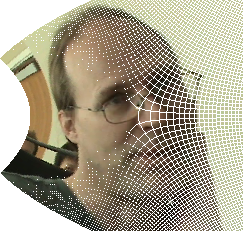
Here's one attempt at such a thing.  It might be better to use the
inverse map, since you get artifacts doing the forward image pixel by
pixel.
Result at: http://www.d.umn.edu/~mhampton/testing.png
and original image: http://www.d.umn.edu/~mhampton/davep.png
for z -> z + z^2/2
from PIL import Image
old_im = Image.open(DATA + 'davep.png')
s1,s2 = old_im.size
new_im = Image.new('RGB',(s1,s2), (255,255,255))
old_data = list(old_im.getdata())
old_data = [old_data[i*s1:i*s1+s1] for i in range(s2)]
new_data = [[(255,255,255) for i in range(s1)] for j in range(s2)]
s1f = float(s1)
s2f = float(s2)
cI = CDF(I)
for i in srange(0,s1):
    x = i/s1f - .5
    for j in srange(0,s2):
        y = j/s2f - .5
        z = (x+y*cI) + (x+y*cI)^2/2
        oi = int(round((z.real()+.5)*s1f))
        oj = int(round((z.imag()+.5)*s2f))
        if oi in range(s1) and oj in range(s2):
            new_data[oj][oi] = old_data[j][i]
new_im = Image.new('RGB',(s1, s2), (255,255,255))
new_im.putdata(flatten(new_data,ltypes=type([])))
new_im.save('./testing.png')

On Mar 2, 5:28 pm, David Joyner <[email protected]> wrote:
> Doeshttp://trac.sagemath.org/sage_trac/ticket/6648
> help?
>
> On Tue, Mar 2, 2010 at 6:06 PM, davidp <[email protected]> wrote:
> > For a class I am teaching, I would like to display an image in the
> > plane---say a png-file--- and show how it is transformed under a
> > complex function f: C --> C.  What is the best way to do this?
>
> > Thanks,
> > Dave
>
> > --
> > To post to this group, send email to [email protected]
> > To unsubscribe from this group, send email to
> > [email protected]
> > For more options, visit this group
> > athttp://groups.google.com/group/sage-support
> > URL:http://www.sagemath.org

--
To post to this group, send email to [email protected]
To unsubscribe from this group, send email to
[email protected]
For more options, visit this group at
http://groups.google.com/group/sage-support
URL: http://www.sagemath.org