Thank you Greg, I had sent an example but I am pasting it in again if that is
exaptabul????
  Normal
  0


  MicrosoftInternetExplorer4


https://dl.dropboxusercontent.com/u/53724979/Diwedd%20prawf%201.sla

Wena


 /* Style Definitions */
 table.MsoNormalTable
        {mso-style-name:"Table Normal";
        mso-tstyle-rowband-size:0;
        mso-tstyle-colband-size:0;
        mso-style-noshow:yes;
        mso-style-parent:"";
        mso-padding-alt:0cm 5.4pt 0cm 5.4pt;
        mso-para-margin:0cm;
        mso-para-margin-bottom:.0001pt;
        mso-pagination:widow-orphan;
        font-size:10.0pt;
        font-family:"Times New Roman";}


----Original Message----
From: [email protected]
Date: 02/10/2016 13:00
To: <scribus at lists.scribus.net>
Subj: scribus Digest, Vol 103, Issue 2

Send scribus mailing list submissions to
        scribus at lists.scribus.net

To subscribe or unsubscribe via the World Wide Web, visit
        http://lists.scribus.net/mailman/listinfo/scribus
or, via email, send a message with subject or body 'help' to
        scribus-request at lists.scribus.net

You can reach the person managing the list at
        scribus-owner at lists.scribus.net

When replying, please edit your Subject line so it is more specific
than "Re: Contents of scribus digest..."


Today's Topics:

   1.  English Welsh forn problem. (wena-parry at talktalk.net)
   2. Re:  English Welsh forn problem. (Gregory Pittman)


----------------------------------------------------------------------

Message: 1
Date: Sat, 1 Oct 2016 20:20:33 +0100 (BST)
From: "wena-parry at talktalk.net" <[email protected]>
To: <scribus at lists.scribus.net>
Subject: [scribus] English Welsh forn problem.
Message-ID:
        <28290606.110371475349633888.JavaMail.defaultUser at defaultHost>
Content-Type: text/plain; charset="utf-8"


  Normal
  0


  MicrosoftInternetExplorer4


I have
installed a Scribus 1.5 2 on my Windows 7 laptop 64 bit. I have a large graphic
on a A4 page. With 2 text boxes, one in Welsh and
the other in English. Although I have seat both boxes to the same font and size
and line
spacing the same. I get different line spacing and font size.


Opening the
editing part of I find that the Welsh text is in a completely different editing
system to the English. I have attempted to set them both the same font, size,
and line spacing.


I have also
attempted to do the same thing in Scribus 1.4.5 and 1.4.4 but with the same
result, this
computer is a Windaws XP 32 bit.


Is there a
solution.


Is it
something I am doing incorrectly??


Help!!

Wena D. Parry


Example
attached.

https://dl.dropboxusercontent.com/u/53724979/Diwedd%20prawf%201.sla


st1\:*{behavior:url(#ieooui) }


 /* Style Definitions */
 table.MsoNormalTable
        {mso-style-name:"Table Normal";
        mso-tstyle-rowband-size:0;
        mso-tstyle-colband-size:0;
        mso-style-noshow:yes;
        mso-style-parent:"";
        mso-padding-alt:0cm 5.4pt 0cm 5.4pt;
        mso-para-margin:0cm;
        mso-para-margin-bottom:.0001pt;
        mso-pagination:widow-orphan;
        font-size:10.0pt;
        font-family:"Times New Roman";}


----Original Message----
From: [email protected]
Date: 01/10/2016 13:00
To: <scribus at lists.scribus.net>
Subj: scribus Digest, Vol 103, Issue 1

Send scribus mailing list submissions to
        scribus at lists.scribus.net

To subscribe or unsubscribe via the World Wide Web, visit
        http://lists.scribus.net/mailman/listinfo/scribus
or, via email, send a message with subject or body 'help' to
        scribus-request at lists.scribus.net

You can reach the person managing the list at
        scribus-owner at lists.scribus.net

When replying, please edit your Subject line so it is more specific
than "Re: Contents of scribus digest..."


Today's Topics:

   1. Re:  scribus Digest, Vol 102, Issue 14 (wena-parry at talktalk.net)
   2. Re:  pdf form: textbox entries get right justified
      (Gregory Pittman)
   3. Re:  scribus Digest, Vol 102, Issue 14 (wena-parry at talktalk.net)


----------------------------------------------------------------------

Message: 1
Date: Fri, 30 Sep 2016 14:27:46 +0100 (BST)
From: "wena-parry at talktalk.net" <[email protected]>
To: <scribus at lists.scribus.net>
Subject: Re: [scribus] scribus Digest, Vol 102, Issue 14
Message-ID:
        <28597954.102271475242066732.JavaMail.defaultUser at defaultHost>
Content-Type: text/plain; charset="utf-8"


  Normal
  0


  MicrosoftInternetExplorer4


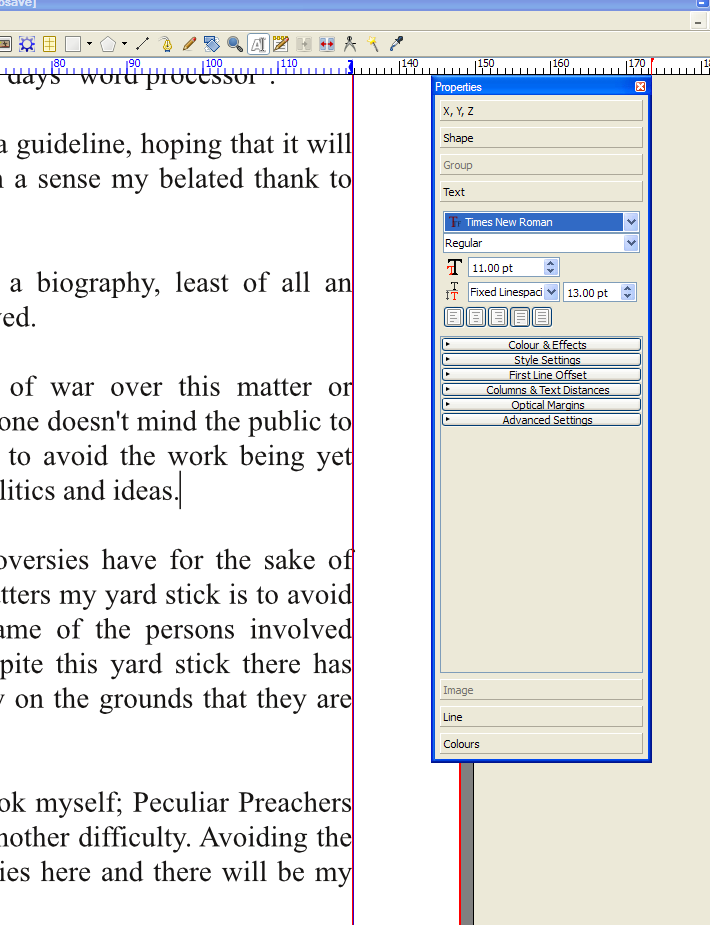
Hi.If you haven?t
got the ?Properties box showing go to the ?Windows? pull down options and there
take you curser on properties. In that box you have all the choices you need.


In the
screen shot I have attached I have given you the options you will need. However
if your text if not highlighted
you will have to do so. There are options in the properties box for left
aright, centre, right alien
and alien both sides.

 You will
also see fonts, font size and so may other things. If you scroll down the box
you will
come to the graphics control.

 Wena Parry

South
 Wales. U.K.My system will not send the attachment but I will abl to send its
address from my cloud. In an houre or two.


st1\:*{behavior:url(#ieooui) }


 /* Style Definitions */
 table.MsoNormalTable
        {mso-style-name:"Table Normal";
        mso-tstyle-rowband-size:0;
        mso-tstyle-colband-size:0;
        mso-style-noshow:yes;
        mso-style-parent:"";
        mso-padding-alt:0cm 5.4pt 0cm 5.4pt;
        mso-para-margin:0cm;
        mso-para-margin-bottom:.0001pt;
        mso-pagination:widow-orphan;
        font-size:10.0pt;
        font-family:"Times New Roman";}


----Original Message----
From: [email protected]
Date: 29/09/2016 13:00
To: <scribus at lists.scribus.net>
Subj: scribus Digest, Vol 102, Issue 14

Send scribus mailing list submissions to
        scribus at lists.scribus.net

To subscribe or unsubscribe via the World Wide Web, visit
        http://lists.scribus.net/mailman/listinfo/scribus
or, via email, send a message with subject or body 'help' to
        scribus-request at lists.scribus.net

You can reach the person managing the list at
        scribus-owner at lists.scribus.net

When replying, please edit your Subject line so it is more specific
than "Re: Contents of scribus digest..."


Today's Topics:

   1.  pdf form: textbox entries get right justified (Corey Moffet)


----------------------------------------------------------------------

Message: 1
Date: Wed, 28 Sep 2016 16:15:58 -0500
From: Corey Moffet <[email protected]>
To: scribus at lists.scribus.net
Subject: [scribus] pdf form: textbox entries get right justified
Message-ID:
        <CADCxGj4SnAND8ikqGAqxNJUcDc2n24qSA0iDphrfXkTBiTA+=A at mail.gmail.com>
Content-Type: text/plain; charset="utf-8"

I have made a pdf form in Scribus and I'm pleased with the form layout.
However, text that's entered in textfields gets right justified in the
box.  This is particularly disappointing for large multiline entries that
span the entire page.  I am still relatively new to Scribus, but it's not
obvious to me where, or if, this behavior can be changed, nor have I had
any luck finding information about this on the Scribus wiki.  Does anyone
know how to get the text that's entered in a pdf form's textfield to left
justify?
-------------- next part --------------
An HTML attachment was scrubbed...
URL:
<http://lists.scribus.net/pipermail/scribus/attachments/20160928/8a8d9a9c/attachment.html>

------------------------------

Subject: Digest Footer

_______________________________________________
scribus mailing list
scribus at lists.scribus.net
http://lists.scribus.net/mailman/listinfo/scribus


------------------------------

End of scribus Digest, Vol 102, Issue 14
****************************************


-------------- next part --------------
An HTML attachment was scrubbed...
URL:
<http://lists.scribus.net/pipermail/scribus/attachments/20160930/186860af/attachment.html>
-------------- next part --------------
A non-text attachment was scrubbed...
Name: Properties.PNG
Type: image/png
Size: 144920 bytes
Desc: not available
URL:
<http://lists.scribus.net/pipermail/scribus/attachments/20160930/186860af/attachment.png>

------------------------------

Message: 2
Date: Fri, 30 Sep 2016 10:08:26 -0400
From: Gregory Pittman <[email protected]>
To: scribus at lists.scribus.net
Subject: Re: [scribus] pdf form: textbox entries get right justified
Message-ID: <11a38472-0337-516a-0380-fe6852ee9b87 at iglou.com>
Content-Type: text/plain; charset=windows-1252

On 09/28/2016 05:15 PM, Corey Moffet wrote:
> I have made a pdf form in Scribus and I'm pleased with the form layout.
> However, text that's entered in textfields gets right justified in the
> box.  This is particularly disappointing for large multiline entries that
> span the entire page.  I am still relatively new to Scribus, but it's not
> obvious to me where, or if, this behavior can be changed, nor have I had
> any luck finding information about this on the Scribus wiki.  Does anyone
> know how to get the text that's entered in a pdf form's textfield to left
> justify?


I checked this out in 1.5.3svn and couldn't see an issue. The settings
for PDF form textfields are admittedly not so straightforward.
There is only an implicit justification.
After you create your textfield frame, double click to bring up the
Field Properties dialog.
Under Options, choose for multiline text.
Under Format, you should have Plain Text selected, which should give
left-justified text. Currency and I think also Number and Percentage
will right-justify.


As I say, when I tried this and later entered multiline text in the PDF
form, it was all left-justified.

Greg


------------------------------

Message: 3
Date: Fri, 30 Sep 2016 15:36:24 +0100 (BST)
From: "wena-parry at talktalk.net" <[email protected]>
To: <scribus at lists.scribus.net>
Subject: Re: [scribus] scribus Digest, Vol 102, Issue 14
Message-ID:
        <19304.103211475246184059.JavaMail.defaultUser at defaultHost>
Content-Type: text/plain; charset="utf-8"


  Normal
  0


  MicrosoftInternetExplorer4


As promised, hear is the  hyper link for you to see the ?property? BOX. Then
you will see some square boxes they give you choices.
https://dl.dropboxusercontent.com/u/53724979/Properties.PNG


Wena

st1\:*{behavior:url(#ieooui) }


 /* Style Definitions */
 table.MsoNormalTable
        {mso-style-name:"Table Normal";
        mso-tstyle-rowband-size:0;
        mso-tstyle-colband-size:0;
        mso-style-noshow:yes;
        mso-style-parent:"";
        mso-padding-alt:0cm 5.4pt 0cm 5.4pt;
        mso-para-margin:0cm;
        mso-para-margin-bottom:.0001pt;
        mso-pagination:widow-orphan;
        font-size:10.0pt;
        font-family:"Times New Roman";}


----Original Message----
From: [email protected]
Date: 29/09/2016 13:00
To: <scribus at lists.scribus.net>
Subj: scribus Digest, Vol 102, Issue 14

Send scribus mailing list submissions to
        scribus at lists.scribus.net

To subscribe or unsubscribe via the World Wide Web, visit
        http://lists.scribus.net/mailman/listinfo/scribus
or, via email, send a message with subject or body 'help' to
        scribus-request at lists.scribus.net

You can reach the person managing the list at
        scribus-owner at lists.scribus.net

When replying, please edit your Subject line so it is more specific
than "Re: Contents of scribus digest..."


Today's Topics:

   1.  pdf form: textbox entries get right justified (Corey Moffet)


----------------------------------------------------------------------

Message: 1
Date: Wed, 28 Sep 2016 16:15:58 -0500
From: Corey Moffet <[email protected]>
To: scribus at lists.scribus.net
Subject: [scribus] pdf form: textbox entries get right justified
Message-ID:
        <CADCxGj4SnAND8ikqGAqxNJUcDc2n24qSA0iDphrfXkTBiTA+=A at mail.gmail.com>
Content-Type: text/plain; charset="utf-8"

I have made a pdf form in Scribus and I'm pleased with the form layout.
However, text that's entered in textfields gets right justified in the
box.  This is particularly disappointing for large multiline entries that
span the entire page.  I am still relatively new to Scribus, but it's not
obvious to me where, or if, this behavior can be changed, nor have I had
any luck finding information about this on the Scribus wiki.  Does anyone
know how to get the text that's entered in a pdf form's textfield to left
justify?
-------------- next part --------------
An HTML attachment was scrubbed...
URL:
<http://lists.scribus.net/pipermail/scribus/attachments/20160928/8a8d9a9c/attachment.html>

------------------------------

Subject: Digest Footer

_______________________________________________
scribus mailing list
scribus at lists.scribus.net
http://lists.scribus.net/mailman/listinfo/scribus


------------------------------

End of scribus Digest, Vol 102, Issue 14
****************************************


-------------- next part --------------
An HTML attachment was scrubbed...
URL:
<http://lists.scribus.net/pipermail/scribus/attachments/20160930/647b1893/attachment.html>

------------------------------

Subject: Digest Footer

_______________________________________________
scribus mailing list
scribus at lists.scribus.net
http://lists.scribus.net/mailman/listinfo/scribus


------------------------------

End of scribus Digest, Vol 103, Issue 1
***************************************


-------------- next part --------------
An HTML attachment was scrubbed...
URL:
<http://lists.scribus.net/pipermail/scribus/attachments/20161001/76c6c363/attachment.html>

------------------------------

Message: 2
Date: Sat, 1 Oct 2016 16:53:13 -0400
From: Gregory Pittman <[email protected]>
To: scribus at lists.scribus.net
Subject: Re: [scribus] English Welsh forn problem.
Message-ID: <f6dd2315-b586-21c1-baf7-6e8449dc994f at iglou.com>
Content-Type: text/plain; charset=windows-1252

On 10/01/2016 03:20 PM, wena-parry at talktalk.net wrote:
>
>

> I have
> installed a Scribus 1.5 2 on my Windows 7 laptop 64 bit. I have a large
> graphic on a A4 page. With 2 text boxes, one in Welsh and
> the other in English. Although I have seat both boxes to the same font and
> size and line
> spacing the same. I get different line spacing and font size.
>
>
> Opening the
> editing part of I find that the Welsh text is in a completely different
> editing
> system to the English. I have attempted to set them both the same font, size,
> and line spacing.
>
>
> I have also
> attempted to do the same thing in Scribus 1.4.5 and 1.4.4 but with the same
> result, this
> computer is a Windaws XP 32 bit.
>
>
> Is there a
> solution.
>
>
> Is it
> something I am doing incorrectly??
>

You might try setting up a Paragraph style, then use the style for each
frame and see what happens. It's probably worth submitting a bug report
for this, if you can include an example file for others to analyze.

Greg


------------------------------

Subject: Digest Footer

_______________________________________________
scribus mailing list
scribus at lists.scribus.net
http://lists.scribus.net/mailman/listinfo/scribus


------------------------------

End of scribus Digest, Vol 103, Issue 2
***************************************


-------------- next part --------------
An HTML attachment was scrubbed...
URL:
<http://lists.scribus.net/pipermail/scribus/attachments/20161003/c95141fc/attachment.html>