Tried the autokey on 2105 sp2 with a GTX980, it doesn’t work good.. saves keys
only when releasing the mouse, and does not allow me
to move the object freely, just an axis at a time..
Remembering channels from SI|3D, I managed to get it to work (sort of) in XSI,

Under the animation panel, Devices>Manage device drivers – then click add
choose the mouse (or what ever)
Now you can start capture , and it will capture your movements..


From: [email protected]
[mailto:[email protected]] On Behalf Of Sven Constable
Sent: יום ג 17 מאי 2016 08:58
To: [email protected]
Subject: RE: Autokey while playback

No, it creates keyframes on release. Consecutive keyframes *could* be possible
when using channels, like back in the days with Soft|3D. I never used that
feature in XSI but it's implemented somewhere. I was thinking of a possible GPU
or maybe OS issue too. I can't verify it, because I'm entirely on Win7 on all
machines (tested Win10 an dropped it).  I'm using a Nvidia GTX980ti. Are you
able to change parameters and drag stuff around during playback at all?
Would be interesting if others could check the autokey on playback behavior on
their machines.
sven

From:
[email protected]<mailto:[email protected]>
 [mailto:[email protected]] On Behalf Of Jason S
Sent: Tuesday, May 17, 2016 1:25 AM
To: [email protected]<mailto:[email protected]>
Subject: Re: Autokey while playback

Hum, Perhaps it's also a GPU thing.  Or perhaps it works, but when the mouse is
released that a keyframe is created during playback? Or does it create
consecutive keyframes -while- a slider is being dragged (without ever releasing
mouse) ?

(would be awesome if so :-] )


On 05/16/16 18:59, Sven Constable wrote:
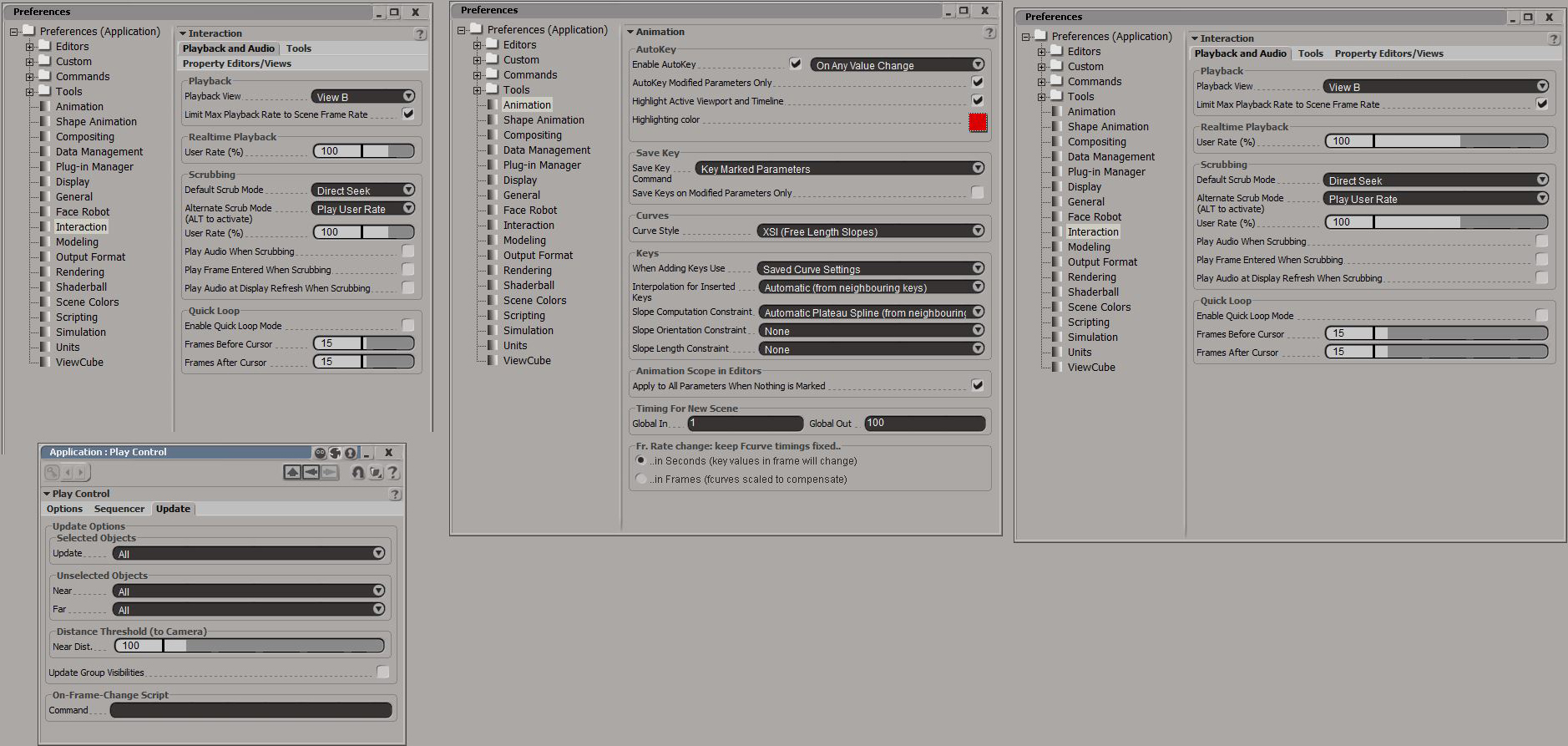
Here are screenshots of the prefs I'm using:
www.imagefront.de/tmp/playback_prefs.jpg<http://www.imagefront.de/tmp/playback_prefs.jpg>


From:
[email protected]<mailto:[email protected]>
 [mailto:[email protected]] On Behalf Of Sven Constable
Sent: Tuesday, May 17, 2016 12:41 AM
To: [email protected]<mailto:[email protected]>
Subject: RE: Autokey while playback

I did a few tests and changed most of the prefs in the playback option,
playback preferences and global preferences back and forth  but it remains
working. So, yes, autokey during playback works here (it creates keyframes for
every parameter changed, no matter if its sliders or interactive transforms .
I'm on SI2015 SP2. I have no idea why it should not work. Afaik it was always
like that.


From:
[email protected]<mailto:[email protected]>
 [mailto:[email protected]] On Behalf Of Jason S
Sent: Tuesday, May 17, 2016 12:12 AM
To: [email protected]<mailto:[email protected]>
Subject: Re: Autokey while playback

Hum! perhaps there is another pref that may affect it?

So it creates a key every frame while playback as you do transforms (or slider
changes) ?


On 05/16/16 17:43, Sven Constable wrote:
Yes, autokey while playing works here. With transformations as well as other
keyable parameters.
sven

From:
[email protected]<mailto:[email protected]>
 [mailto:[email protected]] On Behalf Of Jason S
Sent: Monday, May 16, 2016 10:52 PM
To: [email protected]<mailto:[email protected]>
Subject: Re: Autokey while playback

Hi,

@Sven are you sure you got it working?  I may be wronng, but I don't think
playback with transforms + autokey ever worked
(or was meant to work) to capture transform actions.

@toonafish   Sorry for not posting sooner, but this also should work for
recording viewport actions;
http://www.si-community.com/community/viewtopic.php?p=53922#p53922

Cheers,
-J

On 05/16/16 13:25, toonafish wrote:
Strange, can’t get it to work. But I used the Device Input thingy instead, it
needs a little more work to setup, but gets the job done.

Thanks, Sven


On 16 May 2016, at 15:36, Sven Constable
<[email protected]<mailto:[email protected]>> wrote:

Works here in 2015. Make sure, the Autokey function is using 'on any value
change' (Preferences/Animation)

sven

From:
[email protected]<mailto:[email protected]>
 [mailto:[email protected]] On Behalf Of toonafish
Sent: Monday, May 16, 2016 1:51 PM
To: [email protected]<mailto:[email protected]>
Subject: Autokey while playback

I remember it being possible to automatically set keyframes while playing the
animation by simply enabling autokey and translating or rotating an object in
the viewport. But no matter what I try, it no longer seems to work. I only get
a keyframe at the beginning and end of playback.

Is it me, or is this feature broken in SI 2015 ?

Thanks, Ronald


------
Softimage Mailing List.
To unsubscribe, send a mail to
[email protected]<mailto:[email protected]>
 with "unsubscribe" in the subject, and reply to confirm.


------

Softimage Mailing List.

To unsubscribe, send a mail to
[email protected]<mailto:[email protected]>
 with "unsubscribe" in the subject, and reply to confirm.


------

Softimage Mailing List.

To unsubscribe, send a mail to
[email protected]<mailto:[email protected]>
 with "unsubscribe" in the subject, and reply to confirm.


------

Softimage Mailing List.

To unsubscribe, send a mail to
[email protected]<mailto:[email protected]>
 with "unsubscribe" in the subject, and reply to confirm.
------
Softimage Mailing List.
To unsubscribe, send a mail to [email protected] with
"unsubscribe" in the subject, and reply to confirm.