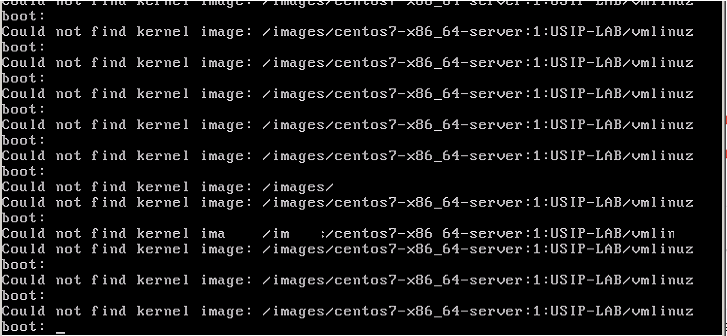
Maybe it's just the 2 // at the beginning?? I'm asking myself, where do these 2
// come from?
Please check contents of /var/lib/tftpboot/pxelinux.cfg/default for wrong paths.


Robert


________________________________
Von: Afify, Sherif S (IBS) <[email protected]>
Gesendet: Dienstag, 24. April 2018 12:11:58
An: Paschedag, Robert; [email protected]
Betreff: RE: PCX boot for spacewalk client


Thanks rob, I got the same error I see on the console ,


Apr 23 23:57:53 vm1 in.tftpd[14018]: RRQ from 10.222.21.2 filename
//images/centos7-x86_64-server:2:usip-lab/vmlinuz

Apr 23 23:57:53 vm1 in.tftpd[14019]: RRQ from 10.222.21.2 filename
//images/centos7-x86_64-server:2:usip-lab/vmlinuz.cbt

Apr 23 23:57:53 vm1 in.tftpd[14019]: Client 10.222.21.2 File not found
//images/centos7-x86_64-server:2:usip-lab/vmlinuz.cbt

Apr 23 23:57:53 vm1 in.tftpd[14020]: RRQ from 10.222.21.2 filename
//images/centos7-x86_64-server:2:usip-lab/vmlinuz.0

Apr 23 23:57:53 vm1 in.tftpd[14020]: Client 10.222.21.2 File not found
//images/centos7-x86_64-server:2:usip-lab/vmlinuz.0

Apr 23 23:57:53 vm1 in.tftpd[14021]: RRQ from 10.222.21.2 filename
//images/centos7-x86_64-server:2:usip-lab/vmlinuz.com

Apr 23 23:57:53 vm1 in.tftpd[14021]: Client 10.222.21.2 File not found
//images/centos7-x86_64-server:2:usip-lab/vmlinuz.com

Apr 23 23:57:53 vm1 in.tftpd[14022]: RRQ from 10.222.21.2 filename
//images/centos7-x86_64-server:2:usip-lab/vmlinuz.c32

Apr 23 23:57:53 vm1 in.tftpd[14022]: Client 10.222.21.2 File not found
//images/centos7-x86_64-server:2:usip-lab/vmlinuz.c32

Apr 23 23:57:53 vm1 in.tftpd[14023]: RRQ from 10.222.21.2 filename
//images/centos7-x86_64-server:2:usip-lab/vmlinuz

Apr 23 23:57:53 vm1 in.tftpd[14024]: RRQ from 10.222.21.2 filename
//images/centos7-x86_64-server:2:usip-lab/vmlinuz.cbt

Apr 23 23:57:53 vm1 in.tftpd[14024]: Client 10.222.21.2 File not found
//images/centos7-x86_64-server:2:usip-lab/vmlinuz.cbt

Apr 23 23:57:53 vm1 in.tftpd[14025]: RRQ from 10.222.21.2 filename
//images/centos7-x86_64-server:2:usip-lab/vmlinuz.0


it looks it’s a permission issue as when I try to view the cobbler folder from
the IE it says donot have permission to view that page.


Below the the permission on the www directory and under cobbler, is that looks
correct ?


[root@vm1 www]# ls -lZ

drwxr-xr-x. root   root   system_u:object_r:httpd_sys_script_exec_t:s0 cgi-bin

drwxrwxrwx. apache apache system_u:object_r:cobbler_var_lib_t:s0 cobbler

drwxr-xr-x. root   root   system_u:object_r:httpd_sys_content_t:s0 html

[root@vm1 www]#


[root@vm1 www]# ls -lZ cobbler/

drwxrwxrwx. apache apache system_u:object_r:cobbler_var_lib_t:s0 aux

drwxrwxrwx. apache apache system_u:object_r:cobbler_var_lib_t:s0 images

drwxrwxrwx. apache apache system_u:object_r:cobbler_var_lib_t:s0 ks_mirror

drwxrwxrwx. apache apache system_u:object_r:cobbler_var_lib_t:s0 links

drwxrwxrwx. apache apache system_u:object_r:cobbler_var_lib_t:s0 localmirror

drwxrwxrwx. apache apache system_u:object_r:cobbler_var_lib_t:s0 pub

drwxrwxrwx. apache apache system_u:object_r:cobbler_var_lib_t:s0 rendered

drwxrwxrwx. apache apache system_u:object_r:cobbler_var_lib_t:s0 repo_mirror

drwxrwxrwx. apache apache system_u:object_r:cobbler_var_lib_t:s0 svc

drwxrwxrwx. apache apache system_u:object_r:cobbler_var_lib_t:s0 web

[root@vm1 www]# pwd

/var/www

[root@vm1 www]#


From: Paschedag, Robert [mailto:[email protected]]
Sent: Tuesday, April 24, 2018 11:03 AM
To: Afify, Sherif S (IBS) <[email protected]>; [email protected]
Subject: AW: PCX boot for spacewalk client


I'm sorry....that was my fault. Of course, have a look into /var/log/messages
and search for "tftp"


[root@server log]# grep tftp /var/log/messages

Apr 23 11:09:40 server xinetd[1910]: START: tftp pid=23264 from=10.x.x.x

Apr 23 11:09:41 server in.tftpd[23265]: tftp: client does not accept options

Apr 23 11:09:41 server in.tftpd[23266]: Client 10.x.x.x finished pxelinux.0

Apr 23 11:09:41 server in.tftpd[23277]: Client 10.x.x.x finished
pxelinux.cfg/default

Apr 23 11:09:41 server in.tftpd[23282]: Client 10.x.x.x finished menu.c32

Apr 23 11:09:41 server in.tftpd[23283]: Client 10.x.x.x finished
pxelinux.cfg/default

Apr 23 11:09:48 server in.tftpd[23284]: Client 10.x.x.x finished
/images/SLES11-SP4:1:SpacewalkDefaultOrganization/linux

Apr 23 11:09:57 server in.tftpd[23285]: Client 10.x.x.x finished
/images/SLES11-SP4:1:SpacewalkDefaultOrganization/initrd

[root@server log]#


See the colons? No problem here on SW 2.7.


Robert


________________________________

Von: Afify, Sherif S (IBS)
<[email protected]<mailto:[email protected]>>
Gesendet: Dienstag, 24. April 2018 10:48:49
An: [email protected]<mailto:[email protected]>; Paschedag,
Robert
Betreff: PCX boot for spacewalk client


Hi Robert, the httpd error logs or access log do not show any thing , and the
LogLevel in httpd is set to debug.


------------------------------

Message: 3
Date: Tue, 24 Apr 2018 06:50:30 +0000
From: "Paschedag, Robert"
<[email protected]<mailto:[email protected]>>
To: "'[email protected]'"
<[email protected]<mailto:[email protected]>>
Subject: Re: [Spacewalk-list] PCX boot for spacewalk client
Message-ID:

<db7pr08mb30980e052fde86b005f2577a99...@db7pr08mb3098.eurprd08.prod.outlook.com<mailto:db7pr08mb30980e052fde86b005f2577a99...@db7pr08mb3098.eurprd08.prod.outlook.com>>

Content-Type: text/plain; charset="windows-1252"

The colon sign is normally no problem. This is the default for all of our
profiles and they work without a problem.


Please look into the webserver log in /var/log/httpd/ to check for errors.


Robert


________________________________
Von:
[email protected]<mailto:[email protected]>
<[email protected]<mailto:[email protected]>>
im Auftrag von Afify, Sherif S (IBS)
<[email protected]<mailto:[email protected]>>
Gesendet: Montag, 23. April 2018 18:50:36
An: '[email protected]'
Betreff: [Spacewalk-list] PCX boot for spacewalk client


I managed configuring the cobbler via spacewalk but faced a new issue , when
the client pxe boot start it start to give error that  "could not find kernel
image : /images/centos7-x86_64-server:1:USIP-LAB/vmlinuz"


I did some trouble shooting and the issue due to the directory name stored
inside it  the vmlinuz  have ":"
(/images/centos7-x86_64-server:1:USIP-LAB/vmlinuz").


I tried to rename it to another name do not have the ?:? sign it worked fine
but every time I run ?cobbler sync? it  put back the distor name created on
spacewalk.


Is there a way to set the spacewalk to remove the ?:? sign ?


[cid:[email protected]]
-------------- next part --------------
An HTML attachment was scrubbed...
URL:
<https://emea01.safelinks.protection.outlook.com/?url=https%3A%2F%2Fwww.redhat.com%2Farchives%2Fspacewalk-list%2Fattachments%2F20180424%2F31abe2c3%2Fattachment.html&data=02%7C01%7CPaschedag.Netlution%40swr.de%7Ccf0d55a21c5d45df72ed08d5a9c03799%7Cbcca095d88d442f88260cc216b81f62d%7C0%7C0%7C636601565387587373&sdata=1Q5dyRIdTyRO8a12tW7857kiGbfDl5UEvWrAZFNZw%2BI%3D&reserved=0>
-------------- next part --------------
A non-text attachment was scrubbed...
Name: image001.png
Type: image/png
Size: 36116 bytes
Desc: image001.png
URL:
<https://emea01.safelinks.protection.outlook.com/?url=https%3A%2F%2Fwww.redhat.com%2Farchives%2Fspacewalk-list%2Fattachments%2F20180424%2F31abe2c3%2Fattachment.png&data=02%7C01%7CPaschedag.Netlution%40swr.de%7Ccf0d55a21c5d45df72ed08d5a9c03799%7Cbcca095d88d442f88260cc216b81f62d%7C0%7C0%7C636601565387587373&sdata=ZmO09pD3u0En%2B2VHzDCWbjSqgkIuvfIOaX8pzRxlEqk%3D&reserved=0>
_______________________________________________
Spacewalk-list mailing list
[email protected]
https://www.redhat.com/mailman/listinfo/spacewalk-list